- Company Articles
- Industry articles
- Industry standards
- Computer Peripherals Production: 4040r EU Standard Aluminum Profile Workstations

Computer Peripherals Production: 4040r EU Standard Aluminum Profile Workstations
Related Product
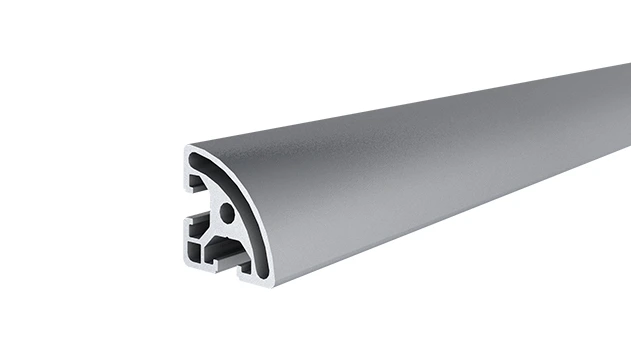
4040R EU Standard Aluminum Profile
4040R is a 4.00x4.00 CM fractional 40 series square extrusion T-slot profile with two side open T-slots, each side with 4.00cm face,the other side is round face. The profile has align-a-grooves to assist in aligning connecting profiles.
Walk into any computer peripherals factory, and you'll quickly realize that the magic of a well-made keyboard, mouse, or monitor doesn't just happen on the assembly line—it starts with the workspace itself. Picture this: a production floor where workers hunch over clunky, fixed workbenches, struggling to reach tools that never seem to stay in place. Cables dangle haphazardly, components get misplaced, and when a new product model rolls in, reconfiguring the line takes days of wrenching and rearranging. Sound familiar? For too long, the backbone of manufacturing—workstations—has been an afterthought, treated as static furniture rather than a dynamic tool to boost efficiency. But in an industry where precision, speed, and adaptability are everything, that's a costly mistake.
Enter the 4040r EU Standard Aluminum Profile Workstation. It's not just a table or a shelf; it's a modular, flexible system designed to grow, change, and evolve with your production needs. In this article, we'll dive into why this unassuming yet powerful setup is becoming the unsung hero of computer peripherals manufacturing, how it solves the everyday headaches of production teams, and why aluminum profile accessories, roller track systems, and lean principles are the secret ingredients to its success. Whether you're running a small-scale workshop or a large factory, this isn't just about upgrading equipment—it's about reimagining how work gets done.
The Hidden Cost of "Good Enough" Workstations
Let's start with the basics: computer peripherals are precise products. A keyboard's key travel, a mouse's sensor accuracy, a monitor's bezel alignment—these details matter. To build them right, workers need stability, organization, and tools within arm's reach. But traditional workstations? They're often built with rigidity in mind, not flexibility. Steel frames that rust, wooden surfaces that warp, and fixed shelves that can't be adjusted for a taller worker or a bulkier component. Over time, these "good enough" setups lead to more than just frustration—they chip away at your bottom line.
Take, for example, a typical keyboard assembly line. Each station needs to hold circuit boards, keycaps, springs, and a soldering iron. With a fixed workstation, the shelf for keycaps might be 6 inches too low for the tallest operator, forcing them to bend down 500 times a day. That's not just uncomfortable—it's a recipe for repetitive strain injuries and missed workdays. Or consider when your team switches from assembling a compact wireless mouse to a full-sized gaming mouse with extra buttons. Suddenly, the tool tray that fit the small components is overflowing, and the cable management system designed for short wires is tangled with longer ones. Reconfiguring? It might mean buying a whole new workstation, or spending hours drilling new holes and jury-rigging shelves with zip ties. Either way, production stalls, and deadlines slip.
Then there's the issue of durability. Computer peripherals production involves constant movement—components sliding across surfaces, tools being set down and picked up, cleaning solutions being wiped off. A wooden workbench might look sturdy, but after six months of daily use, it's covered in scratches that trap dust (a nightmare for sensitive electronics). A steel frame, if not properly treated, starts to rust in humid factory environments, leaving unsightly stains on circuit boards. These aren't just cosmetic issues; they're quality control risks. A single speck of dust in a keyboard switch can lead to a sticky key, and a rust spot on a monitor frame can mean a returned product. "Good enough" workstations, it turns out, are rarely good enough.
Why 4040r EU Standard Aluminum Profile? It's All in the Details
So, what makes the 4040r EU Standard Aluminum Profile stand out? Let's break it down. First, the "4040r" part: that refers to the profile's dimensions (40mm x 40mm) and the rounded edges (the "r" stands for radius). Unlike sharp-edged steel or bulky wood, those rounded edges are a small detail with big benefits—no more scraped knuckles when reaching for a tool, and a smoother surface that's easier to clean (critical for keeping dust at bay). But the real star here is the aluminum itself. Aluminum is lightweight yet surprisingly strong—strong enough to hold heavy monitors or stacks of circuit boards, but light enough that even a single worker can reposition a section of the workstation without a forklift. It's also naturally corrosion-resistant, so you won't have to worry about rust eating away at the frame in humid or temperature-fluctuating environments. For computer peripherals production, where precision and cleanliness are non-negotiable, that's a game-changer.
Then there's the "EU Standard" label. This isn't just a marketing buzzword; it's a guarantee of quality. EU standards for aluminum profiles ensure consistent wall thickness, precise T-slot dimensions (more on those later), and strict material purity. What does that mean for you? Parts from different suppliers will fit together seamlessly. A bracket from one manufacturer will slide into a T-slot from another without gaps or wobbles. In a production environment where downtime is money, that compatibility is priceless. No more hunting for "matching" parts or dealing with loose connections that throw off your assembly alignment.
But perhaps the most revolutionary feature is the T-slot design. Run your hand along the length of the 4040r profile, and you'll notice long, narrow grooves (the T-slots) running along its sides. These slots are like the workstation's "nerve endings"—they let you attach, adjust, and reconfigure almost any component with just a hex key. Need a shelf at 30 inches instead of 24? Slide a bracket into the T-slot, tighten a screw, and you're done. Want to add a tool hook, a monitor arm, or a cable management clip? Just pop it into the slot. This isn't just flexibility—it's adaptability on demand. And when paired with aluminum profile accessories like end caps, hinges, and corner brackets, the possibilities are nearly endless.

Building Blocks of a Better Workstation: Aluminum Profile Accessories and Roller Track
A 4040r aluminum profile frame is just the starting point. To turn it into a fully functional workstation, you need the right accessories—and aluminum profile accessories are where the system truly shines. Let's start with the basics: end caps. These simple plastic or rubber caps snap onto the ends of the aluminum profiles, covering sharp edges and preventing dust from collecting inside the T-slots. They're small, cheap, and often overlooked, but try running a production line without them, and you'll quickly notice the difference—less dust on components, fewer snags on gloves, and a cleaner, more professional look.
Then there are the connectors. From 90-degree angle brackets to 135-degree joints, these pieces let you build frames, shelves, and work surfaces in any configuration. Unlike traditional bolts or welds, aluminum connectors lock into the T-slots with a friction fit, meaning you can take them apart and rebuild without damaging the profile. Need a U-shaped workstation one week and a straight line the next? No problem—just loosen the connectors, rearrange, and retighten. For computer peripherals production, where product sizes and assembly steps change regularly, this is a lifesaver. Imagine switching from assembling 24-inch monitors to 32-inch ones: with aluminum connectors, you can raise the shelf height in 10 minutes instead of waiting for a new workstation to be built.
But let's talk about material flow—the unsung hero of efficient production. That's where roller track systems come in. A roller track is exactly what it sounds like: a series of small wheels mounted on a track, designed to let materials glide from one station to the next with minimal effort. In computer peripherals manufacturing, this could mean circuit boards sliding from the soldering station to the testing station, or keycap trays moving from the sorting area to assembly. Traditional setups might use conveyor belts, which are loud, expensive, and hard to adjust. Roller tracks, though? They're modular, quiet, and easy to integrate into a 4040r workstation.
Here's how it works: using roller track placon mounts (those handy brackets that attach to the T-slots), you can mount a roller track directly to the aluminum profile frame. Choose from steel wheels for heavy loads or plastic wheels for lighter components; yellow or grey guide rails to color-code different product lines; or even ESD (electrostatic discharge) wheels to protect sensitive electronics from static damage. The best part? Roller tracks can be angled slightly downward, so gravity does the work—no motors, no electricity, just smooth, consistent movement. For a worker assembling mice, that means never having to walk 10 feet to grab the next batch of sensor modules; they just glide right to their station. It's a small change, but multiplied across 8 hours and 50 workers, it adds up to hours of saved time every day.
Lean System Principles: Less Waste, More Value
At its core, the 4040r aluminum profile workstation is a tool for lean manufacturing. Lean isn't just a buzzword—it's a philosophy about eliminating waste (time, materials, effort) and focusing on value. Traditional workstations are full of waste: wasted time searching for tools, wasted space with unused shelves, wasted energy moving heavy components. The 4040r system? It's built to cut that waste out.
Take, for example, the concept of "5S"—sort, set in order, shine, standardize, sustain. A 4040r workstation makes 5S easy. "Sort" (removing unnecessary items) is simpler when you have adjustable shelves—only keep what you need, and store the rest elsewhere. "Set in order" (organizing tools) becomes a breeze with T-slot tool holders and pegboards that can be positioned exactly where the worker stands. "Shine" (cleaning) is easier with smooth aluminum surfaces that wipe down quickly and roller tracks that don't trap dust. "Standardize" (making processes consistent) is possible because every workstation can be built to the same specs, so workers can switch stations without confusion. And "sustain" (maintaining the system) is effortless because the workstation is adaptable—if a new tool is needed, just add a bracket. No more cluttered, disorganized workspaces; just clean, efficient stations that let workers focus on building great products.
Another lean principle is "just-in-time" production—having materials arrive exactly when they're needed, not before or after. Roller track systems support this perfectly. Instead of piling up stacks of circuit boards at each station (which takes up space and risks damage), materials can flow through the roller track from the warehouse to the assembly line as needed. It's like a conveyor belt, but smarter—you can adjust the speed by changing the track angle, or reroute materials by adding a new track section. For computer peripherals with short production runs (like limited-edition gaming keyboards), this flexibility means you can scale up or down without overstocking materials or wasting space.
Traditional vs. 4040r Aluminum Workstations: A Side-by-Side Comparison
| Feature | Traditional Workstation | 4040r Aluminum Profile Workstation |
|---|---|---|
| Material | Steel, wood, or plastic; often heavy and prone to rust/warping. | Lightweight aluminum with EU-standard corrosion resistance; rounded edges for safety. |
| Flexibility | Fixed design; reconfiguration requires drilling, welding, or new parts. | Modular T-slot system; adjust shelves, add accessories, or rearrange in minutes with aluminum profile connectors. |
| Material Flow | Manual handling or expensive, fixed conveyor belts. | Integrated roller track systems with adjustable angles and ESD-safe options; gravity-powered for low cost. |
| Durability | Wood warps, steel rusts, plastic cracks; lifespan of 2-3 years in heavy use. | Aluminum resists corrosion and wear; lifespan of 10+ years with proper care. |
| Ergonomics | One-size-fits-all height; no adjustability for different worker sizes. | Height-adjustable shelves and work surfaces; reduces bending, reaching, and strain. |
| Cost Over Time | Low upfront cost, but high replacement and reconfiguration costs. | Higher upfront cost, but no replacement needed; reconfiguration costs are minimal (just labor). |
From Blueprint to Bench: Building Your First 4040r Workstation
So, you're convinced—now what? Building a 4040r aluminum profile workstation doesn't require an engineering degree, but a little planning goes a long way. Start by mapping out your workflow. What does a typical day look like at your station? Which tools are used most often? How do materials arrive and leave? Sketching this out will help you decide how many shelves you need, where to mount the roller track, and how much space to leave for workers to move comfortably.
Next, choose your base components. You'll need 4040r aluminum profiles for the frame (measure twice, cut once—most suppliers will cut to length for you), aluminum profile connectors (90-degree brackets for the corners, T-joints for shelves), and a work surface. For computer peripherals, a flat, non-conductive surface like an aluminum honeycomb panel is ideal—it's lightweight, strong, and won't interfere with sensitive electronics. Then, add your accessories: tool hooks in the T-slots, a roller track along one side for materials, and end caps to finish the edges.
Don't forget about cable management. Computer peripherals production involves a lot of wires—soldering irons, testing equipment, power tools. Use T-slot cable clips to run wires along the profile frames, keeping them off the work surface and out of the way. It's a small detail, but it makes a huge difference in keeping the station organized and preventing tripping hazards.
Finally, test and adjust. Set up the workstation, have a worker use it for a day, and ask for feedback. Is the roller track at the right angle? Is the tool shelf high enough? Do they need an extra bracket for the soldering iron? The beauty of the 4040r system is that you can tweak it on the fly. Maybe you'll add a second roller track for finished products, or raise the monitor shelf by 2 inches—whatever works for your team.
The Bottom Line: Workstations That Grow With You
At the end of the day, computer peripherals production is about more than just building products—it's about building a sustainable, efficient operation that can adapt to new technologies, new products, and new challenges. The 4040r EU Standard Aluminum Profile Workstation isn't just a piece of equipment; it's a partner in that journey. It's the difference between a team that's stuck in the past, struggling with outdated tools, and a team that's ready to innovate, iterate, and thrive.
Think about it: every minute saved reconfiguring a workstation, every injury prevented by an ergonomic design, every component protected from dust or static—these add up to higher quality products, happier workers, and a stronger bottom line. And with aluminum profile accessories, roller track systems, and lean principles working together, the possibilities are endless. Whether you're assembling your first batch of wireless mice or scaling up to meet demand for a new monitor line, your workstation should be the last thing you worry about.
So, what are you waiting for? It's time to stop settling for "good enough" and start building workstations that work as hard as your team does. The 4040r EU Standard Aluminum Profile Workstation isn't just the future of computer peripherals production—it's the present. And once you make the switch, you'll wonder how you ever worked without it.