- Company Articles
- Industry articles
- Industry standards
- 3030 National Standard Profile A Connectors: Choosing the Right Joints for Stability

3030 National Standard Profile A Connectors: Choosing the Right Joints for Stability
Related Product
3030 National Standard Profile A
Workbench, production line, logistic rack, warehouse rack Industry: Manufacturer workshop, Automobile, Electronic, Assembling, logistic
Walk into any busy workshop, manufacturing plant, or even a small-scale assembly line, and you'll likely spot rows of sturdy workbenches, neatly organized material racks, and smooth-flowing conveyor systems. What holds these structures together? Sure, the aluminum profiles get most of the attention—their sleek lines, durable build, and versatility make them the backbone of industrial setups. But if the profiles are the "bones," then the connectors are the "ligaments" and "tendons" that give strength, flexibility, and stability to the entire framework. Today, we're zeroing in on one of the most widely used profiles in the industry: the 3030 National Standard Profile A. More importantly, we'll explore how choosing the right connectors for this profile can mean the difference between a wobbly, unreliable structure and one that stands firm, even under the daily grind of heavy tools, constant movement, and shifting loads.
What is 3030 National Standard Profile A, Anyway?
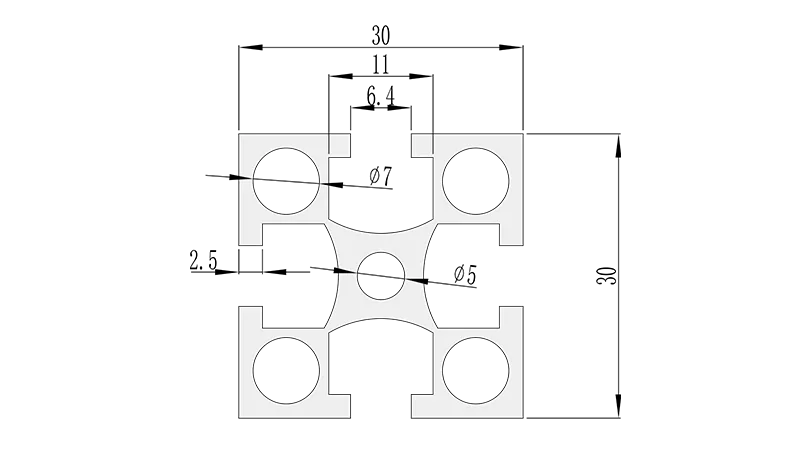
Before diving into connectors, let's get familiar with the star of the show: the 3030 National Standard Profile A. If you've ever worked with industrial aluminum profiles, you've probably come across this name. Simply put, it's a type of aluminum extrusion with a cross-sectional dimension of 30mm x 30mm—hence the "3030" label. The "National Standard" part means it adheres to specific manufacturing guidelines, ensuring consistency in size, material quality, and performance across different suppliers. The "A" in its name often refers to a specific groove design or wall thickness, though this can vary slightly by manufacturer (always check with your supplier for exact specs).
What makes the 3030 National Standard Profile A so popular? For starters, it's a sweet spot between strength and weight. Aluminum, by nature, is lightweight yet surprisingly robust, making the profile easy to handle during assembly while still supporting heavy loads. It's also corrosion-resistant, which is a big plus in environments where moisture or chemicals might be present—think automotive workshops, food processing plants, or even outdoor storage areas. And let's not forget its versatility: you'll find it in everything from simple workbenches and material racks to complex assembly line stations and machine guards. Its T-slot design (those grooves running along the length) allows for easy attachment of accessories like shelves, panels, and, of course, connectors—making customization a breeze.
Why Connectors Matter: The Unsung Heroes of Stability
Imagine building a house with top-of-the-line bricks but using weak mortar. No matter how strong the bricks are, the walls will crack, lean, or even collapse over time. The same logic applies to aluminum profiles and their connectors. A high-quality 3030 National Standard Profile A is only as good as the connectors holding it together. These small, often unassuming pieces are responsible for transferring loads between profiles, maintaining structural alignment, and absorbing vibrations from daily use. Skimp on connectors, and you risk wobbly workbenches that make precision tasks impossible, material racks that sag under the weight of inventory, or safety barriers that fail when they're needed most.
Take a common scenario: a workbench used for assembling small electronic components. If the connectors joining the profile legs to the tabletop are loose or poorly designed, the bench might shake every time you tighten a screw or place a heavy tool. Over time, this instability can lead to mistakes in assembly, increased fatigue for workers, and even damage to delicate parts. On the flip side, a workbench built with the right connectors—ones that lock the profiles securely, distribute weight evenly, and resist loosening from vibration—becomes a reliable workspace where employees can focus on their tasks without worrying about the structure itself.
Types of Connectors for 3030 National Standard Profile A
Not all connectors are created equal, and choosing the right one depends on your specific needs: the type of structure you're building, the loads it will bear, the angles at which profiles meet, and even how often you might need to disassemble and reconfigure the setup. Let's break down some of the most common connector types for 3030 National Standard Profile A, along with their best uses and stability features.
1. 90° Aluminum Profile Connector
As the name suggests, this connector is designed to join two 3030 profiles at a right angle (90 degrees). It's the workhorse of connector types, found in everything from workbench frames (where vertical legs meet horizontal tabletop supports) to the corners of material racks. Most 90° connectors use a combination of bolts, nuts, and T-slot nuts to secure the profiles—insert the T-slot nut into the groove of the profile, align the connector, and tighten the bolt until it's snug. What makes this connector stable? Its ability to lock the profiles in place along two axes (horizontal and vertical), preventing twisting or shifting. Look for models with reinforced edges or metal construction (aluminum or steel) for added durability, especially in heavy-load applications.
2. Three-Way Aluminum Profile Connector
Need to join three profiles at a single point? Enter the three-way connector. This versatile piece allows you to connect one profile straight ahead and two at 90-degree angles (like a "T" or "Y" shape), making it ideal for adding shelves to a material rack, branching out a workbench extension, or creating a multi-level structure. Stability here comes from even load distribution—each connected profile shares the weight, reducing stress on any single joint. Installation is similar to the 90° connector but with an extra bolt or set screw to secure the third profile. Pro tip: If you're building a material rack with multiple shelves (like the popular "Material Rack B (3 row and 3 floor)" setup), three-way connectors are a must for keeping each shelf level and secure, even when stacked with heavy boxes or tools.
3. Gusset Alp 3030
Think of gussets as the "insurance policy" for your connectors. The Gusset Alp 3030 isn't a connector in the traditional sense—it's a small, triangular (or sometimes square) plate that bolts onto the corner where two profiles meet, reinforcing the joint. While a 90° connector might hold the profiles together, adding a gusset increases the surface area of the connection, making it more resistant to bending or shearing forces. This is especially useful in high-stress areas, like the base of a workbench where the legs meet the floor, or the corners of a rack that holds heavy machinery. Gussets are easy to install: just align them with the existing connector bolts or add new T-slot nuts if needed. They're often made of aluminum or steel, so they won't add much weight but will significantly boost stability.
4. 45° Aluminum Profile Connector
Not all structures are built with right angles. Sometimes, you need a slope, a diagonal brace, or a corner that's less than 90 degrees. That's where the 45° aluminum profile connector comes in. This connector joins profiles at a 45-degree angle, common in applications like inclined conveyor tracks, angled shelves, or safety barriers that need to follow the contour of a machine. Stability here depends on the connector's design—look for models with a tight grip on both profiles, as diagonal joints are more prone to sliding if not secured properly. Some 45° connectors also come with adjustable angles, allowing for minor tweaks (e.g., 40-50 degrees) to fit unique setups, though fixed 45° models are generally more stable for permanent structures.
5. 135° Aluminum Profile Connector
On the flip side of the 45° connector is the 135° aluminum profile connector, which joins profiles at an obtuse angle (greater than 90 degrees). This is handy for creating "notch" corners, like the inside of a U-shaped workbench or the outer edge of a curved material rack. While less common than 90° or three-way connectors, the 135° joint is crucial for structures that need to wrap around equipment or maximize floor space. Stability-wise, it's similar to the 90° connector but with a wider angle, so ensuring a tight fit is key—loose 135° joints can lead to the structure "splaying" outward under load, which is a safety hazard.
Comparing Connector Types: A Quick Reference Table
| Connector Type | Primary Use Case | Stability Rating (1-5) | Installation Difficulty (1-5) | Common Material |
|---|---|---|---|---|
| 90° Aluminum Profile Connector | Right-angle joints (workbench frames, rack corners) | 4.5 | 2 (Easy) | Aluminum, Steel |
| Three-Way Aluminum Profile Connector | T/Y-junctions (shelves, multi-level racks) | 4.0 | 3 (Moderate) | Aluminum |
| Gusset Alp 3030 | Reinforcing corners (high-stress joints) | 5.0 (when paired with connectors) | 2 (Easy) | Aluminum, Steel |
| 45° Aluminum Profile Connector | Diagonal joints (sloped racks, braces) | 3.5 | 3 (Moderate) | Aluminum |
| 135° Aluminum Profile Connector | Obtuse angles (U-shaped structures, curved racks) | 3.5 | 3 (Moderate) | Aluminum |
Note: Stability ratings are based on typical use cases with proper installation. Higher numbers indicate better resistance to bending, twisting, and shifting under load. Installation difficulty: 1 = Very Easy, 5 = Very Difficult.
5 Key Factors to Consider When Choosing Connectors
Now that you know the main connector types, how do you pick the right one for your project? Here are five critical factors to keep in mind:
1. Load Capacity: How Much Weight Will It Bear?
This is the most important question. A connector that works for a lightweight workbench holding small tools won't cut it for a material rack stacked with 50kg boxes. Check the manufacturer's specs for load capacity—this is usually listed as "static load" (weight when the structure is stationary) and "dynamic load" (weight when the structure is moving, like a trolley). For example, the 90° connector might have a static load rating of 500kg per joint, while a 45° connector could be lower due to its angled design. When in doubt, overestimate the load—adding a gusset or upgrading to a heavy-duty connector is cheaper than replacing a collapsed structure.
2. Angle and Joint Configuration
Start by sketching your structure. Are there right angles? Diagonals? T-junctions? Match the connector to the angle: 90° for squares/rectangles, 45°/135° for slopes, three-way for branches. Don't force a connector to work at the wrong angle—using a 90° connector for a 45° joint will result in a loose, unstable fit and could damage both the connector and the profile.
3. Installation and Reusability
Do you need a permanent structure, or will you be disassembling and reconfiguring it often? Some connectors, like those with set screws or snap-on designs, are quick to install but may loosen over time with frequent use. Others, like bolt-on connectors with T-slot nuts, take a bit longer to set up but are more secure and reusable. If you're building a fixed workbench that will stay in one place for years, opt for bolt-on connectors. If you're creating a temporary display or a mobile trolley, quick-connect options might be better (just check their stability rating first).
4. Environmental Conditions
Where will the structure live? In a dry, indoor workshop? A humid warehouse? Or an outdoor area exposed to rain and sun? Aluminum connectors are corrosion-resistant, making them a good all-around choice. Steel connectors are stronger but can rust if not coated (look for zinc-plated or stainless steel options for wet environments). Avoid plastic connectors in high-heat areas, as they can warp, or in cold environments, as they may become brittle.
5. Compatibility with 3030 National Standard Profile A
Not all connectors labeled "3030" are created equal. National Standard Profile A has specific groove dimensions (e.g., groove width, depth, and spacing between grooves). A connector designed for a non-standard 3030 profile might not fit snugly, leading to instability. Always check with your supplier to ensure the connectors are compatible with the exact profile model you're using. If possible, buy profiles and connectors from the same supplier—they'll be guaranteed to work together.
Real-World Example: Building a Stable Material Rack B (3 Row and 3 Floor)
Let's put this all into practice with a common project: building Material Rack B, a 3-row, 3-floor storage rack designed to hold tools, parts, or inventory. Here's how the right connectors make all the difference:
Step 1: Frame the Vertical Supports – Start with four vertical 3030 National Standard Profile A legs. Use 90° connectors at the base to join horizontal "base rails" (these prevent the legs from spreading). Add Gusset Alp 3030 plates at each base corner for extra stability—this keeps the rack from tipping when loaded.
Step 2: Add Horizontal Shelf Supports – For each floor (3 total), attach horizontal profiles to the vertical legs using three-way connectors. The three-way design lets you connect the front, back, and side supports of each shelf, ensuring the shelf stays level. Tighten the bolts firmly but don't overtighten—stripping the threads is a common mistake!
Step 3: Secure the Shelves – Place aluminum or plywood shelves on top of the horizontal supports. Use small angle brackets (another type of connector) to bolt the shelves to the supports, preventing them from sliding. For extra stability, add diagonal braces (using 45° connectors) between the top and bottom legs—this resists side-to-side movement, especially important in high-traffic areas.
Result? A Material Rack B that can hold hundreds of kilograms of weight, stays level even when loaded unevenly, and won't wobble or tip. All thanks to choosing the right connectors for each joint.
Common Mistakes to Avoid
Even with the best connectors, small mistakes can compromise stability. Here are a few to watch out for:
- Undertightening/Over tightening: Too loose, and the connector will slip; too tight, and you'll strip the threads or warp the profile. Tighten until snug, then give a quarter-turn more—you'll feel resistance, but the bolt shouldn't bend.
- Using the wrong size T-slot nuts: T-slot nuts come in different widths to fit different profile grooves. A nut that's too small will spin in the groove, making it impossible to tighten the connector.
- Ignoring gussets in high-stress areas: Skipping gussets at the base of a tall rack or the corners of a heavy workbench is a recipe for failure. They're cheap insurance!
- Mixing and matching connector materials: Using steel connectors with aluminum profiles can cause galvanic corrosion (a chemical reaction between metals) in humid environments. Stick to the same material or use corrosion-resistant coatings.
Maintaining Your Connectors: Keep Them Tight, Keep Them Strong
Stability isn't a one-and-done deal. Over time, vibrations, temperature changes, and regular use can loosen even the best connectors. Make it a habit to inspect your structures monthly: check for loose bolts, bent connectors, or signs of wear (like stripped threads or cracks). Tighten any loose bolts, replace damaged connectors immediately, and clean out debris from T-slots (dust and dirt can prevent nuts from seating properly). A little maintenance goes a long way in extending the life of your structure and keeping your workspace safe.
Final Thoughts: Invest in the "Little Things"
At the end of the day, the 3030 National Standard Profile A is a fantastic building block for industrial structures, but its true potential is unlocked by the connectors you choose. These small, often overlooked components are the difference between a structure that lasts for years and one that fails when you need it most. By considering load capacity, angle, environment, and installation needs, and by pairing the right connectors with gussets and proper maintenance, you'll create setups that are not just stable, but also efficient, safe, and ready to handle whatever your workspace throws at them. So next time you're planning a project, remember: the connectors might not be the stars, but they're definitely the unsung heroes keeping everything together.