- Company Articles
- Industry articles
- Industry standards
- Structural Design of 3030 National Standard Profile A: Slot Type & Connection Methods Explained

Structural Design of 3030 National Standard Profile A: Slot Type & Connection Methods Explained
Related Product
3030 National Standard Profile A
Workbench, production line, logistic rack, warehouse rack Industry: Manufacturer workshop, Automobile, Electronic, Assembling, logistic
Walk into any modern factory, workshop, or even a tech lab, and you'll likely spot a familiar sight: sleek, sturdy structures holding up workbenches, material racks, or assembly lines. Chances are, those structures are built from aluminum profiles—versatile, lightweight, and endlessly customizable. Among the wide range of profiles available, the 3030 National Standard Profile A stands out as a workhorse, trusted by manufacturers and facility managers for its balance of strength, flexibility, and cost-effectiveness. In this article, we're going to take a deep dive into what makes this profile tick, focusing specifically on its slot design and the clever connection methods that make it so adaptable. Whether you're a seasoned engineer or just starting to explore industrial setup solutions, understanding the 3030A profile will give you a new appreciation for the "building blocks" that power efficient workspaces.
Meet the 3030 National Standard Profile A: An Industrial Workhorse
Before we jump into the nitty-gritty of slots and connections, let's get to know the star of the show: the 3030 National Standard Profile A. At first glance, it's a simple extruded aluminum bar, typically measuring 30mm in width and 30mm in height—hence the "3030" in its name. But don't let its simplicity fool you. This profile is the result of careful engineering, designed to meet strict national standards for consistency, strength, and compatibility.
Most 3030A profiles are made from 6063-T5 aluminum alloy, a material prized for its excellent combination of strength, corrosion resistance, and machinability. The "T5" designation refers to its heat treatment process, which gives it a good balance of hardness and ductility—meaning it can handle heavy loads without bending, but is still easy to cut or drill if needed. The surface is usually anodized, creating a smooth, protective layer that resists scratches and wear, making it ideal for high-traffic industrial environments.
But what really sets the 3030A apart is its adherence to national standards. In manufacturing, "standardization" is more than just a buzzword—it ensures that profiles from different suppliers will fit together seamlessly, that accessories (like connectors or end caps) will work across brands, and that you won't be locked into a single vendor. This interoperability is a game-changer for anyone building or expanding a workspace: you can mix and match components, replace parts easily, and scale up without worrying about compatibility headaches.
Slot Type Design: The Profile's "Interface" with the World
If the 3030A profile is the backbone of your structure, then its slot design is the "interface" that lets you attach everything else—connectors, shelves, tools, and accessories. Without well-designed slots, the profile would be little more than a rigid metal bar. Let's break down the anatomy of these slots and why they matter.
T-Slot Basics: More Than Just a Groove
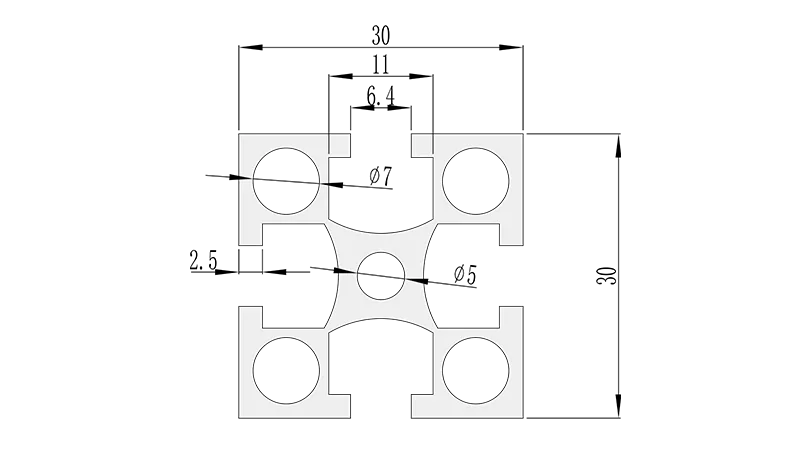
The 3030 National Standard Profile A typically features a T-shaped slot (hence "T-slot") running along its length. This isn't a random design choice—the T-shape is engineered to balance two key needs: holding fasteners securely and allowing for adjustability. Let's get specific with dimensions: the standard T-slot on this profile is usually 8mm wide at the opening and 10mm deep, with the "crossbar" of the T (the wider part inside the slot) measuring around 12mm. These numbers might seem small, but they're critical.
Why 8mm wide? It's wide enough to fit common fasteners like M5 or M6 bolts (the threads on these bolts measure around 5-6mm, leaving room for easy insertion). The 10mm depth ensures the bolt's head or nut sits flush inside the slot, so it doesn't protrude and interfere with other components. The 12mm crossbar? That's where the magic happens. When you tighten a bolt in the slot, the nut or bolt head wedges against the crossbar, creating a friction fit that's surprisingly strong. This design lets you slide the fastener along the slot to any position before tightening—so you're not stuck with fixed holes; you can adjust shelves, brackets, or tools exactly where you need them.
Slot Placement: Symmetry for Versatility
Take a close look at a 3030A profile, and you'll notice the T-slots aren't just on one side—they're usually on all four sides. This symmetry is intentional. It means you can attach components to any face of the profile, opening up endless design possibilities. Need to mount a tool holder on the front? Use the front slot. Add a side shelf? Use the side slot. Even the back or bottom can become useful surfaces, depending on your setup.
Some variations of the 3030A might have fewer slots (e.g., two or three), but the four-slot design is most common for industrial use. It's a small feature that makes a big difference in flexibility. For example, if you're building a workbench, you might use the top slots for securing the tabletop, the bottom slots for attaching casters (for mobility), and the side slots for hanging tool organizers. Without four slots, you'd be limited in how you configure these elements.
Why Not Other Slot Shapes?
You might wonder: why T-slots and not, say, square slots or round holes? Square slots can work, but they're harder to manufacture precisely, and fasteners can rattle loose more easily. Round holes are fixed—once drilled, you can't adjust the position of your components, which defeats the profile's modular appeal. The T-slot, by contrast, offers the best of both worlds: secure hold and adjustability. It's no accident that T-slots have become the industry standard for aluminum profiles.
Connection Methods: Bringing Profiles Together
Now that we understand the slot's role as the profile's "interface," let's explore how we use that interface to connect profiles into useful structures. Whether you're building a frame, a shelf, or a complete workbench, the way you join profiles determines the structure's strength, stability, and how easy it is to reconfigure later. Let's focus on the most common connection methods for the 3030A profile, starting with the workhorses of the connector world.
90° Aluminum Profile Connector: The Right-Angle Expert
Connecting two profiles at a right angle (90 degrees) is the most basic—and most common—task in any setup. For this, the 90° aluminum profile connector is your best friend. These connectors are small, usually around 30mm x 30mm (matching the profile's size), and made from die-cast aluminum (aluminum melted and poured into a mold for precise, strong shapes). Here's how they work in practice:
1. Start with two 3030A profiles, cut to your desired length (most suppliers will cut profiles to size, or you can do it yourself with a hacksaw or miter saw).
2. Slide the 90° connector into the T-slot of the first profile. The connector has a small threaded hole for a bolt.
3. Align the second profile so it's perpendicular to the first (like the corner of a square).
4. Slide another 90° connector into the T-slot of the second profile, making sure it lines up with the first connector.
5. insert an Allen bolt (usually M5) through the hole in one connector and thread it into the other. Tighten with an Allen key until snug.
The magic here is the friction fit: as you tighten the bolt, the connectors press against the walls of the T-slots, creating a clamp-like hold. It's surprisingly secure—we've seen workbenches built with these connectors support over 100kg of weight without so much as a wobble. And if you need to reposition the connection? Just loosen the bolt, slide the connector to a new spot, and retighten. No drilling, no welding, no permanent changes.
Internal Straight Aluminum Joint: Extending Lengths Seamlessly
Sometimes, you need a longer profile than the standard 2m or 3m lengths suppliers offer. That's where the internal straight aluminum joint comes in. These joints are designed to connect two profiles end-to-end, creating a single, extended length. Unlike external brackets (which can add bulk), internal joints fit inside the hollow core of the 3030A profile, keeping the connection smooth and streamlined.
Installation is straightforward: insert one end of the joint into the first profile until it's flush with the end, then slide the second profile over the other end of the joint. Most internal joints have a small hole for a spring-loaded pin or a setscrew, which you tighten to lock the joint in place. The result? A straight, seamless connection that's almost as strong as a single piece of profile. It's perfect for building long shelves, extended workbench tops, or tall frames where a clean look matters.
Three-Way Connectors: For Complex Intersections
As your structures get more complex—think of a multi-level material rack or a frame with cross-braces—you'll need to connect more than two profiles at once. That's where three-way aluminum profile connectors shine. These connectors have three slots (instead of two), allowing you to join three profiles at a single point. They're often used at the corners of cubic structures or where a vertical profile intersects with two horizontal ones.
For example, if you're building a three-shelf rack, you might use a three-way connector at each vertical post to attach the top, middle, and bottom shelves. Like the 90° connector, they use Allen bolts to secure into the T-slots, and they're adjustable, so you can tweak shelf heights even after assembly.
A Quick Comparison: Which Connector to Use When?
With so many connectors available, it can be hard to choose. Let's simplify with a table comparing the most common options for the 3030A profile:
| Connector Type | Angle/Use Case | Material | Installation Difficulty | Best For |
|---|---|---|---|---|
| 90° Aluminum Profile Connector | Right angles (90°) | Die-cast aluminum | Easy (Allen key required) | Corners, frames, workbench legs |
| Internal Straight Aluminum Joint | Straight (180°), extending length | Aluminum alloy | Moderate (needs precise alignment) | Long shelves, extended frames |
| Three-Way Connector | Multi-angle (90°/180°), 3 profiles | Die-cast aluminum | Moderate (more bolts to tighten) | Multi-level racks, complex frames |
| 45° Connector | Diagonal (45°) | Die-cast aluminum | Easy (similar to 90°) | Sloped surfaces, diagonal bracing |
Complementary Accessories: The Finishing Touches
A profile is only as good as the accessories that complement it. The 3030 National Standard Profile A works best when paired with small but mighty add-ons that enhance functionality, safety, and longevity. Let's highlight a few must-have accessories, starting with one that might seem trivial but makes a big difference: the aluminum profile rubber strip .
Aluminum Profile Rubber Strip: More Than Just a Seal
At first glance, a rubber strip might not seem important, but ask anyone who's used a bare T-slot profile and they'll tell you: it's a game-changer. These strips are thin, flexible, and designed to fit snugly into the T-slot. Here's why they matter:
- Dust and debris protection: The T-slot's opening is a magnet for sawdust, metal shavings, or dirt in a workshop. Over time, this gunk can jam fasteners or scratch the slot's walls. A rubber strip blocks debris from entering, keeping the slot clean and functional.
- Noise reduction: When you slide a fastener or connector into an empty T-slot, it can rattle or clang against the aluminum. The rubber strip cushions the contact, quieting the process—handy in busy factories where noise adds up.
- Safety: The edges of the T-slot opening can be sharp, especially on new profiles. The rubber strip softens these edges, reducing the risk of cuts when handling the profile.
Rubber strips come in various colors (black, gray, or even yellow for high-visibility), and they're easy to install: just press them into the slot with your thumb. They're also replaceable—if one gets worn or torn, you can peel it out and pop in a new one in seconds.
3030 Aluminum Profile End Cap: Safety First
Another small but critical accessory is the 3030 aluminum profile end cap. The 3030A profile is hollow, leaving open ends that can be sharp, collect dust, or even trap fingers (a hazard in busy workplaces). End caps are plastic or rubber covers that snap onto the profile's ends, solving all these problems at once.
Most end caps are designed to fit snugly without adhesives—they simply press into place, held by friction. They come in colors that match the profile's anodized finish (silver, black, or clear), so they blend in seamlessly. For added security (e.g., in high-vibration environments), some end caps have small tabs that lock into the T-slot, ensuring they won't pop off accidentally.
Real-World Applications: From Workbenches to Material Racks
To truly appreciate the 3030 National Standard Profile A, let's look at how it's used in real-world setups. These examples will show you how slot design and connection methods come together to solve common industrial challenges.
Workbench: The Ultimate Flexible Workspace
A workbench is one of the most common applications for the 3030A profile, and for good reason. Let's walk through building a basic workbench using 3030A profiles, 90° connectors, and a few accessories:
1. Frame: Start with four vertical profiles (legs) cut to your desired height (typically 800-900mm for a standing workbench). Use 90° connectors to attach horizontal profiles to the top and bottom of the legs, forming a rectangular frame. Add cross-braces (diagonal profiles) for stability, using 45° connectors.
2. Tabletop: Cut a plywood or metal sheet to fit the frame's top. Use T-slot bolts (inserted into the top horizontal profiles' slots) to secure the tabletop—no drilling into the tabletop itself, so you can replace it later if it gets damaged.
3. Accessories: Add a shelf halfway up the legs using three-way connectors, install a tool rail along the back with T-slot bolts, and attach casters to the bottom legs (using caster mounting plates and 90° connectors) for mobility. Finish with rubber strips in the T-slots and end caps on all open profile ends.
The result? A sturdy, customizable workbench that can grow with your needs. Need more shelf space? Loosen the three-way connectors and add another shelf. Want to move it to a new location? Just roll it on the casters. It's why so many workshops replace heavy, fixed wooden workbenches with aluminum profile versions—they're lighter, stronger, and infinitely adaptable.
Material Rack: Organizing Supplies Efficiently
Another popular use for the 3030A profile is building material racks—think of a multi-level shelf for storing boxes, tools, or production components. Using 90° connectors, three-way connectors, and internal straight joints, you can build a rack with adjustable shelf heights to fit different-sized items. For example, a "3 row and 3 floor" material rack (common in warehouses) can be built with vertical 3030A posts, horizontal beams connected via three-way connectors, and shelves made from plywood or metal sheets secured with T-slot bolts. Add roller tracks (another profile accessory) to the shelves, and you've got a gravity-fed rack where materials slide forward as the front ones are removed—perfect for assembly lines.
Why Choose the 3030 National Standard Profile A?
With so many aluminum profiles on the market, you might wonder: why stick with the 3030 National Standard Profile A? Here's a quick recap of its key advantages:
- Balanced size: 30mm x 30mm is large enough to support heavy loads but small enough to keep structures lightweight and maneuverable.
- National standard compatibility: Profiles and accessories from different suppliers work together, giving you flexibility to shop around.
- Adjustable connections: T-slots and modular connectors let you reconfigure structures without rebuilding from scratch.
- Cost-effective: Compared to custom-machined metal parts or welded steel frames, 3030A profiles and accessories are affordable, especially for small to medium-scale projects.
- Low maintenance: Anodized aluminum resists corrosion, and accessories like rubber strips and end caps are easy to replace, keeping your setup looking and working like new for years.
Conclusion: More Than a Profile—A Tool for Innovation
The 3030 National Standard Profile A might seem like a humble piece of aluminum, but its thoughtful design—from the precision of its T-slot to the versatility of its connectors—makes it a cornerstone of modern industrial design. It's a tool that empowers creators, engineers, and facility managers to build not just structures, but solutions: workspaces that adapt to changing needs, material racks that organize chaos, and frames that support innovation.
Whether you're a seasoned professional or a hobbyist building your first workshop setup, the 3030A profile offers something invaluable: the freedom to create. And with accessories like aluminum profile rubber strips and 90° aluminum profile connectors turning raw aluminum into functional systems, it's no wonder this profile remains a favorite in factories, labs, and garages worldwide. So the next time you walk into a well-organized workspace, take a closer look—chances are, the 3030 National Standard Profile A is hard at work behind the scenes.