- Company Articles
- Industry articles
- Industry standards
- Telecommunication Equipment Racks: 4040r EU Standard Aluminum Profile Usage

Telecommunication Equipment Racks: 4040r EU Standard Aluminum Profile Usage
Related Product
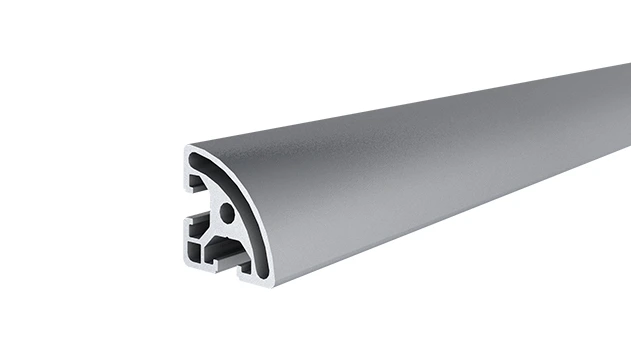
4040R EU Standard Aluminum Profile
4040R is a 4.00x4.00 CM fractional 40 series square extrusion T-slot profile with two side open T-slots, each side with 4.00cm face,the other side is round face. The profile has align-a-grooves to assist in aligning connecting profiles.
In the quiet hum of a data center or the bustling backroom of a telecom hub, there's an unsung hero keeping our world connected: the equipment rack. These unassuming structures hold the servers, routers, switches, and cables that power everything from a morning video call to a global streaming event. But not all racks are created equal. In an industry where space is tight, reliability is non-negotiable, and adaptability is key, the materials used to build these racks matter more than most realize. Enter the 4040r EU standard aluminum profile—a game-changer that's redefining how telecom professionals design, build, and maintain their equipment infrastructure. Let's dive into why this unassuming aluminum extrusion is becoming the backbone of modern telecommunication setups.
Understanding the Role of Equipment Racks in Telecommunication
Before we get into the specifics of aluminum profiles, let's take a moment to appreciate what telecommunication equipment racks actually do. At their core, they're organizers. Imagine walking into a room where servers, cables, and network devices are haphazardly stacked on the floor—dust collecting, wires tangling, heat trapped in a chaotic mess. That's a recipe for downtime, inefficiency, and frustration. Racks solve this by providing a structured framework to mount, secure, and arrange equipment. But their job doesn't stop there.
Telecom racks also act as protectors. They shield sensitive electronics from physical damage, whether it's an accidental bump from a technician or a spill on the floor. They're critical for cooling too: by spacing equipment vertically and leaving gaps for airflow, racks help heat escape, preventing overheating that could crash a network. And in a world where technology evolves faster than ever, racks need to be adaptable. A 5G router might replace a 4G one next year, or a server might need to be swapped out for a more powerful model—racks must grow and change with these needs.
For decades, steel was the go-to material for these racks. It's strong, durable, and familiar. But steel has drawbacks: it's heavy, prone to rust if not coated, and rigid—making reconfiguration a headache. As telecom facilities squeezed more equipment into smaller spaces and demanded more flexibility, a new solution was needed. That's where aluminum, specifically the 4040r EU standard aluminum profile, stepped in.
What is 4040r EU Standard Aluminum Profile?
Let's break down the name first: "4040r" isn't just a random string of numbers and letters. It refers to the profile's dimensions and design. The "4040" means the profile is 40mm wide and 40mm tall—compact enough to fit in tight spaces but sturdy enough to support heavy equipment. The "r" stands for "rounded," a subtle but important detail: the edges are curved instead of sharp, making the profile safer to handle during installation and reducing the risk of snags when routing cables. "EU standard" tells us it meets strict European union regulations for quality, safety, and environmental impact—something telecom companies value when sourcing components for global operations.
But what truly sets this profile apart is how it's made: through aluminum extrusion. Aluminum extrusion profile is created by forcing heated aluminum through a die, shaping it into consistent, precise cross-sections. This process allows for complex designs—like the T-slots that run along the length of the 4040r profile. These slots are the secret to its versatility: they let you slide in bolts, brackets, and other accessories without drilling new holes, making assembly and modification a breeze. It's like building with a set of adult Legos, but for servers instead of spaceships.
The 4040r isn't just any aluminum, either. It's typically made from 6063-T5 aluminum alloy, known for its excellent strength-to-weight ratio, corrosion resistance, and thermal conductivity. This alloy is lightweight—about a third the weight of steel—but still strong enough to support the heavy servers and devices telecom racks hold. It's also naturally resistant to rust, thanks to a thin oxide layer that forms on its surface, making it ideal for environments where humidity or temperature fluctuations are common.

Why 4040r Aluminum Profile is a Game-Changer for Telecom Racks
So, why are telecom engineers and facility managers swapping steel for 4040r aluminum profiles? Let's break down the benefits that make this material stand out in a crowded market.
Lightweight Yet Remarkably Strong
Weight matters in telecom facilities. Many data centers and telecom hubs are built with raised floors to accommodate cables and cooling systems, and every pound counts. A traditional steel rack might weigh 50-60kg when fully loaded; a 4040r aluminum rack of the same size? Closer to 30-35kg. That's a 40% reduction in weight, which means easier installation (no need for a team of people to hoist it into place) and less strain on the building's structure. But don't let the lightness fool you—4040r aluminum profiles can handle serious weight. Thanks to the extrusion process and the 6063-T5 alloy, a single 4040r profile can support up to 200kg per linear meter, more than enough for most telecom equipment.
Modularity: The Power of Aluminum Profile Accessories
Here's where the 4040r really shines: modularity. Telecom setups are never static. A new router might need to be added next month, or a server might need to be moved to a different row to improve airflow. With steel racks, modifying the layout often meant drilling new holes, welding brackets, or even replacing the entire rack. With 4040r, it's as simple as sliding in a new bracket or connector.
Aluminum profile accessories are the unsung heroes here. Think of them as the building blocks that turn a basic aluminum extrusion into a fully functional rack. There are corner brackets that lock two 4040r profiles at 90-degree angles, T-slot nuts that slide into the profile's slots to secure shelves, and end caps that cover sharp edges (though the "r" in 4040r already helps with that). There are even specialized accessories like cable management clips that snap into the T-slots, keeping wires organized and out of the way. This modularity means a telecom team can reconfigure a rack in hours instead of days, saving time and minimizing downtime.
Corrosion Resistance for Longevity
Telecom facilities aren't always pristine environments. Some are in basements with high humidity; others are in industrial areas with dust and fumes. Steel racks, even when painted, can rust over time, weakening the structure and potentially contaminating equipment with rust particles. Aluminum, on the other hand, is naturally corrosion-resistant. The oxide layer that forms on its surface acts as a protective barrier, preventing rust and degradation. This means a 4040r aluminum rack can last 15-20 years with minimal maintenance, outliving many steel counterparts that might need replacement after a decade.
Thermal Conductivity: A Cooling Advantage
Heat is the enemy of electronics. A server running at 80°C is less efficient and more likely to fail than one running at 60°C. Steel is a decent conductor of heat, but aluminum is even better—about three times more conductive, in fact. This means 4040r racks help dissipate heat from equipment more effectively. When paired with proper airflow, the aluminum acts like a heat sink, pulling warmth away from servers and routers and into the surrounding air. Over time, this can reduce cooling costs and extend the lifespan of expensive telecom gear.
Compliance and Safety
Telecom is a heavily regulated industry, and for good reason—non-compliant equipment can lead to network outages, safety hazards, or even legal issues. The "EU standard" in 4040r isn't just a marketing term; it means the profile meets strict European guidelines for material safety, structural integrity, and environmental impact. For example, it's free from harmful substances like lead or cadmium, making it safe to handle and dispose of. The rounded edges (the "r" in 4040r) also reduce the risk of cuts during installation, a small detail that makes a big difference for technicians spending hours assembling racks.
Comparing 4040r to Other Materials: A Telecom Perspective
To really understand why 4040r is gaining traction, let's compare it to other common materials used in telecom racks: traditional steel, smaller aluminum profiles (like 3030), and even wood (yes, some older setups still use wood, though it's rare today).
| Feature | 4040r EU Aluminum Profile | Traditional Steel Rack | 3030 EU Aluminum Profile | Wooden Rack (Legacy) |
|---|---|---|---|---|
| Weight (per meter) | ~1.8kg | ~5kg | ~1.2kg | ~3kg (varies by wood type) |
| Max Load Capacity | 200kg/m² | 300kg/m² | 150kg/m² | 100kg/m² (untreated) |
| Corrosion Resistance | High (natural oxide layer) | Low (needs coating) | High | Low (prone to rot/mold) |
| Modularity | Excellent (via aluminum profile accessories) | Poor (rigid, requires drilling/welding) | Good (but smaller T-slots limit accessory options) | Very Poor (fixed, no reconfiguration) |
| Thermal Conductivity | High (aids cooling) | Moderate | High | Low (traps heat) |
| Cost (Initial vs. Long-Term) | Higher initial; lower long-term (less maintenance, reconfigurable) | Lower initial; higher long-term (coating, replacement costs) | Similar to 4040r, but lower load capacity limits use cases | Low initial; very high long-term (frequent replacement) |
As the table shows, 4040r strikes a balance that's hard to beat. Steel might have a higher load capacity, but for most telecom setups (where servers and routers weigh 10-30kg each), 4040r's 200kg/m² is more than enough. And the trade-off in weight and modularity makes it worth it. The 3030 aluminum profile is lighter, but its smaller size (30mm x 30mm) means it can't support as much weight and has narrower T-slots, limiting the types of aluminum profile accessories you can use. Wood? It's cheap upfront, but it's a disaster for cooling, prone to warping, and impossible to reconfigure—hardly a fit for modern telecom needs.
Designing a Telecom Rack with 4040r: Key Considerations
So, you've decided to go with 4040r aluminum profiles for your telecom rack—great choice! Now what? Designing a rack that's efficient, safe, and future-proof requires some careful planning. Let's walk through the key considerations telecom professionals need to keep in mind.
Space and Layout
First, measure your space. How tall is the room? How much floor space can you dedicate to racks? Telecom racks are typically 19 inches wide (a standard for server mounting), so you'll need to ensure your 4040r frame can accommodate that width. The 40mm x 40mm profile is narrow enough to keep the rack's footprint small, but you'll still need to plan for depth—most equipment requires 600mm or 800mm of depth, so your rack should extend far enough to support that without overhanging (which could make it unstable).
Also, think about accessibility. Technicians need to reach the front and back of equipment to plug in cables, swap out drives, or perform maintenance. Leave at least 750mm of clearance in front of and behind the rack—more if you're using a workbench nearby for testing gear. Which brings us to another point: integrating workbenches into your setup.
Workbench Integration
Many telecom facilities place workbenches near racks so technicians can test equipment before installing it or troubleshoot issues without disrupting the entire network. The beauty of 4040r is that you can build these workbenches using the same aluminum profiles and accessories as your racks. Imagine a workbench with a laminate top, power strips mounted via T-slot brackets, and shelves for tools—all built from 4040r. It matches the rack's height, material, and modularity, creating a cohesive workspace that's both functional and easy to adjust. If you need to raise the workbench height next year or add a shelf, just grab some new aluminum profile accessories and reconfigure it—no need to buy a whole new bench.
Weight Distribution
Even though 4040r is strong, you can't just pile equipment haphazardly. Heavy devices like servers should be mounted lower in the rack to keep the center of gravity stable, preventing tipping. Lighter gear, like patch panels or small routers, can go on the top shelves. Use a weight calculator (many aluminum profile suppliers offer these online) to ensure you're not exceeding the profile's load capacity. And don't forget about dynamic weight—if a technician is leaning on the rack or moving equipment, that adds temporary stress, so leave a little buffer in your calculations.
Cable Management
Nothing slows down a telecom technician like a rat's nest of cables. 4040r profiles make cable management easier thanks to their T-slots. You can mount cable management arms, D-rings, or Velcro straps directly to the profile, keeping wires organized and out of the way of airflow. Some aluminum profile accessories are designed specifically for cables, like clip-on raceways that snap into the T-slots, routing cords neatly from top to bottom. Plan for cable entry and exit points too—leave gaps between equipment or drill small holes in the profile (carefully!) to feed cables through without kinking.
Cooling Integration
We touched on this earlier, but it's worth emphasizing: 4040r's thermal conductivity is a boon for cooling, but you still need to design the rack to maximize airflow. Leave at least 50mm of space between equipment for air to circulate. If you're using fans or air conditioning, position the rack so that cool air flows from front to back (the standard for server cooling). Avoid blocking vents with cables or accessories, and consider adding ventilation panels (made from 4040r and mesh) if the rack is enclosed.
Future-Proofing
Telecom technology moves fast. That 1U server you're installing today might be replaced by a more powerful 2U model next year, or you might need to add a battery backup unit. Design your rack with extra space—leave a few empty "U" (unit) spaces between devices for future additions. Use adjustable shelves (another perk of aluminum profile accessories) so you can raise or lower them as needed. And don't skimp on the frame: build it taller than you think you need—you can always add more shelves later, but you can't easily make a short rack taller.
Installing Your 4040r Telecom Rack: A Step-by-Step Guide
Installing a 4040r rack is surprisingly straightforward, especially compared to welding steel or drilling into wood. With the right aluminum profile accessories and a few basic tools, even someone with minimal DIY experience can assemble a functional rack in a few hours. Here's a simplified step-by-step guide:
Step 1: Gather Your Materials
You'll need: 4040r aluminum extrusion profiles (cut to your desired length), aluminum profile accessories (corner brackets, T-slot nuts, bolts, end caps), a rubber mallet (to tap brackets into place), an Allen wrench (to tighten bolts), a level (to ensure the rack is straight), and a measuring tape. If you're mounting equipment, you'll also need server rails or shelf brackets.
Step 2: Build the Frame
Start with the vertical posts—these are the backbone of your rack. Cut four 4040r profiles to your desired height (common heights are 1.8m, 2m, or 2.2m). Then, cut horizontal profiles for the top, bottom, and middle (to add stability). Use corner brackets to connect the vertical and horizontal profiles. Slide T-slot nuts into the horizontal profiles, align the brackets, and tighten the bolts with the Allen wrench. Tap gently with the rubber mallet if the brackets are tight—don't force them, as aluminum can bend if pressured too hard.
Step 3: Add Stability
Once the basic frame is up, check if it's level. If it's wobbly, add diagonal braces (using 4040r profiles and angle brackets) to reinforce the structure. This is especially important if you're stacking heavy equipment—diagonal braces prevent the rack from swaying.
Step 4: Install Shelves and Mounting Rails
Now it's time to add shelves or server rails. For shelves, use shelf brackets (another type of aluminum profile accessory) mounted to the vertical posts. Adjust the height using the T-slots—no need to drill new holes. For server rails, most are designed to bolt directly to the rack's vertical posts; use T-slot nuts to secure them at the right height.
Step 5: Add Cable Management and Finishing Touches
Mount cable management accessories like D-rings or raceways to the vertical or horizontal profiles. Snap on end caps to cover any exposed profile ends (even though 4040r has rounded edges, end caps add a clean look and prevent dust from collecting in the T-slots). Finally, double-check all bolts to ensure they're tight, and give the rack a gentle shake to test stability—if it moves, tighten the brackets or add more braces.
Pro tip: Enlist a friend to help! While 4040r is lightweight, holding profiles in place while tightening brackets is easier with two people. And always wear gloves when handling aluminum profiles—even rounded edges can have sharp spots from cutting.
Maintenance and Longevity: Keeping Your 4040r Rack in Top Shape
One of the best things about 4040r aluminum racks is that they require minimal maintenance, but a little care goes a long way in ensuring they last for years (or even decades). Here's how to keep your rack in top shape:
Regular Inspections
Every few months, take a few minutes to inspect the rack. Check for loose bolts—vibration from equipment can sometimes loosen them. Tighten any that are wobbly with an Allen wrench. Look at the aluminum profiles for signs of damage: dents, bends, or corrosion (though corrosion is rare, it can happen in extremely humid environments). If you spot a bent profile, replace it—aluminum can weaken when bent, and a damaged profile might not support weight safely.
Cleaning
Dust is the enemy of electronics, and it loves to collect on racks. Wipe down the 4040r profiles and accessories with a soft, dry cloth every few months. For stubborn grime, use a mild soap and water solution—avoid harsh chemicals like bleach, which can damage the aluminum's oxide layer. Dry thoroughly after cleaning to prevent water spots.
Lubricating Accessories
Some aluminum profile accessories, like sliding brackets or hinges, might need occasional lubrication to keep them moving smoothly. Use a dry lubricant (like silicone spray) to avoid attracting dust. Apply a small amount to the moving parts and wipe away excess.
Reconfiguring with Care
One of the perks of 4040r is that it's easy to reconfigure, but that doesn't mean you should yank brackets off without care. When moving shelves or adding new accessories, loosen bolts slowly to avoid stripping the T-slots. If a bracket is stuck, tap it gently with a rubber mallet—don't force it, as you could bend the profile or damage the accessory.
Real-World Example: A Telecom Facility's Switch to 4040r
To put all this into perspective, let's look at a real-world example (with names changed for privacy). A mid-sized telecom provider in Madrid, Spain, was struggling with its existing steel racks. The facility housed 15 servers, 8 routers, and countless cables, spread across 10 steel racks. The issues? The racks were heavy, making it impossible to rearrange them when adding new equipment. Cooling costs were skyrocketing because the steel trapped heat, and the rigid design meant technicians spent hours drilling new holes every time they needed to add a shelf.
The team decided to test 4040r aluminum profiles with a small pilot: replacing two steel racks with 4040r-based ones. The results were immediate. The new racks weighed half as much, so two technicians could move them into place in 30 minutes (compared to four people and two hours for the steel racks). The modular design let them reconfigure the shelves three times in the first month as they optimized equipment placement—no drilling required. Best of all, cooling costs dropped by 18% in those two rack areas, thanks to better airflow and aluminum's thermal conductivity.
Encouraged, the facility replaced all 10 racks with 4040r setups over the next six months. Today, they report 25% lower cooling costs overall, 40% faster equipment installation times, and a workspace that's easier to keep organized. "We used to dread adding new equipment because it meant a full day of wrestling with steel racks," said one technician. "Now, we can have a new router mounted and connected in under an hour. The 4040r profiles and aluminum profile accessories make it that easy."
Future Trends: 4040r and the Next Generation of Telecom
As telecom evolves—with 5G, edge computing, and the Internet of Things (IoT) driving demand for more equipment in smaller spaces—the role of 4040r aluminum profiles is only going to grow. Here are a few trends to watch:
Edge Computing and Micro Data Centers
Edge computing brings data processing closer to where it's needed—think small data centers in retail stores, hospitals, or factories. These micro data centers have tiny footprints, so lightweight, compact racks are a must. 4040r's small size (40mm x 40mm) and modularity make it perfect for these setups, allowing technicians to build custom racks that fit in closets or under stairs.
Smart Racks with IoT Integration
Imagine a rack that can monitor its own temperature, track equipment weight, or alert you when a bolt comes loose. With 4040r's T-slots, it's easy to mount IoT sensors (like temperature probes or vibration detectors) using aluminum profile accessories. These sensors can send data to a central system, helping telecom teams predict failures and optimize cooling—all while keeping the rack's design sleek and modular.
Sustainability
Aluminum is 100% recyclable, and recycling it uses 95% less energy than producing new aluminum. As telecom companies push for greener operations, 4040r racks offer a sustainable alternative to steel (which is recyclable but requires more energy to process). Plus, the modular design means racks can be reconfigured instead of replaced, reducing waste.
Conveyor Integration for Large Facilities
In larger telecom hubs or data centers, moving equipment between racks can be time-consuming. Some facilities are starting to integrate conveyor systems built from aluminum extrusion profiles—including 4040r—to transport servers, cables, and tools. These conveyors are lightweight, easy to install, and match the rack's modular design, creating a seamless workflow from storage to installation.
Conclusion: 4040r Aluminum Profile—More Than Just a Rack Material
At the end of the day, 4040r EU standard aluminum profile is more than just a material for building racks. It's a tool that empowers telecom professionals to work smarter, adapt faster, and build infrastructure that can keep up with the demands of our connected world. Its lightweight strength, modularity (thanks to aluminum profile accessories), and thermal conductivity solve real pain points—from high cooling costs to frustrating reconfigurations.
Whether you're designing a new telecom facility, upgrading an old setup, or just curious about the future of data center design, 4040r is worth considering. It's not just a trend; it's a shift toward a more efficient, flexible, and sustainable way of building the backbone of our digital lives. And in a world where connectivity never stops, that's a foundation worth investing in.