- Company Articles
- Products and Technology
- Product knowledge
- Aluminum Foot Base Sizing Mistakes to Avoid in Workstation Design

Aluminum Foot Base Sizing Mistakes to Avoid in Workstation Design
Related Product
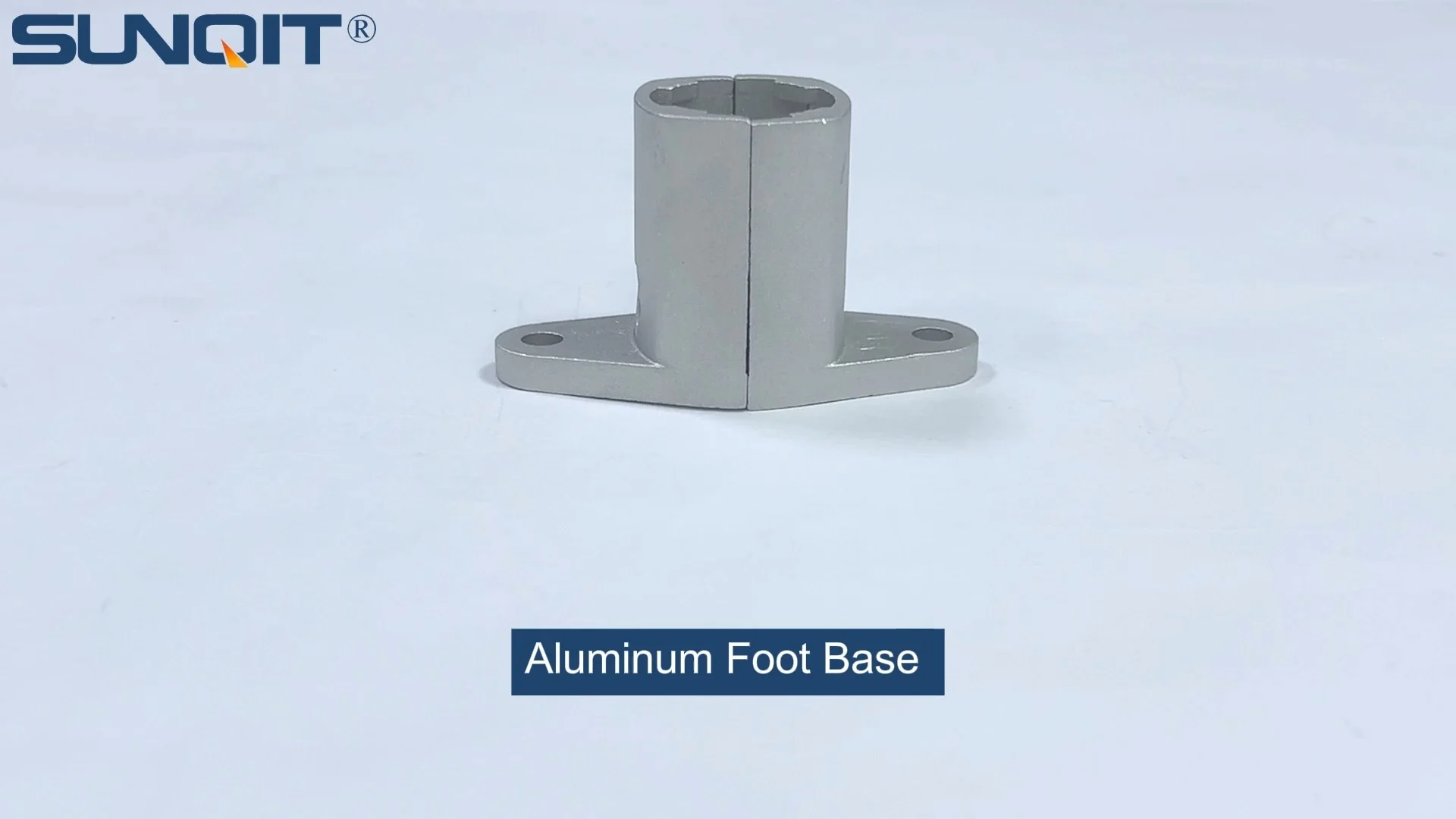
Aluminum Foot Base
Aluminum foot base to connect 28mm aluminum pipe and fixed it on the ground and prevent pipe fall and move.
Walk into any well-run workshop, factory, or lab, and you'll notice something subtle but critical: the workstations stand steady. No wobbling, no creaking, no tools sliding off the edges. Behind that stability often lies a component that's easy to overlook but impossible to replace: the aluminum foot base. These unassuming pieces—small, sturdy, and designed to anchor everything from lightweight assembly tables to heavy-duty industrial workbenches—are the unsung heroes of efficient workspace design. But here's the catch: get their sizing wrong, and you're not just looking at a wobbly desk. You're risking safety hazards, reduced productivity, and even damage to expensive equipment or materials.
If you've ever dismissed foot base sizing as "just a detail," think again. In lean system setups—where every inch of space and every second of workflow counts—an ill-fitted aluminum foot base can throw off the entire rhythm. A workbench that tilts slightly might seem minor until a technician misaligns a part, or a tool rolls off and hits the floor. Worse, over time, uneven weight distribution can warp the aluminum profile of the workstation itself, turning a one-time annoyance into a costly replacement.
In this guide, we'll dive into the most common aluminum foot base sizing mistakes designers, facility managers, and even DIY workstation builders make. We'll break down why each mistake happens, the real-world impact it has, and—most importantly—how to avoid it. Whether you're setting up a small garage workshop or outfitting a large-scale production line, these insights will help you build workstations that are not just functional, but foundational to success.
Mistake 1: Underestimating Load Capacity—When "Strong Enough" Isn't Enough
Let's start with the most dangerous mistake: guessing at load capacity. It's tempting to look at an aluminum foot base and think, "That looks sturdy—surely it can hold my workbench." But here's the problem: load capacity isn't just about the foot base itself. It's about the total weight it needs to support, including the workstation's frame, the tools on it, the materials being processed, and even the occasional operator leaning on it.
Take a typical scenario: You're building a workbench using a 4040 aluminum profile frame (a common choice for its balance of strength and weight). The frame alone weighs around 15-20 kg. Then you add a plywood top (another 10 kg), a vice (5 kg), a power drill (2 kg), and bins of screws and parts (8 kg). That's already 40-45 kg—and that's before anyone uses it. If an operator leans on the edge while reaching for a tool, you could easily add another 70-80 kg of force. Suddenly, that "sturdy" foot base rated for 50 kg total is now supporting nearly double its limit.
What happens next? Over time, the aluminum foot base will start to deform. The metal might bend slightly at the base, or the connection points to the aluminum profile could loosen. At first, it's a tiny wobble. Then, as the foot base weakens, the wobble grows. Tools slide, parts misalign, and eventually, the workstation might even tip if the load shifts suddenly (say, when someone yanks a heavy tool off the bench). In a worst-case scenario, this could lead to injuries or broken equipment.
So how do you avoid this? It starts with calculating , not guessing. Here's a simple formula to follow:
Total Load = Workstation Weight + Tool Weight + Material Weight + "Dynamic Load"
- Workstation Weight: Include the aluminum profile frame, tabletop, and any built-in features (like shelves or drawers).
- Tool Weight: Add the heaviest tools that will stay on the workstation permanently (e.g., a bench grinder, soldering station, or 3D printer).
- Material Weight: Estimate the maximum amount of material you'll store on the workstation at once (e.g., a stack of metal sheets, boxes of components).
- Dynamic Load: This is the "surprise" weight—operator leaning, sudden impacts (like dropping a tool), or shifting materials. A good rule of thumb is to add 30-50% of the static load (the first three categories) to account for this.
Once you have that total, check the manufacturer's specs for the aluminum foot base. Don't just look at the "maximum load" number—look for static load capacity (weight it can hold steadily) and dynamic load capacity (weight during movement or impact). For fixed workstations, static load is key; for mobile setups (though foot bases are typically fixed, some have caster-compatible designs), dynamic load matters more.
Pro tip: If you're using a custom aluminum profile setup (e.g., mixing 2020 and 4040 profiles), consult the supplier for weight distribution guidance. Thinner profiles bend more under stress, which means the foot base has to compensate by supporting more weight at the corners. When in doubt, size up—opting for a foot base with 20-30% higher capacity than your calculated total load is a small investment to avoid big problems later.
Mistake 2: Ignoring Floor Unevenness—Why "Flat Enough" Floors Lie
"The floor looks flat to me!" How many times has that thought crossed your mind when setting up a workstation? It's a common assumption, but floors—even in new buildings—are rarely perfectly level. A 1/8-inch slope over 10 feet might not be visible to the eye, but when multiplied across a 6-foot workbench, it can create a noticeable tilt. And if your aluminum foot bases aren't sized to adjust for that tilt, you're in for a world of wobble.
Here's why this matters: Aluminum foot bases come in two main types—fixed-height and adjustable. Fixed-height bases are simple, affordable, and work great… if your floor is a perfectly level concrete slab. But in reality, most floors have minor dips, bumps, or even slopes (especially in older buildings or areas near drains). A fixed foot base can't adapt, so one corner of the workstation will sit slightly higher or lower than the others. The result? The entire weight of the workstation shifts to the "lowest" foot base, overloading it, while the others barely touch the ground. Over time, this uneven pressure warps the aluminum profile frame, leading to cracks or misalignment.
Take a real example: A electronics manufacturer set up a row of assembly workbenches using fixed-height aluminum foot bases. The facility had a subtle slope toward the center (to drain spills), but the team didn't notice. Within a month, operators reported that components kept rolling off the right side of the workbenches. Upon inspection, the rightmost foot bases were lifting off the floor by nearly 1/4 inch, causing the entire bench to tilt. The solution? Swapping out the fixed bases for adjustable aluminum foot bases with leveling screws. By tweaking each foot base's height by just a few millimeters, they leveled the workbench, and the rolling components stopped.
So when should you choose adjustable over fixed? If you're working with:
- Older buildings with uneven concrete or wooden floors
- Floors with drains, ramps, or slight slopes (common in food processing, labs, or garages)
- Workstations that might be moved (even occasionally) to different parts of the facility
- Heavy loads that require precise leveling to prevent material slippage (e.g., glassworking, electronics assembly)
When sizing adjustable aluminum foot bases, pay attention to the adjustment range . Most models offer 10-20mm of height adjustment, which is enough for minor unevenness. For floors with bigger dips (e.g., 25mm or more), look for heavy-duty adjustable bases with extended screws. And don't forget to check the base's diameter—wider bases (e.g., 80mm vs. 60mm) distribute weight better on uneven floors, reducing the risk of sinking into soft spots (like cracked concrete or vinyl tiles).

Mistake 3: Mismatching Foot Base Height to Workbench Ergonomics
Ergonomics is all about fit—between the worker and the workstation. A workbench that's too high strains shoulders; too low, and backs ache. But here's a detail many overlook: the aluminum foot base's height plays a direct role in that fit. Choose a base that's too short, and you might have to raise the aluminum profile frame to compensate, making the workstation unstable. Too tall, and the bench sits so high that operators hunch or stretch, leading to fatigue and errors.
Let's break it down. Standard workbench height is typically 36-40 inches (91-102 cm) for standing work, or 28-30 inches (71-76 cm) for seated work. The aluminum foot base contributes 4-8 inches (10-20 cm) to that total height, depending on the model. If you start with a 6-inch foot base but need the workbench to be 36 inches high, the aluminum profile frame and tabletop need to make up the remaining 30 inches. But if the frame is designed for a 28-inch height (common for seated work), you'll either have to add extra profile sections (which can weaken the frame) or settle for a shorter bench—throwing off ergonomics.
Worse, some designers try to "fix" height mismatches by stacking foot bases or adding shims (like pieces of wood or metal under the base). This is a disaster waiting to happen. Shims can slip, and stacked foot bases create weak points where the connection can loosen. In one case, a warehouse tried to raise a workbench by stacking two 4-inch foot bases. A few weeks later, a worker leaned on the bench, and the stacked bases shifted, causing the bench to collapse. No one was hurt, but the aluminum profile frame bent, and the tools on top were damaged.
The fix? Start with ergonomics first. Measure the average height of the operators who will use the workstation. For standing work, the ideal bench height is roughly elbow height when the operator's arms are hanging relaxed (typically 36-40 inches for most adults). For seated work, it's 2-3 inches above the operator's knee height. Once you have that target height, subtract the thickness of the tabletop and the height of the aluminum profile frame. The remaining number is the exact height your aluminum foot base needs to be.
Example: Target workbench height = 38 inches. Tabletop thickness = 1.5 inches. Aluminum profile frame height (from bottom rail to tabletop) = 30 inches. Required foot base height = 38 – 1.5 – 30 = 6.5 inches. Choose a foot base with a height of 6.5 inches (or adjustable within that range). It sounds simple, but skipping this step is one of the top reasons workstations end up uncomfortable or unstable.

Mistake 4: Overlooking Compatibility with Aluminum Profile and Accessories
Aluminum foot bases don't work alone—they're part of a system. They connect directly to the aluminum profile of the workstation, and if that connection is weak or misaligned, even the best-sized foot base will fail. This is where compatibility comes in: not all foot bases fit all aluminum profiles, and assuming they do is a recipe for disaster.
Aluminum profiles come in different sizes, from small 2020 (20mm x 20mm) profiles for lightweight tables to heavy-duty 4080 (40mm x 80mm) profiles for industrial use. Each profile has a specific slot size, hole pattern, and mounting style. Aluminum foot bases are designed to match these specs—for example, a base made for a 3030 profile might have smaller mounting screws or a narrower bracket than one made for a 4040 profile. If you force a 3030 foot base onto a 4040 profile, the screws won't reach the holes properly, or the bracket will sit loosely, creating a wobbly connection.
Accessories complicate things further. Many workstations add shelves, tool hooks, or material racks to the aluminum profile frame. These accessories add weight and stress to specific points on the frame, which the foot base must counteract. For example, a material rack mounted on the side of the workstation will pull that side downward. If the foot base isn't wide enough or the mounting bracket isn't secure, the workstation could tip toward the rack.
A furniture manufacturer learned this the hard way. They ordered 4040 aluminum profiles and generic aluminum foot bases, assuming "one size fits all." The foot bases had mounting brackets that were 10mm narrower than the profile's width, so they used washers to fill the gap. When they added side-mounted tool racks to the workstations, the extra weight caused the brackets to bend—since the washers didn't distribute the load evenly. Within weeks, the foot bases started pulling away from the profiles, and the workstations leaned dangerously.
The solution? Always check the manufacturer's compatibility chart. Most aluminum profile suppliers (and foot base suppliers) list which foot bases work with which profiles. Look for bases with adjustable brackets or slotted mounting holes—these can adapt to minor size variations (e.g., a 4040 profile with slightly thicker walls). If you're adding accessories like material racks or shelves, opt for foot bases with wider bases or reinforced brackets to counteract side loads. And never use washers or makeshift spacers to "make it fit"—invest in the right foot base for your profile.

Mistake 5: Forgetting About Future Adaptability—When "Good Enough Now" Fails Later
Workstations aren't set-it-and-forget-it. Over time, needs change: production lines expand, new tools are added, or workflows shift. An aluminum foot base that fits perfectly today might become a liability tomorrow if you don't plan for adaptability. This is especially true in lean system environments, where flexibility is key to staying efficient.
Consider this: A small startup sets up workbenches with lightweight aluminum foot bases, assuming they'll only need to support basic hand tools. Six months later, they scale up and add a small CNC machine to one workstation. The CNC weighs 150 lbs—far more than the foot base's 100 lbs capacity. Now they're stuck: replacing the foot base means disassembling the entire workstation, which disrupts production. Alternatively, they could try to reinforce the existing base, but that's a temporary fix that risks damage to the aluminum profile.
Another scenario: A lab installs fixed-height foot bases for their workstations, only to realize later they need to add under-bench storage. The fixed bases are too short to fit the storage bins underneath, so they have to either remove the bins (losing valuable space) or replace the foot bases (costing time and money). In a lean system, where space optimization is critical, this is a major setback.
So how do you plan for adaptability? Start by asking: What might this workstation need to support in 1-2 years? If there's a chance you'll add heavier tools, opt for a foot base with a higher load capacity than you need today (aim for 50% extra—you'll rarely regret it). If you think you might need to adjust height (for storage, taller operators, or new equipment), choose adjustable foot bases with a wide height range (e.g., 4-8 inches of adjustability). And if you're unsure, talk to your supplier—many offer modular foot bases that can be upgraded with thicker plates or longer adjustment screws as needs change.
A Quick Reference: Common Sizing Mistakes & Solutions
| Mistake | Why It Happens | Impact | Solution |
|---|---|---|---|
| Underestimating load capacity | Guessing instead of calculating total weight (workstation + tools + materials + dynamic load) | Wobbling, foot base deformation, risk of tipping | Calculate total load using the formula: Static load + 30-50% dynamic load. Choose a foot base with 20-30% extra capacity. |
| Ignoring floor unevenness | Assuming floors are perfectly level; using fixed-height bases on uneven surfaces | Uneven weight distribution, warped aluminum profile, tool/material slippage | Use adjustable foot bases with 10-20mm height range. Opt for wider bases (80mm+) for better weight distribution. |
| Mismatching height to ergonomics | Choosing foot base height without accounting for total workbench height (operator comfort) | Operator fatigue, reduced productivity, strained posture | Calculate required foot base height: Target workbench height – (profile frame height + tabletop thickness). Choose adjustable bases if height needs might change. |
| Overlooking profile compatibility | Assuming "any foot base fits any aluminum profile" | Loose connections, weak stability, risk of profile damage | Check supplier compatibility charts. Choose bases with adjustable brackets for minor profile variations. |
| Forgetting future adaptability | Focusing only on current needs, not future growth or changes | Costly replacements, production disruptions, lost efficiency | Choose foot bases with 50% extra load capacity and adjustable height. Opt for modular designs that can be upgraded. |
Final Thoughts: The Foundation of a Better Workstation
Aluminum foot bases might not be the most glamorous part of workstation design, but they're the foundation on which everything else rests. Get their sizing right, and you'll build workstations that are stable, safe, and efficient—workstations that support your team instead of frustrating them. Get it wrong, and you'll spend more time fixing problems than focusing on what matters: production, innovation, and growth.
The next time you're designing a workstation, take a moment to think about the aluminum foot base. Calculate the load. Check the floor. Match the profile. Plan for tomorrow. These small steps will save you from big headaches down the line. After all, in a lean system—or any well-designed workspace—success starts from the ground up.