- Company Articles
- Products and Technology
- Installation And Maintenance
- Aluminum Profile 3 Way Connector Maintenance Tips for Longevity

Aluminum Profile 3 Way Connector Maintenance Tips for Longevity
Related Product
Aluminum Profile 3 Way Connector
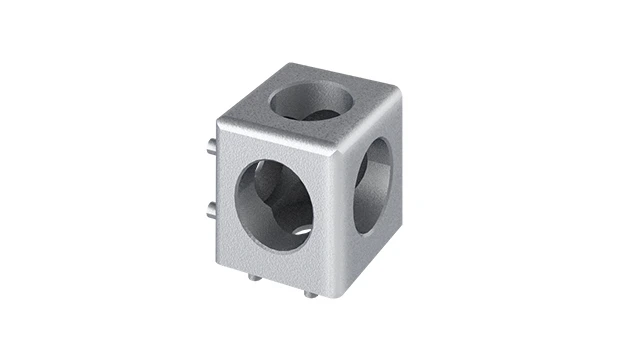
The 3 way - squared corner connector is an external fastening method that is typically used to create a corner connection between three profiles. It is a heavy-duty connection that is simple to use and provides a polished look.
Walk into any modern workshop, manufacturing plant, or even a well-organized garage, and you'll likely spot structures built with aluminum profiles—sturdy workbenches, sleek material racks, flexible conveyor frames, or modular storage systems. These setups owe their strength and versatility to one unsung hero: the connectors that hold everything together. Among these, the aluminum profile 3 way connector stands out as a workhorse, seamlessly joining three profile sections at angles to create stable, multi-directional frameworks. But here's the thing: even the most durable components need a little TLC to keep performing at their best. In this guide, we'll dive into practical, everyday maintenance tips to ensure your 3 way connectors—and the entire aluminum profile system they support—last for years, saving you time, money, and headaches down the line.
What Makes the Aluminum Profile 3 Way Connector So Critical?
Before we jump into maintenance, let's take a moment to appreciate what these small but mighty parts do. The 3 way connector is part of the broader family of aluminum profile accessories , designed to lock three aluminum profiles together at 90-degree angles (or custom angles, depending on the design). Think of it as the "cornerstone" of structures like L-shaped workbenches, T-junction material racks, or multi-tiered shelving. Unlike generic fasteners, these connectors are engineered to fit the precise T-slots of aluminum profiles, ensuring a tight, wobble-free fit that can withstand daily wear—from the vibrations of a busy assembly line to the weight of heavy tools or materials.
But here's the catch: their reliability hinges on how well you care for them. A single loose or corroded 3 way connector can throw off the balance of an entire structure, leading to squeaky racks, unstable work surfaces, or even safety hazards. And since aluminum profile systems are often modular (meaning one part connects to another), a weak link in the chain can compromise multiple components. So, maintaining these connectors isn't just about the parts themselves—it's about protecting your entire workflow.
The Golden Rule: Prevention Beats Repair
When it comes to maintenance, the best strategy is simple: catch small issues before they become big problems. Let's say you notice a 3 way connector feels slightly loose during a routine check. Tightening it then takes 30 seconds. Ignore it, and a month later, that looseness could lead to stripped threads, bent prongs, or even a profile shifting out of alignment—repairs that might require replacing the connector entirely (and possibly the profiles it's attached to). Over time, these small oversights add up, turning minor inconveniences into costly downtime.
Pro Tip: Think of It Like a Bicycle Chain
You wouldn't wait for your bike chain to rust solid before oiling it, right? The same logic applies here. Regular, small acts of maintenance (like cleaning or tightening) keep the "chain" of your aluminum profile system moving smoothly.

Daily Inspection: 2-Minute Checks That Save the Day
You don't need to be a mechanical engineer to keep your 3 way connectors in shape—just a few minutes each day. Start with a visual and tactile inspection. Here's what to look for:
- Cracks or Chips: Run your finger along the connector's edges. Even tiny cracks (especially around the screw holes or prongs) can weaken the part over time, especially under load.
- Looseness: Gently wiggle the connected profiles. If there's any play or creaking, the connector's screws or internal components might need tightening.
- Corrosion or Discoloration: Aluminum is resistant to rust, but it can develop a white, powdery film (oxidation) if exposed to moisture or chemicals. While light oxidation is normal, heavy buildup or greenish spots (a sign of chemical reaction) means trouble.
- Debris Buildup: Dust, metal shavings, or grease can get trapped in the connector's T-slot or around the screws, preventing a tight fit. A quick glance will tell you if it needs a wipe-down.
These checks work best as part of your daily setup routine. For example, if you use an aluminum profile workbench, take 60 seconds each morning to inspect the connectors at the corners and joints. It's a small habit that pays off big.

Cleaning: How to Keep Connectors Debris-Free
Aluminum profiles and their accessories thrive in clean environments. Dust and grime might seem harmless, but over time, they can act like sandpaper, wearing down the connector's surfaces and making it harder to tighten screws. Here's how to clean your 3 way connectors effectively:
Step 1: Gather Your Tools – You'll need a soft-bristled brush (an old toothbrush works great for tight spots), a lint-free cloth (microfiber is ideal), and mild soap mixed with warm water (dish soap like Dawn works well). Avoid harsh chemicals like bleach, ammonia, or abrasive cleaners—they can damage the aluminum's protective oxide layer.
Step 2: Brush Away Loose Debris – Use the brush to gently dislodge dust, dirt, or metal shavings from the connector's crevices, especially around the screw heads and T-slot openings. Be careful not to scratch the surface—aluminum is soft, and rough brushing can leave marks.
Step 3: Wipe with Soapy Water – Dampen the cloth with the soapy water (don't soak it—you don't want excess moisture seeping into the connector's internal parts) and wipe the entire surface. Focus on areas with grease or oil buildup (common in manufacturing settings where lubricants are used nearby). For stubborn spots, let the soapy cloth sit on the area for 30 seconds before wiping.
Step 4: Dry Thoroughly – Use a dry microfiber cloth to wipe away any remaining moisture. If the connector is in a humid environment (like a workshop with steam or frequent water use), consider drying it with a hairdryer on the cool setting to prevent oxidation.
Pro Caution: Never Submerge the Connector! While aluminum is water-resistant, submerging the connector can trap moisture in hidden areas (like the threads of the screws), leading to corrosion from the inside out. Stick to surface cleaning only.
Lubrication: Keeping the "Movable Parts" Moving
Not all 3 way connectors have moving parts, but many (especially those with adjustable angles or spring-loaded prongs) rely on smooth motion to function. Even fixed-angle connectors benefit from a tiny bit of lubrication to prevent screws from seizing up over time. Here's how to do it right:
Choose the Right Lubricant – Opt for a lightweight, non-corrosive lubricant like silicone spray or white lithium grease. Avoid heavy oils (like motor oil) or WD-40 (which is more of a solvent than a lubricant—it can actually dry out parts over time). For screws, a small drop of anti-seize compound (like copper-based anti-seize) can prevent threads from galling (sticking due to friction).
Apply Sparingly – A little goes a long way here. For adjustable connectors, spray a tiny amount (about the size of a pinhead) on the pivot points or moving prongs. For fixed connectors, put a drop of anti-seize on the screw threads before tightening (but wipe away excess—you don't want it attracting dust).
Wipe Excess – After applying, use a clean cloth to wipe away any lubricant that oozes out. Excess grease or spray will just collect dirt, turning into a gritty paste that can gum up the works.
Tightening: The "Sweet Spot" Between Too Loose and Too Tight
One of the most common issues with 3 way connectors is loose screws—and it's easy to see why. Daily vibrations from machinery, the weight of materials, or even temperature changes (aluminum expands and contracts slightly with heat and cold) can cause screws to back out over time. Tightening them is simple, but there's a trick to doing it without damaging the connector:
Use the Right Tool – Always use a properly sized hex key (Allen wrench) or screwdriver. A tool that's too small will strip the screw head; too large can round the edges of the connector's screw hole. If the connector uses Phillips or flathead screws, invest in a magnetic-tip driver to avoid dropping screws into hard-to-reach spots.
Tighten Until "Snug" – Not "Cranked" – The goal is to eliminate play without over-tightening. Aluminum is soft, and cranking a screw too hard can strip the threads in the connector or the profile's T-slot. A good rule of thumb: tighten until you feel resistance, then give it a quarter-turn more. If the screw starts to "bind" (feel like it's catching), stop—you've gone too far.
Check Adjacent Connectors – If one connector is loose, chances are others nearby might be too. For example, if you tighten a 3 way connector on a workbench corner, check the connectors along the same edge—vibrations often affect multiple parts in a system.
Dealing with Wear and Tear: When to Repair vs. replace
Even with perfect maintenance, connectors will eventually show signs of wear. The key is knowing when a part can be saved and when it's time to retire it. Here are common issues and how to handle them:
- Stripped Screw Threads: If a screw spins freely without tightening, the threads in the connector (or the profile) are likely stripped. This is usually irreversible—replace the connector. Trying to force a larger screw or use thread-locking compound might work temporarily, but it's a band-aid that could fail under stress.
- Minor Corrosion: Light oxidation (white film) can be cleaned with a vinegar-water solution (50/50 mix) and a soft cloth. For heavier corrosion (pitting or deep discoloration), replace the connector—corrosion weakens the metal, making it prone to cracking.
- Bent Prongs or Misaligned Holes: If the connector's prongs (the parts that fit into the profile's T-slot) are bent or the screw holes are no longer aligned, don't try to bend them back. Aluminum is brittle when bent, and forcing it can cause cracks. replace the connector.
- Loose Fit Even After Tightening: If you tighten the screws and the connector still wobbles, check if the prongs are worn down (from repeated insertion/removal). Worn prongs can't grip the T-slot properly—time for a new connector.
Remember: When replacing, always use genuine aluminum profile accessories . Generic connectors might be cheaper, but they often have imprecise tolerances (meaning they won't fit your profiles snugly) or use lower-grade aluminum that wears out faster. It's worth spending a little more for parts that match your system's original specs.
Storage: Protecting Spare Connectors (Yes, You Need Spares!)
No matter how careful you are, there will come a day when you need to replace a 3 way connector. That's why keeping a few spares on hand is a smart move—and storing them properly ensures they're ready when you need them. Here's how:
Keep Them Dry – Moisture is aluminum's worst enemy. Store spares in a sealed plastic container or a metal toolbox with a (silica gel packet) to absorb humidity. Avoid basements, garages, or other areas prone to dampness.
Organize by Type – If you have multiple connector types (different angles, sizes, or brands), label them clearly. A small tackle box with dividers works great—you don't want to waste 20 minutes digging through a jumble of parts when you're in the middle of a repair.
Add a Light Coat of Oil – For long-term storage (6 months or more), wipe each connector with a lightly oiled cloth (use the same silicone spray or white lithium grease mentioned earlier). This creates a barrier against oxidation. Just wipe off the excess oil before using them.
Aluminum Profile 3 Way Connector Maintenance Checklist
To make maintenance even easier, we've put together a handy checklist. Print this out and keep it near your workstation as a reminder:
| Task | Frequency | Tools Needed | Key Notes |
|---|---|---|---|
| Visual inspection for cracks, corrosion, or looseness | Daily (during setup) | None—just your eyes and hands | Focus on high-stress areas (e.g., corners of workbenches, bottom of racks) |
| Clean debris from crevices | Weekly | Soft brush, microfiber cloth | Pay extra attention if the area is dusty or greasy |
| Tighten screws | Bi-weekly (or if loose during daily check) | Properly sized hex key/screwdriver | Snug, not tight—avoid stripping threads |
| Lubricate moving parts/screw threads | Monthly (or quarterly for low-use systems) | Silicone spray/white lithium grease, cloth | Use sparingly—wipe excess |
| Deep clean with soapy water | Every 3 months | Mild soap, warm water, microfiber cloth | Dry thoroughly to prevent oxidation |
| Inspect spares and restock if needed | Quarterly | None—just check inventory | replace any spares that show corrosion or damage |
Final Thoughts: Maintenance as a Habit, Not a Chore
At the end of the day, maintaining your aluminum profile 3 way connectors isn't about spending hours on tedious tasks—it's about building small, consistent habits that protect your equipment and your workflow. A daily 2-minute inspection, a weekly wipe-down, and a monthly check of screws and lubrication are all it takes to keep these critical components in top shape.
Think of it this way: Your aluminum profile system is an investment—one that keeps your workspace organized, your team productive, and your operations running smoothly. The 3 way connectors are the glue that holds that investment together. By caring for them, you're not just extending their lifespan—you're ensuring that every part of your setup works as hard as you do.
So, the next time you walk past that aluminum workbench or material rack, take a second to give the connectors a once-over. A little attention today will save you a lot of trouble tomorrow. After all, in the world of manufacturing and workshop efficiency, the strongest structures are built on the smallest details.