- Company Articles
- Products and Technology
- Product knowledge
- Aluminum Profile 3 Way Connectors for Communication Equipment Racks

Aluminum Profile 3 Way Connectors for Communication Equipment Racks
Related Product
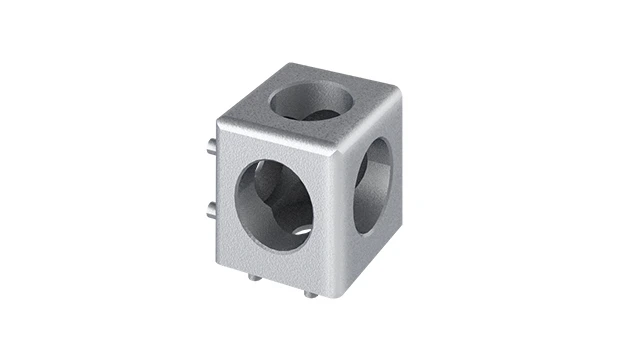
Aluminum Profile 3 Way Connector
The 3 way - squared corner connector is an external fastening method that is typically used to create a corner connection between three profiles. It is a heavy-duty connection that is simple to use and provides a polished look.
Walk into any modern data center, telecom hub, or even a small office server room, and you'll quickly spot the unsung workhorses of our digital age: communication equipment racks. These structures—sleek, organized, and surprisingly complex—hold the servers, routers, switches, and cables that keep our emails flowing, video calls clear, and social media scrolling. But what makes these racks so reliable, flexible, and easy to maintain? Look closer, and you'll find two key components working in harmony: aluminum profiles and the tiny but mighty aluminum profile 3 way connectors that bind them together.
In this article, we'll dive into the world of aluminum profile 3 way connectors, exploring why they're critical for building robust communication racks, how they work with aluminum profiles and accessories, and why they've become the go-to choice for engineers, IT managers, and facility planners alike. Whether you're setting up a new data center or upgrading an existing network closet, understanding these components will help you build racks that are not just strong, but smart—able to adapt to the ever-changing demands of modern communication technology.
1. The Backbone of Communication Racks: Why Aluminum Profiles Lead the Way
Before we talk about connectors, let's start with the foundation: aluminum profiles. When it comes to building communication equipment racks, aluminum has dethroned traditional materials like steel for a simple reason: it's a perfect blend of strength, lightness, and versatility. Unlike steel, which is heavy and prone to rust, aluminum brings a host of benefits that make it ideal for the high-stakes world of communication infrastructure.
First, aluminum is lightweight. A typical 42U server rack made with aluminum weighs 30-40% less than its steel counterpart. That might not sound like a big deal until you consider that data centers often have hundreds of these racks. Lighter racks mean easier installation, lower shipping costs, and less strain on building floors—critical for multi-story facilities. But don't let the lightness fool you: aluminum is surprisingly strong. Thanks to advanced aluminum extrusion profile techniques, modern aluminum profiles can support heavy loads (think 1,000+ pounds per rack) without bending or warping, even under the constant vibration of running servers.
Another win for aluminum? Corrosion resistance. Communication racks are often housed in environments with controlled temperatures but varying humidity levels—think air-conditioned data centers or even outdoor telecom shelters. Aluminum's natural oxide layer acts as a shield against moisture, preventing rust and ensuring racks last for decades. And let's not forget sustainability: aluminum is 100% recyclable, making it a favorite for companies aiming to reduce their carbon footprint.
But perhaps the most game-changing feature of aluminum profiles is their T-slot design. These grooves, running along the length of the profile, allow for easy attachment of aluminum profile accessories—shelves, cable management clips, cooling fans, and yes, connectors. This design turns a simple metal extrusion into a modular building block, letting engineers customize racks to fit specific equipment sizes, cooling needs, and space constraints. And that's where aluminum profile 3 way connectors step in.
2. The Unsung Heroes: What Are Aluminum Profile 3 Way Connectors?
If aluminum profiles are the bones of a communication rack, then 3 way connectors are the joints that hold those bones together. At their core, these small, often unassuming components are designed to connect three pieces of aluminum profile at once, enabling the creation of complex, multi-directional structures. Picture this: you need to build a rack with vertical posts, horizontal beams, and a cross-brace for extra stability. A 3 way connector lets you join the vertical post to both the horizontal beam and the cross-brace in one secure, precise connection.
But why "3 way"? Because communication racks aren't just simple rectangles. They need to adapt to odd angles, support shelves at different heights, and sometimes even integrate with other equipment like cable trays or cooling units. A 3 way connector provides the flexibility to build in three dimensions, turning flat profiles into (three-dimensional) structures that maximize space and functionality. Without these connectors, building a custom rack would mean drilling holes, welding, or using messy adhesives—processes that are time-consuming, permanent, and nearly impossible to modify later.
Most aluminum profile 3 way connectors are made from high-grade aluminum alloy, matching the strength and corrosion resistance of the profiles they join. They come in various designs, but the most common feature a central body with three ports (one for each profile) and internal threads or clamping mechanisms that secure the profiles in place. Some are fixed-angle (e.g., 90° for right-angle connections), while others are adjustable, letting you set angles between 0° and 180° for truly custom setups. This versatility is why they're often referred to as "3 way aluminum pipe joints"—though "pipe" here is a bit of a misnomer, as modern aluminum profiles are more accurately described as extruded beams with T-slots.

3. Why Communication Racks Can't Afford to Skimp on Quality 3 Way Connectors
You might be thinking: "A connector is a connector, right? Why not just use the cheapest one available?" But in the world of communication equipment, where a single rack failure can disrupt services for thousands of users, the quality of these small components matters more than you'd think. Here's why investing in high-quality aluminum profile 3 way connectors is non-negotiable:
Stability Under Stress
Communication racks are under constant stress. Servers generate heat, which causes materials to expand and contract slightly. Fans and cooling systems create vibration. And let's not forget the occasional bump from a technician adjusting cables or swapping out equipment. A cheap, poorly made connector might hold at first, but over time, vibrations can loosen its grip, leading to wobbly racks, misaligned equipment, or worse—equipment falling off shelves. High-quality 3 way connectors, on the other hand, use precision machining and robust clamping systems (like hex bolts or cam levers) to create a tight, vibration-resistant bond that stays secure for years.
Flexibility for Future Upgrades
The only constant in communication technology is change. Today's rack might hold 1U servers; tomorrow, you might need to add a 4U router or a bulkier battery backup system. With traditional welded steel racks, modifying the structure means cutting and rewelding—a costly, time-consuming hassle. But with aluminum profiles and 3 way connectors, reconfiguring is as simple as loosening a few bolts, adjusting the profiles, and tightening the connectors back up. This flexibility lets IT teams adapt racks to new equipment in hours, not days, keeping networks running smoothly even as demands evolve.
Safety First
In any facility, safety is paramount. A rack that collapses or tips over can damage expensive equipment, disrupt services, or even injure workers. 3 way connectors play a critical role in rack stability by distributing weight evenly across the structure. For example, a well-placed 3 way connector at the corner of a rack ensures that the weight of servers is shared between the vertical post, horizontal beam, and diagonal brace, reducing stress on any single component. Reputable manufacturers test their connectors to strict standards, ensuring they can handle not just static loads (the weight of equipment at rest) but also dynamic loads (sudden jolts or vibrations).

3. Types of Aluminum Profile 3 Way Connectors: Finding the Right Fit
Not all 3 way connectors are created equal. Just as communication racks come in different sizes and configurations, so do the connectors that build them. Understanding the types available will help you choose the right one for your project. Let's break down the most common varieties:
| Connector Type | Key Features | Best For |
|---|---|---|
| Fixed 90° 3 Way Connector | Connects three profiles at 90° angles (e.g., vertical post + horizontal beam + cross-brace). Made from aluminum alloy with hex bolt fasteners. | Standard square or rectangular racks, where right angles are needed for stability. |
| Adjustable Angle 3 Way Connector | Allows angle adjustment between 0° and 180° using a pivot mechanism. Often has a locking nut to secure the angle once set. | Custom racks with non-right angles, such as sloped shelves for better cable management or racks that fit into tight, irregular spaces. |
| Heavy-Duty 3 Way Connector | Thicker walls and larger fasteners for higher load capacities (often up to 500+ kg per connection). May include reinforced corners. | Racks holding heavy equipment like batteries, large servers, or industrial-grade routers. |
| Low-Profile 3 Way Connector | Slim design that sits flush with the profile surface, reducing bulk and improving aesthetics. | Visible racks in office spaces or customer-facing areas where appearance matters, such as telecom closets in retail stores. |
| Quick-Release 3 Way Connector | Uses cam levers or push-button mechanisms instead of bolts, allowing for tool-free assembly and disassembly. | Temporary setups, mobile racks, or environments where frequent reconfiguration is needed (e.g., trade shows or testing labs). |
When choosing a connector, start by checking the profile size. Aluminum profiles come in standard sizes like 2020 (20mm x 20mm), 3030, 4040, and 4080, and connectors are designed to fit specific sizes. A 4040 connector won't work with a 2020 profile, so double-check compatibility. Next, consider the load: if you're building a rack for lightweight networking gear, a standard connector will suffice. For heavy servers, opt for a heavy-duty model. Finally, think about installation: do you need tool-free adjustments, or is a bolted connection (which offers more permanence) better?
4. Installing 3 Way Connectors: A Step-by-Step Guide
One of the biggest advantages of aluminum profiles and 3 way connectors is how easy they are to install—no welding, no drilling, just a few simple tools. Even if you're not a seasoned engineer, you can build a sturdy communication rack with the right approach. Here's a step-by-step guide to get you started:
Step 1: Gather Your Materials and Tools
Before you begin, make sure you have everything you need: aluminum profiles (cut to your desired lengths), aluminum profile 3 way connectors, (matching) bolts and nuts, a hex key or Allen wrench (the size will depend on your connector), a tape measure, a level, and a rubber mallet (for gently tapping profiles into place). If you're working with adjustable connectors, you may also need a protractor to measure angles.
Step 2: Plan Your Rack Design
Sketch out your rack design on paper, noting the lengths of each profile and where connectors will go. For a standard 42U rack, you'll typically have four vertical posts (front left, front right, rear left, rear right), horizontal beams connecting the front posts (at the top, middle, and bottom), and horizontal beams connecting the rear posts. 3 way connectors will go at the corners, joining the vertical post to the front and rear horizontal beams. You may also add diagonal braces for stability, which will require additional 3 way connectors at the brace endpoints.
Step 3: Assemble the Base Frame
Start with the bottom frame, as it will support the entire rack. Take two vertical posts and two horizontal front beams. Slide a 3 way connector onto the end of one horizontal beam, then align the vertical post with the connector's third port. insert the bolt through the connector and into the T-slot of the profile, then tighten with the hex key—hand-tight at first, just to hold things in place. Repeat with the other end of the horizontal beam and the second vertical post. Now do the same for the rear horizontal beams, connecting them to the vertical posts with 3 way connectors. Once the base frame is assembled, use a level to ensure it's square (all angles are 90°) and adjust as needed before fully tightening the bolts.
Step 4: Add Vertical Supports and Cross-Beams
With the base frame in place, attach the remaining vertical posts (if using a four-post design) and add horizontal cross-beams at the top and middle of the rack. For each cross-beam, use 3 way connectors to join it to the vertical posts and any adjacent beams. If you're adding shelves, now is the time to install the shelf supports—short horizontal profiles that will hold the shelf boards. These can be attached to the vertical posts using T-slot nuts and bolts, or with additional 3 way connectors if they need to join multiple profiles.
Step 5: Secure and Test
Once all profiles and connectors are in place, go back and fully tighten all bolts. Be careful not to over-tighten—this can strip the threads or warp the profile. A good rule of thumb is to tighten until you feel resistance, then give the bolt a quarter-turn more. Finally, test the rack's stability by gently pushing on the sides and top. It should feel solid, with no wobbling. If it moves, check that all connectors are tight and that the frame is square.
5. Real-World Applications: How 3 Way Connectors Power Modern Communication
To truly appreciate the impact of aluminum profile 3 way connectors, let's look at how they're used in real-world communication setups. From small offices to massive data centers, these connectors are quietly enabling the networks we rely on every day.
Case Study 1: The Small Business Server Closet
A local marketing agency with 20 employees needed a server closet to house their file server, firewall, and backup system. Space was tight—their closet was only 3 feet wide—but they also wanted room to grow. Using 2020 aluminum profiles and adjustable 3 way connectors, their IT consultant built a compact, 24U rack with a sloped top shelf (to fit under a low ceiling) and side-mounted cable management trays. The adjustable connectors allowed the shelf to angle at 15°, giving them extra vertical space without sacrificing stability. Six months later, when they added a new router, they simply loosened the connectors, raised the shelf, and tightened them back up—no new parts needed.
Case Study 2: The Enterprise Data Center
A large cloud provider needed to expand their data center to accommodate 10,000 new servers. Traditional steel racks would have been too heavy for the facility's floors, and welding them on-site would have delayed the project by weeks. Instead, they opted for 4040 aluminum profiles and heavy-duty 3 way connectors. The lightweight aluminum reduced floor load by 35%, and the modular design let teams assemble racks in sections off-site, then transport and connect them in the data center. The 3 way connectors ensured that each rack was precisely aligned, making it easy to install cooling panels and cable trays between rows. The project was completed two weeks ahead of schedule, and the client saved on labor costs thanks to the quick assembly.
Case Study 3: The Outdoor Telecom Shelter
A telecom company needed to build a rack for outdoor 5G equipment in a coastal area, where salt air and rain would test corrosion resistance. They chose aluminum profiles with a special anodized finish and stainless steel 3 way connectors (for extra rust protection). The rack had to hold a large antenna mount, battery backup, and signal booster, requiring complex angles. Using adjustable 3 way connectors, the team angled the antenna mount at 45° to optimize signal strength, while the battery shelf was mounted horizontally for easy access. After two years in harsh weather, the rack showed no signs of corrosion, and the connectors were still tight and secure.
6. Maintaining Your Aluminum Profile Racks: Keeping Connectors in Top Shape
Like any piece of equipment, aluminum profile racks and their connectors need regular maintenance to stay reliable. Fortunately, aluminum's durability and the simplicity of T-slot connections make upkeep a breeze. Here are a few tips to keep your rack in top shape:
- Inspect connectors quarterly: Check for loose bolts or signs of wear, especially in high-vibration areas. Tighten any loose bolts with a hex key—remember, hand-tight plus a quarter-turn is usually enough.
- Clean profiles and connectors: Dust and debris can build up in T-slots, making it hard to adjust connectors later. Wipe profiles with a damp cloth and use a small brush (like a toothbrush) to clean out slots. Avoid harsh chemicals, as they can damage the aluminum's finish.
- Lubricate moving parts (if applicable): If you have adjustable or quick-release connectors with moving parts, apply a small amount of silicone lubricant annually to keep them operating smoothly.
- replace worn connectors: Over time, even high-quality connectors can wear out—especially if they're frequently adjusted. If a connector cracks, strips, or no longer holds tightly, replace it immediately to avoid compromising rack stability.
7. Choosing a Supplier: What to Look For
With so many suppliers offering aluminum profiles and connectors, it can be tough to know where to buy. To ensure you're getting quality components, look for these key traits:
Certifications: Reputable suppliers will have certifications like ISO 9001 (quality management) or RoHS (environmental compliance), ensuring their products meet global standards.
Material quality: Ask about the aluminum alloy used (e.g., 6063-T5 is common for profiles) and whether connectors are made from the same alloy for compatibility. Avoid suppliers who use cheap, low-grade metals.
Customer support: A good supplier will offer technical help, from helping you choose the right connector to providing installation guides. Look for companies with responsive customer service teams.
Range of accessories: Opt for suppliers who carry a full line of aluminum profile accessories—T-slot nuts, bolts, end caps, cable clips—to avoid mismatched parts from different brands.
Conclusion: Building the Future of Communication, One Connector at a Time
Aluminum profile 3 way connectors may be small, but their impact on the world of communication is enormous. By enabling the construction of lightweight, flexible, and durable racks, they're helping keep our digital lives connected—whether we're streaming a movie, sending an email, or making a video call. From the smallest office server closet to the largest data center, these unassuming components are the quiet architects of our connected world.
So the next time you walk into a data center or glance at the server rack in your office, take a moment to appreciate the aluminum profiles and 3 way connectors holding it all together. They may not make headlines, but they're the backbone of the communication systems we rely on every day. And when it's time to build or upgrade your own rack? Choose quality, choose flexibility, choose aluminum profile 3 way connectors—your network will thank you.