- Company Articles
- Products and Technology
- Product knowledge
- Anti-Slip Adjustable Leveling Feet for Communication Equipment Racks

Anti-Slip Adjustable Leveling Feet for Communication Equipment Racks
Related Product
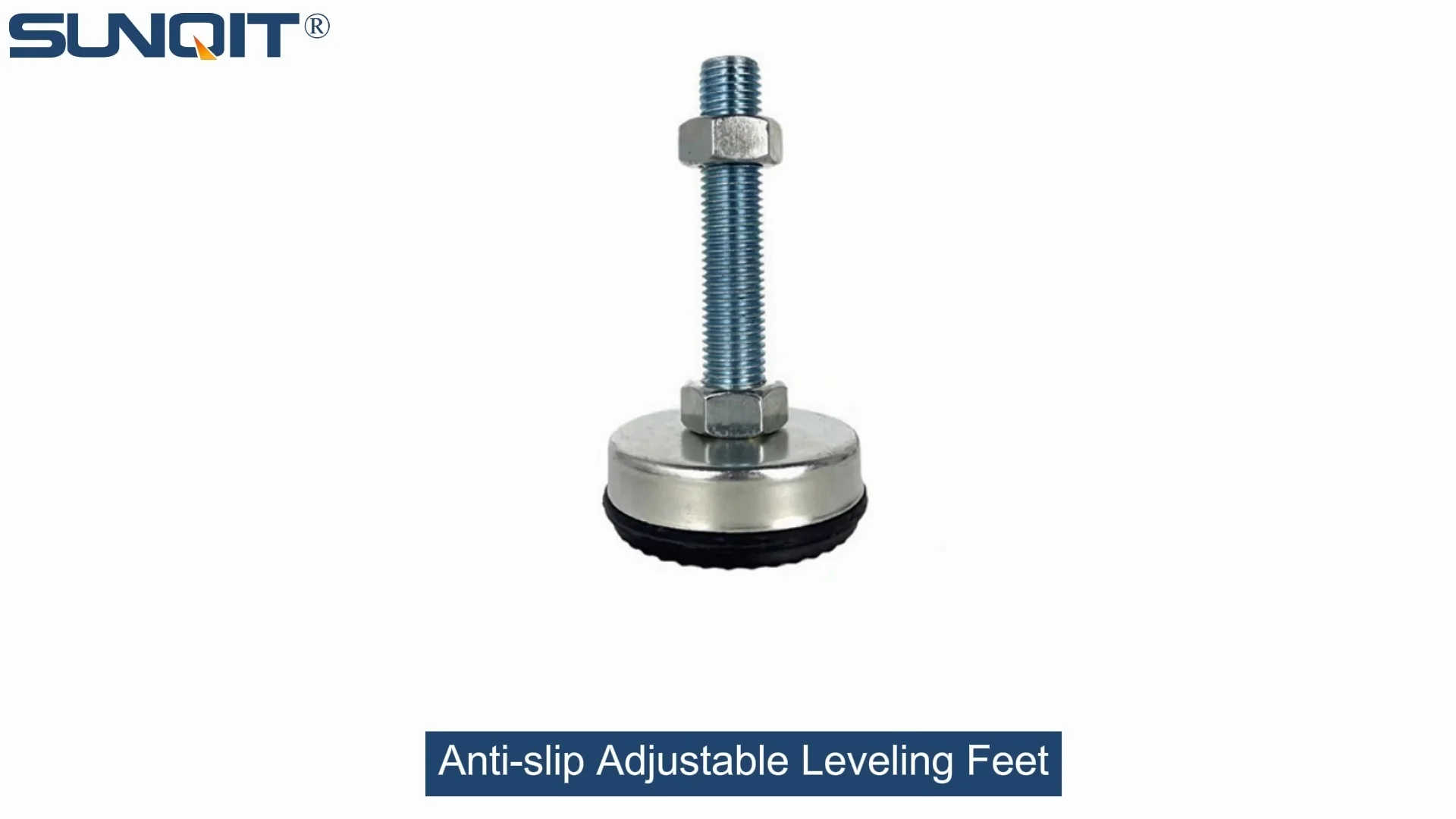
Anti-slip Adjustable Leveling Feet
Anti-slip Adjustable Leveling Feet are designed to keep machines level when placed on uneven or sloped ground, the rubber base will prevent product slip during work.
It's 2 a.m. in a bustling data center, and technician Lila is staring at a server rack that just won't stop wobbling. The hum of cooling systems fills the air, but all she can focus on is the faint, rhythmic creak of metal against concrete. A single misstep, a slight vibration from the nearby HVAC unit, and that rack—loaded with routers, switches, and miles of delicate cabling—could tip. "Not tonight," she mutters, grabbing her toolbelt. She kneels, adjusts a small, unassuming component at the base of the rack, and suddenly, the wobble stops. The rack stands firm, steady as a rock. That component? An anti-slip adjustable leveling foot. In the world of communication infrastructure, where downtime costs businesses thousands per minute and reliability is non-negotiable, these tiny but mighty tools are the unsung guardians of stability.
What Are Anti-Slip Adjustable Leveling Feet, Anyway?
At first glance, anti-slip adjustable leveling feet might seem like simple hardware. They're small, often made of metal or durable plastic, and attach to the bottom of equipment racks. But their design is a masterclass in practical engineering. Think of them as the "feet" of your communication rack—they support the weight, keep it level, and prevent slipping, even on uneven floors. Unlike fixed feet, they're adjustable: twist the top, and the height changes, letting you fine-tune the rack's balance. The "anti-slip" part? A rubber or textured base that grips the floor, turning a potentially hazardous wobble into unshakable stability.
But why does this matter for communication equipment? Let's break it down. Servers, routers, and network switches aren't just heavy—they're sensitive. Even a tiny tilt can strain internal components, disrupt cable connections, or cause overheating by blocking airflow. In worst-case scenarios, an unstable rack can lead to equipment failure, data loss, or even safety risks for technicians. Adjustable leveling feet solve this by ensuring the rack sits perfectly flat, distributing weight evenly and absorbing minor vibrations from foot traffic or machinery.
Why Communication Racks Need Specialized Leveling Feet
Walk into any office, and you'll find furniture with basic leveling feet—desks, filing cabinets, printers. But communication equipment racks? They're in a league of their own. These racks often weigh hundreds of pounds when fully loaded, with components that generate heat and require precise spacing for cooling. They're also rarely placed on perfectly smooth floors: concrete slabs can have hairline cracks, subfloors might settle over time, or the room itself could have a slight slope (yes, even in new buildings).
Consider a typical data center: rows upon rows of racks, each packed with servers. If one rack is off-kilter, it can throw off the alignment of adjacent racks, making cable management a nightmare. Over time, that misalignment strains connectors, leading to intermittent network issues that are impossible to trace. Or imagine a telecom closet in a busy office building, where the floor might vibrate from elevators or foot traffic. Without anti-slip feet, a rack could slowly "walk" across the floor, pulling cables taut and risking disconnections.
Then there's the human factor. Technicians climb ladders to access top rack units, or pull heavy equipment out for maintenance. An unstable rack isn't just a risk to the gear—it's a risk to the people working on it. A single slip could result in injury, not to mention costly downtime. Adjustable leveling feet aren't just about equipment protection; they're about creating a safe workspace.

Inside the Design: What Makes a Great Anti-Slip Adjustable Leveling Foot?
Not all leveling feet are created equal. For communication racks, you need something built to handle heavy loads, resist wear, and grip like a vice. Let's peek under the hood at the key components:
- Threaded Stem: The "adjustable" part. A metal rod with threads that screws into the rack's base. Twist it clockwise, and the foot extends; counterclockwise, it retracts. Look for stems made from hardened steel or aluminum profile —aluminum is lightweight but strong, ideal for racks where every pound counts.
- Base Plate: The part that touches the floor. It needs to be wide enough to distribute weight (think 2-4 inches in diameter for heavy racks) and made from a material that won't scratch floors. Rubber or polyurethane bases are popular for anti-slip grip, while metal bases with rubber pads offer the best of both worlds: durability and traction.
- Locking Nut: Once you've adjusted the height, a locking nut screws up against the rack to hold the foot in place. No one wants to re-adjust feet every week, so a sturdy lock nut—preferably with a nylon insert to prevent loosening—is a must.
- Corrosion Resistance: Communication rooms and data centers can be humid (thanks to cooling systems) or dusty. Feet with zinc plating, stainless steel, or powder coating stand up to these conditions, avoiding rust that could seize the threads.
One specialized design gaining traction is the heavy duty split foot seat . Unlike a solid base plate, this design splits the load across two points, increasing stability on uneven surfaces. It's like having two tiny feet instead of one, each gripping the floor independently. For racks in older buildings with warped floors, this can be a game-changer.
| Leveling Foot Type | Material | Max Load Capacity | Anti-Slip Feature | Best For |
|---|---|---|---|---|
| Standard Adjustable (Rubber Base) | Steel stem, rubber pad | 500 lbs per foot | Textured rubber pad | Light to medium racks, office telecom closets |
| Heavy Duty Split Foot Seat | Zinc-plated steel, dual rubber pads | 1,200 lbs per foot | Split base with two non-slip pads | Data center racks, uneven floors |
| Aluminum Profile Stem | Aluminum stem, polyurethane pad | 800 lbs per foot | Polyurethane pad with grip ridges | Lightweight racks, humid environments |
| ESD-Safe (Anti-Static) | Stainless steel, conductive rubber | 600 lbs per foot | Conductive rubber (prevents static buildup) | Server racks with sensitive electronics |

Adjustable Leveling Feet vs. Casters: When to Choose Which
Here's a common debate: Should I use leveling feet or casters for my rack? It's a fair question—casters let you roll racks around for maintenance, which sounds convenient. But when it comes to communication equipment, the answer is almost always: it depends on the rack's purpose .
Casters (and their caster and accessories , like brakes) are great for mobile equipment—think rolling carts for AV gear or temporary server setups. But for permanent racks that stay in one place for years? Leveling feet are superior. Why? Casters, even with brakes, have more play in their design. Over time, the brake mechanism can wear out, or the caster wheel might develop a flat spot, causing the rack to wobble. Leveling feet, when properly adjusted, create a rigid connection to the floor, eliminating that movement.
That said, some manufacturers offer hybrid solutions: racks with leveling feet that can be swapped out for casters when needed. For example, a telecom technician might install casters to move a rack during a office renovation, then switch back to leveling feet once it's in its permanent spot. It's the best of both worlds—but it requires planning (and a few extra tools).
Pro tip: If you must use casters for mobility, pair them with leveling feet that have a "lift" feature. These feet can be adjusted to raise the caster off the floor once the rack is in place, turning your mobile rack into a stable, stationary one. It's like having a caster and a leveling foot in one!

Installing Leveling Feet: A Technician's Guide to Perfection
You've bought the best leveling feet money can buy—now what? Installation might seem straightforward, but a few missteps can turn a stable rack into a disaster waiting to happen. Let's walk through the process, step by step, as Lila would (the 2 a.m. hero from our opening story).
Step 1: Prep the Rack – Before installing feet, empty the rack. Even a half-loaded rack is too heavy to maneuver safely. Remove all components, label cables (trust us, you'll thank yourself later), and use a pallet jack or lift to raise the rack slightly off the floor. If you're working alone, recruit a helper—safety first!
Step 2: Inspect the Floor – Grab a level and check the floor where the rack will sit. Is it sloped? Are there cracks or debris? Clean the area first—even a small pebble under a foot can throw off the balance. For uneven floors, mark high and low spots with chalk; this will guide your adjustments.
Step 3: Attach the Feet – Screw the leveling feet into the rack's base plate. Most racks have pre-drilled holes for this, but if not, use a drill with a metal bit (and wear safety glasses!). Tighten them by hand first, then use a wrench to snug them up—don't overtighten, or you could strip the threads.
Step 4: Level the Rack – Lower the rack onto the feet. Place a bubble level on top of the rack (front to back, side to side). Twist the leveling feet to adjust height: if the front is low, raise the front feet; if the left side dips, lower the right feet. Go slow—small adjustments make a big difference. Once level, lock the nuts against the rack to prevent loosening.
Step 5: Test for Stability – Push gently on the rack from all sides. It should rock slightly but return to center—no swaying or creaking. If it moves, recheck the level and adjust as needed. Finally, reload the rack slowly , distributing weight evenly (heaviest components at the bottom!) to avoid throwing off the balance.
Maintenance: Keeping Your Feet (and Racks) Happy
Leveling feet aren't "set it and forget it" devices. Like any hardware, they need a little TLC to keep working their best. Here's how to make sure they last:
Monthly Inspections – Walk around your racks and give each foot a quick check. Are the locking nuts tight? Is the rubber pad cracked or worn? If the pad is smooth (no texture left), replace it—without grip, the foot is just a metal rod waiting to slip.
Quarterly Cleaning – Dust, dirt, and spilled liquids (yes, even in data centers!) can build up under the feet, acting like tiny spacers. Use a vacuum with a crevice tool to clean around the base, then wipe the pad with a damp cloth. For sticky residue, a little isopropyl alcohol works wonders.
Annual Re-Leveling – Floors shift, racks settle, and components get added or removed. Once a year, empty the rack (again, label those cables!) and recheck the level. You might be surprised how much a rack can "sag" over time—especially if it's in a room with temperature fluctuations.
replace When Needed – If a stem is bent, the threads are stripped, or the base is cracked, don't "make do" with it. A single faulty foot can compromise the entire rack. Most manufacturers offer replacement parts, so you won't need to buy a whole new set.
Case Study: How Leveling Feet Saved a Hospital's Network
Let's leave the data center for a moment and head to Mercy General Hospital, where reliable communication is a matter of life and death. The hospital's IT team had been battling intermittent network outages in the emergency department for months. Phones would drop calls, electronic health records (EHRs) would freeze, and nurses couldn't access patient data during critical moments. The culprit? A single server rack in the ED telecom closet.
The closet was in an older part of the hospital, with a floor that sloped ½ inch from one end to the other. The rack, loaded with switches and routers, had been installed with basic fixed feet. Over time, it had tilted, causing the top to lean against the wall. The pressure kinked Ethernet cables, and the uneven weight strained the power supply, leading to random shutdowns.
Enter Raj, the hospital's senior IT technician. He inspected the rack, noticed the tilt, and recommended upgrading to heavy duty split foot seats. The split design let each foot adjust independently to the sloped floor, leveling the rack perfectly. Raj also added rubber pads with extra grip to absorb vibrations from the nearby ambulance bay.
The result? No more outages. Nurses could access EHRs without delay, calls stayed connected, and the IT team stopped getting 3 a.m. panic calls. "It sounds silly," Raj told us later, "but those little feet fixed a problem we'd been chasing for six months. Now, we're upgrading all our critical racks to split feet—no exceptions."
The Future of Leveling Feet: Smart, Sustainable, and Stronger Than Ever
Leveling feet might seem low-tech, but the industry is evolving. Here's what to watch for in the next few years:
Smart Leveling Feet – Imagine feet with built-in sensors that detect tilt or vibration and send alerts to your phone. Some manufacturers are already testing prototypes with Bluetooth connectivity, letting technicians monitor rack stability from a laptop or tablet. No more walking the floor—just a dashboard showing which feet need adjustment.
Eco-Friendly Materials – As businesses push for sustainability, we'll see more feet made from recycled steel or plant-based rubber. Some companies are even experimenting with bamboo-reinforced plastics for lighter, greener options.
Self-Adjusting Mechanisms – Think of a leveling foot that uses a small motor to adjust itself if it detects a tilt. These could be powered by the rack's own power supply, making them ideal for remote locations or hard-to-reach racks (like those in ceiling-mounted telecom closets).
Integration with Rack Management Systems – Future data centers might link leveling feet to their overall infrastructure management software. If a foot fails, the system could automatically alert technicians, log the issue, and even suggest a replacement part—all before a problem arises.
Final Thoughts: Don't Overlook the "Little" Things
In the world of communication equipment, we're obsessed with specs: faster servers, higher bandwidth, more storage. But stability? It's the quiet foundation that makes all those specs matter. Without adjustable leveling feet, even the most advanced rack is just a heavy, wobbly box waiting to fail.
So, take a page from Lila and Raj's book. Walk your data center or telecom closet today. Check your racks for wobble. Inspect the feet—are the pads worn? Are the nuts loose? If the answer is yes, it's time to upgrade. Your equipment, your technicians, and your bottom line will thank you.
After all, in the race to build faster, smarter networks, the most important upgrade might just be the one keeping everything standing—one leveling foot at a time.