- Company Articles
- Products and Technology
- Product knowledge
- Castor Install Base for 3D Printing Workstations: Supporting Additive Manufacturing

Castor Install Base for 3D Printing Workstations: Supporting Additive Manufacturing
Related Product
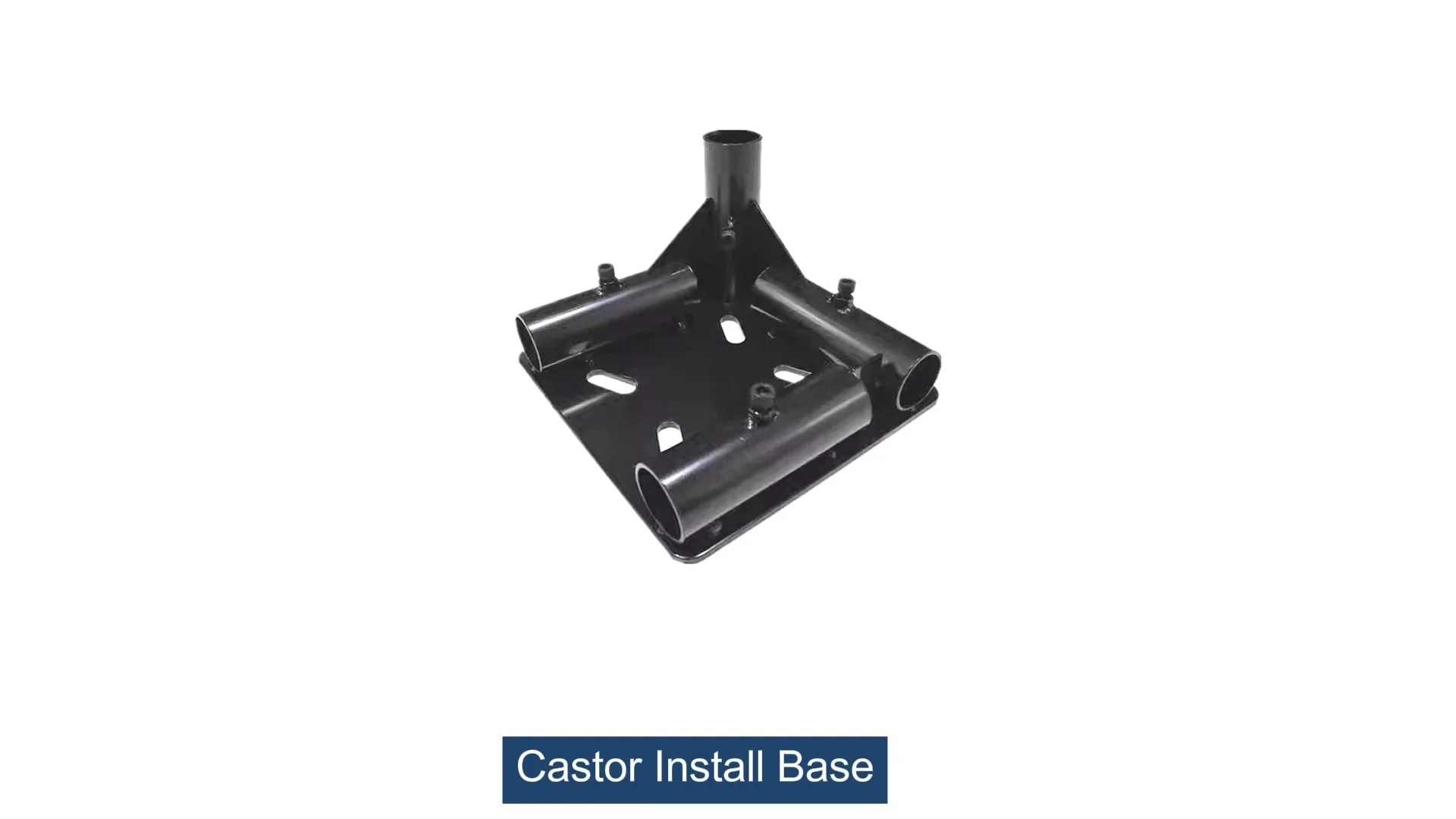
Castor Install Base
Castor install base, used for connection between pipe and castor, it can connect 4 pcs pipe by 1 pcs castor base, to make the structure strong and stable.
Walk into any modern 3D printing lab, and you'll likely be met with the hum of printers layered with the soft whir of cooling fans, the faint smell of molten plastic or resin, and the quiet focus of engineers, designers, or students hunched over screens, tweaking models before sending them to print. In this dynamic space, where innovation happens layer by layer, the unsung heroes often aren't the high-tech printers themselves—but the workstations that support them. These workstations are the backbone of productivity, holding printers, materials, tools, and sometimes even the dreams of the next big invention. Yet, as 3D printing evolves—shifting from desktop hobbyists to industrial powerhouses—so too do the demands on these workstations. Mobility, flexibility, and stability have become non-negotiable. Enter the castor install base: a simple yet transformative component that turns static workbenches into dynamic hubs of efficiency. In this article, we'll explore how castor install bases are redefining 3D printing workstations, the key components that make them tick, and why they're an essential investment for anyone serious about additive manufacturing.
The Evolving Needs of 3D Printing Workstations
Not long ago, 3D printing was a niche technology, confined to small desktop printers in garages or university labs. Today, it's a cornerstone of industries from aerospace to healthcare, producing everything from custom prosthetics to rocket engine parts. With this growth has come a dramatic shift in workstation requirements. Early setups might have been little more than a table with a printer on top, but modern workstations must juggle heavy-duty industrial printers (some weighing hundreds of pounds), spools of specialized filaments (like carbon fiber or metal-infused plastics), post-processing tools (sanders, curing stations), and even multi-material storage. Add to that the need for collaboration—teams often need to reconfigure lab layouts for group projects—or adapt to changing workflows (e.g., moving a printer closer to a scanning station for rapid prototyping), and static workbenches suddenly feel like relics of the past.
Another critical factor is precision. 3D printing, by nature, is a process of microscopic accuracy; even the smallest vibration can warp layers, leading to failed prints and wasted materials. This means workstations must be both mobile and rock-solid when in use. A flimsy base that wobbles during printing is worse than no mobility at all. Meanwhile, lab managers are increasingly focused on lean manufacturing principles—streamlining processes to reduce waste and boost efficiency. A workstation that can't adapt to these lean systems (think: quick repositioning to minimize material movement) becomes a bottleneck rather than a tool.
In short, today's 3D printing workstations need to be chameleons: strong enough to support heavy equipment, nimble enough to move at a moment's notice, and stable enough to ensure print quality. And that's where the castor install base steps in.
Why Castor Install Bases Matter: More Than Just Wheels
At first glance, a castor install base might seem like little more than a set of wheels bolted to a frame. But in reality, it's a carefully engineered system that bridges the gap between the workstation and the floor, addressing three critical needs: support, mobility, and stability. Let's break it down.
Supporting the Load: Industrial 3D printers, especially those used for metal or large-format printing, aren't lightweight. A single printer can weigh 500 pounds or more, and when you add materials, tools, and a workbench surface, the total load can easily exceed 1,000 pounds. A cheap or poorly designed castor install base will buckle under this weight, leading to uneven surfaces, damaged floors, or even safety hazards. High-quality bases, often built with robust materials like aluminum profile, distribute weight evenly across all casters, ensuring the workstation sits level and secure.
Enabling Mobility Without Compromise: The ability to move a workstation shouldn't require a team of people or a forklift. Castor wheels, when paired with a well-designed install base, let users reposition even heavy setups with minimal effort. This is game-changing for labs where space is at a premium—imagine sliding a workstation against the wall during a cleaning session, then rolling it back when a project starts. Or moving a printer from a climate-controlled room to a testing area without disconnecting power or disrupting cables (though, of course, safety protocols for electronics still apply).
Stability When It Counts: Here's the paradox: mobility is useless if the workstation moves when it shouldn't . During printing, even a tiny shift can ruin hours of work. That's why the best castor install bases come with reliable locking mechanisms. Foot brakes, for example, let users lock individual casters with a simple tap, anchoring the workstation in place. Some advanced systems even feature dual-locking casters, which lock both the wheel rotation and the swivel, preventing any movement whatsoever. This balance—easy to move, rock-solid when stationary—is what makes castor install bases indispensable.
Think of it this way: a 3D printer is only as good as the surface it sits on. A castor install base isn't an afterthought; it's the foundation that ensures your printer can perform at its best, no matter where in the lab it needs to be.

Breaking Down the Components: Caster Wheels, Accessories, and the Install Base
To understand what makes a castor install base effective, let's zoom in on its key parts. At its core, the system includes three main elements: the castor wheels, caster accessories, and the mounting structure (often built with aluminum profile or similar materials).
Caster Wheels: The Workhorses of Mobility
The wheels themselves are where the rubber meets the road—literally. Not all caster wheels are created equal, and choosing the right type depends on your lab's floor surface, load capacity, and mobility needs. Common materials include:
- Rubber: Ideal for hardwood or tiled floors, rubber wheels absorb shocks and prevent scratches. They're quiet and offer good traction, making them a popular choice for indoor labs.
- Polyurethane: A step up in durability, polyurethane wheels handle heavier loads and resist wear from rough surfaces like concrete. They're also chemical-resistant, which is useful in labs with solvent-based post-processing.
- Nylon: Lightweight and budget-friendly, nylon wheels are best for lighter workstations (e.g., desktop 3D printers). They're less shock-absorbent, though, so they may not be ideal for precision printing.
- Steel: For the heaviest loads (think industrial metal printers), steel wheels are unmatched in strength. However, they're noisy and can damage soft floors, so they're typically reserved for warehouses or workshops with concrete surfaces.
Wheels also come in two main styles: swivel (which rotate 360 degrees for easy maneuvering) and rigid (fixed in place, offering straight-line movement). Most workstations use a mix—two swivel casters for steering and two rigid casters for stability—or all swivel for maximum flexibility.
Caster Accessories: The Little Parts That Make a Big Difference
While the wheels get the attention, caster accessories are what turn a basic wheel into a functional system. These include:
- Brakes: As mentioned earlier, brakes are non-negotiable for 3D printing workstations. Foot-operated brakes are the most common—simply step on a lever to lock the wheel. Some systems also include swivel locks, which prevent the wheel from turning, adding an extra layer of stability.
- Bearings: High-quality bearings reduce friction, making wheels roll smoothly even under heavy loads. Ball bearings are standard, but roller bearings offer better weight distribution for larger workstations.
- Mounting Plates: These metal plates attach the caster wheels to the workstation base. They come in various sizes and hole patterns to match different workstation frames, including aluminum profiles with T-slots for easy customization.
- Stem Casters: Instead of a mounting plate, some casters use a stem (a metal rod) that inserts into a hole in the workstation base. These are common in lightweight setups but may not be as secure for heavy loads.
Together, these caster and accessories ensure that the wheels move smoothly, lock securely, and stay attached to the workstation—even under stress.
The Install Base: The Backbone of the System
The install base itself is the frame that connects the workstation to the casters. For 3D printing workstations, aluminum profile is a popular choice for this frame. Why aluminum? It's lightweight yet strong, resistant to corrosion (important in labs with humidity or chemicals), and infinitely customizable. Aluminum profiles feature T-slots along their length, which allow users to attach casters, shelves, or tools without drilling—perfect for adapting to changing needs. Plus, aluminum is easy to cut and assemble, making it possible to build a custom base that fits your workstation's exact dimensions.
Some bases also use steel for added strength, but this adds weight, which can make the workstation harder to move. For most labs, aluminum profile strikes the perfect balance between durability and mobility.

Materials Matter: Why Aluminum Profile Stands Out
When it comes to building the install base, aluminum profile isn't just a trend—it's a practical choice backed by decades of use in manufacturing and lab design. Let's dive deeper into why aluminum profile is the go-to material for modern 3D printing workstations.
Lightweight Strength: Aluminum has a high strength-to-weight ratio, meaning it can support heavy loads without adding unnecessary bulk. A typical aluminum profile frame for a workstation might weigh 30-50 pounds, making it easy to move even with casters. Compare that to steel, which could weigh twice as much for the same strength, and you see why aluminum is preferred for mobile setups.
Corrosion Resistance: 3D printing labs can be harsh environments. Resins, solvents, and even humidity can take a toll on metal frames. Aluminum naturally forms a protective oxide layer, which resists rust and corrosion. For labs using water-soluble resins or chemical post-processing, this is a game-changer—it ensures the base will last for years without degrading.
Modularity: The T-slot design of aluminum profiles is a stroke of genius. These slots run along the length of the profile, allowing users to slide in bolts, brackets, or accessories without drilling new holes. Need to add a shelf for filament spools? Just attach a bracket to the T-slot. Want to reposition the casters for better weight distribution? Loosen the bolts, slide the mounting plate, and tighten—done. This modularity makes aluminum profiles ideal for lean systems, where adaptability is key to reducing waste and improving workflow.
Aesthetic Appeal: Let's not overlook the visual aspect. Aluminum profiles have a clean, modern look that fits well in professional labs. They can be anodized in different colors (silver, black, or even custom hues) to match your lab's branding or design scheme, making the workstation feel less like a piece of equipment and more like a cohesive part of the space.
Of course, aluminum isn't the only option. Some labs use wood for a budget-friendly, DIY approach, but wood is prone to warping and isn't as durable. Plastic is lightweight but lacks the strength for heavy printers. For most applications, though, aluminum profile hits the sweet spot of strength, flexibility, and longevity.

The Tangible Benefits of a Quality Castor Install Base
Investing in a well-designed castor install base might seem like a small detail, but the benefits ripple through your entire 3D printing workflow. Here's how it can transform your lab:
Enhanced Workflow Efficiency
Time is money, especially in a busy lab. A mobile workstation lets you rearrange your space in minutes, not hours. Need to group printers for a team project? Roll them together. Want to move a printer closer to a ventilation hood for resin printing? No problem. This flexibility reduces downtime and keeps your team focused on creating, not rearranging furniture.
Reduced Risk of Injury
Moving a heavy workstation without casters often requires lifting or sliding, which can lead to back strain or pulled muscles. Castor install bases eliminate this risk—one person can move even a 500-pound setup with minimal effort. This is especially important in labs with rotating staff or students who may not be trained in heavy lifting.
Improved Print Quality
As mentioned earlier, stability is critical for 3D printing. A high-quality castor install base with locking casters ensures your printer stays perfectly still during printing, reducing layer shifts and failed prints. Over time, this saves money on wasted materials and reprints.
Long-Term Cost Savings
While a premium castor install base may cost more upfront than a basic set of wheels, it pays for itself in the long run. Durable materials like aluminum and polyurethane resist wear, meaning you won't need to replace parts every year. Plus, the modular design lets you upgrade components (e.g., swapping wheels for a different floor type) instead of replacing the entire base.
Support for Lean Manufacturing
Lean manufacturing is all about eliminating waste—whether it's time, materials, or space. A mobile workstation fits seamlessly into lean systems by allowing you to optimize workflow layouts on the fly. For example, you can arrange workstations in a U-shape to minimize movement between design, printing, and post-processing stations. This "lean pipe" approach to lab design (using modular components to create efficient workflows) is made possible, in part, by castor install bases.
Choosing the Right Castor Install Base: A Buyer's Guide
With so many options on the market, selecting the perfect castor install base can feel overwhelming. To narrow it down, focus on these key factors:
1. Weight Capacity
Start by calculating the total weight your workstation will need to support: printer weight + materials + tools + workbench surface. Add 20% to this number to account for unexpected loads (e.g., a stack of print bed sheets). Most manufacturers list caster weight capacities per wheel, so divide the total by the number of casters (typically 4) to ensure each wheel can handle its share.
2. Floor Type
As discussed earlier, wheel material depends on your floors. For hardwood or tile, rubber or polyurethane is best. For concrete, steel or polyurethane works. If your lab has mixed flooring, opt for polyurethane—it's versatile enough to handle most surfaces.
3. Mobility Needs
How often will you move the workstation? If it's rarely moved, rigid casters with a few swivel for steering may suffice. If you're constantly rearranging, all-swivel casters with brakes offer maximum flexibility.
4. Locking Mechanism
Not all brakes are equal. Look for "total lock" casters, which lock both the wheel and the swivel. This prevents any movement, even if someone bumps the workstation. Foot brakes are easier to use than hand brakes, especially when your hands are full of tools.
5. Environmental Factors
Do you work with chemicals, high humidity, or extreme temperatures? Choose casters with corrosion-resistant materials (e.g., stainless steel brackets, polyurethane wheels) to ensure longevity.
| Wheel Material | Best For | Weight Capacity (per wheel) | Floor Protection | Durability |
|---|---|---|---|---|
| Rubber | Hardwood/tile, light to medium loads | Up to 200 lbs | Excellent | Medium |
| Polyurethane | Mixed floors, medium to heavy loads | Up to 500 lbs | Good | High |
| Nylon | Light loads, budget setups | Up to 150 lbs | Poor | Medium |
| Steel | Concrete, very heavy loads | Up to 1,000 lbs | Poor | Excellent |
Installation Tips for Optimal Performance
Even the best castor install base won't perform well if installed incorrectly. Follow these steps to ensure a smooth, stable setup:
- Measure Twice, Drill Once: If you're building a custom aluminum profile base, measure the workstation's footprint to ensure the base is the same size or slightly larger. This prevents tipping.
- Distribute Weight Evenly: Mount casters at the corners of the base, not the center. This ensures weight is spread across all four wheels, reducing strain on individual casters.
- Level the Base: Use a spirit level to ensure the base is flat before attaching the workstation. Uneven bases can cause printers to wobble, even with brakes locked.
- Tighten All Hardware: Loose bolts can lead to rattling or instability. Use a torque wrench to tighten mounting plates to the manufacturer's specifications.
- Test Before Use: Roll the workstation around the lab to check for resistance or uneven movement. Test the brakes on different floor surfaces to ensure they hold.
- Maintain Regularly: Clean wheels of debris (e.g., plastic filaments, dust) monthly, and lubricate bearings with silicone spray to keep them rolling smoothly.
For most setups, installation is a DIY project—especially with aluminum profiles, which use T-slot nuts and bolts that don't require drilling. If you're unsure, though, hire a professional to ensure safety and performance.
Real-World Impact: Case Studies
To see how castor install bases transform 3D printing workflows, let's look at two real-world examples:
Case Study 1: University Engineering Lab
A large public university's engineering department was struggling with space constraints. With 20+ 3D printers spread across a single lab, students often had to wait to use printers, and group projects were hindered by static workstations. The department invested in aluminum profile workstations with all-swivel, total-lock casters. Overnight, the lab became a flexible space: students could roll printers into teams for collaborative projects, then return them to their original positions. Print failures due to vibration dropped by 30%, and student satisfaction scores rose significantly. "We used to spend hours rearranging tables for design sprints," said one professor. "Now, we can reconfigure the lab in 10 minutes. It's been a game-changer."
Case Study 2: Automotive Prototyping Facility
An automotive parts manufacturer uses 3D printing to create rapid prototypes of new components. Before installing castor bases, prototypes had to be carried by hand from the printing room to the testing bay—a 50-yard walk that risked damaging delicate parts. The company installed heavy-duty aluminum profile workstations with polyurethane wheels and total-lock brakes. Now, engineers roll printed prototypes directly to testing, reducing transit time by 80% and eliminating part damage. "We're printing more, testing faster, and iterating quicker," said the facility manager. "The castor bases paid for themselves in three months."
Looking Ahead: The Future of Castor Install Bases
As 3D printing continues to advance, so too will the technology that supports it. Here are a few trends to watch in castor install base design:
Smart Casters
Imagine casters with built-in sensors that monitor weight distribution, wheel wear, or vibration. If a wheel starts to fail, the sensor could alert lab managers via an app, preventing downtime. Some companies are already testing self-locking casters that engage automatically if vibration exceeds a threshold—perfect for precision printing.
Eco-Friendly Materials
With sustainability becoming a priority, manufacturers are exploring recycled aluminum for profiles and plant-based polyurethane for wheels. These materials offer the same performance as traditional options but with a lower environmental footprint.
Integrated Power and Data
Future workstations may feature castor bases with built-in cable management, including power strips and USB ports routed through the aluminum profile. This would eliminate tangled cords and make moving workstations even easier (no more unplugging everything).
AI-Driven Layout Optimization
Pairing mobile workstations with AI lab management software could allow the system to suggest optimal layouts based on workflow data. For example, the software might notice that two printers are always used together and recommend keeping them adjacent, reducing movement time.
Conclusion: The Unsung Hero of 3D Printing Workflows
In the world of 3D printing, the focus is often on the latest printer, the strongest filament, or the most advanced slicing software. But behind every successful print is a foundation that supports it—quite literally. Castor install bases may not grab headlines, but they're the unsung heroes that make modern 3D printing labs efficient, flexible, and safe. By combining durable materials like aluminum profile, high-quality caster wheels, and smart accessories, these bases ensure your workstation can keep up with the fast pace of additive manufacturing.
Whether you're running a university lab, a small startup, or a large industrial facility, investing in a quality castor install base is an investment in your team's productivity, your print quality, and your bottom line. After all, in 3D printing, as in life, it's the foundation that determines how high you can build.