- Company Articles
- Products and Technology
- Installation And Maintenance
- Castor Installation Base Maintenance: Extending Lifespan of Flexible Workstations

Castor Installation Base Maintenance: Extending Lifespan of Flexible Workstations
Related Product
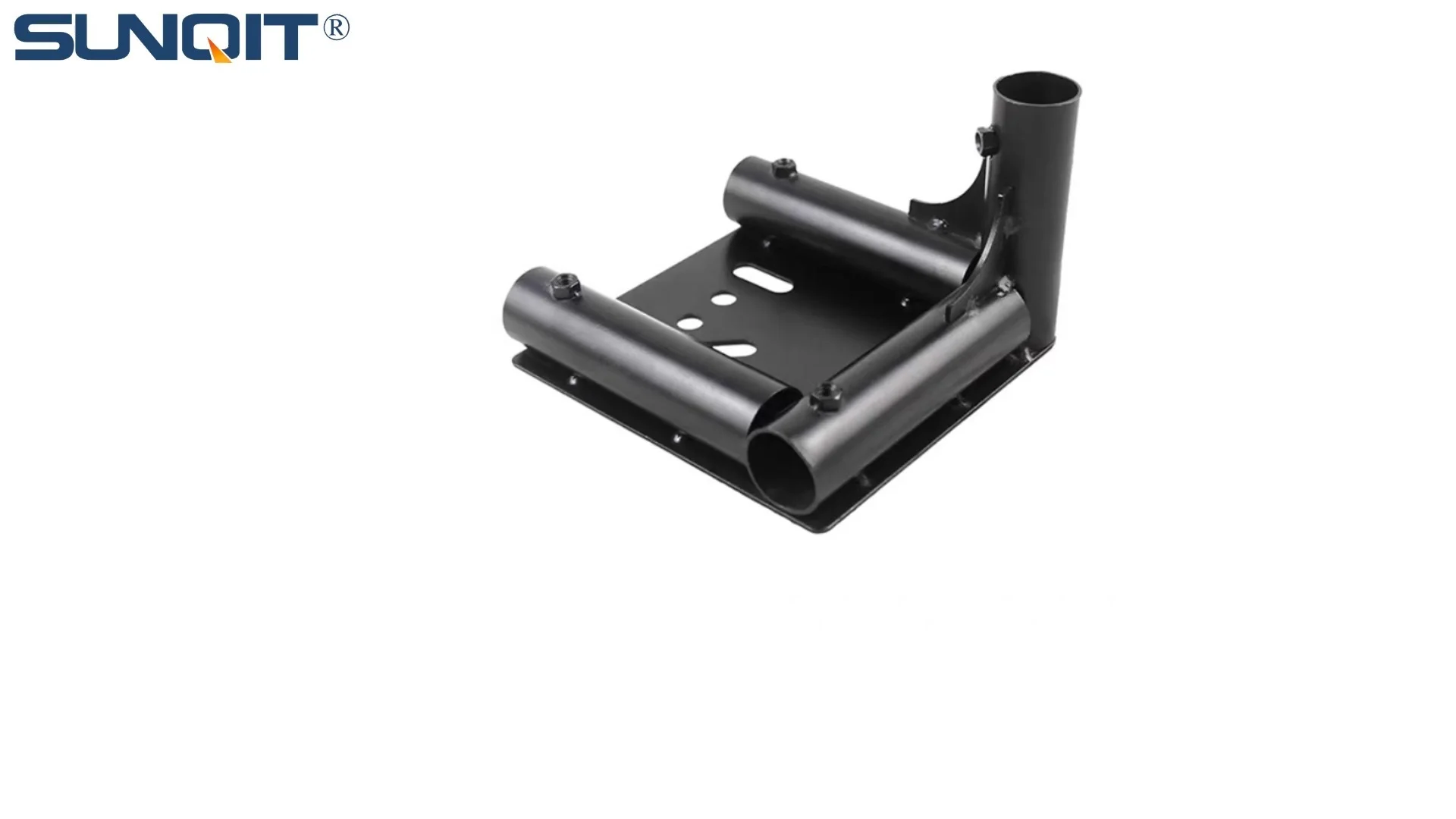
Castor Installation Base
Pipe fitting castor installation base,Well made, precise and strong. Made of high quality of steel,black painting surface treatment for greater resistance to corrosion. It is used for castor or foot lever connection with lean pipe.
In the fast-paced world of modern manufacturing and warehousing, flexible workstations have become the unsung heroes of productivity. These adaptable setups—whether they're workbenches on wheels, mobile material racks, or agile assembly stations—keep operations flowing, teams moving, and deadlines on track. But behind their smooth mobility lies a critical component that often goes unnoticed: the castor installation base. This unassuming part is the bridge between your workstation and the floor, bearing the weight of tools, materials, and daily wear. Neglecting its care isn't just a recipe for squeaky wheels or wobbly surfaces; it's a shortcut to costly downtime, safety risks, and premature replacement. Let's dive into how nurturing your castor installation base can breathe years of life into your flexible workstations.
The Unsung Backbone: What Is a Castor Installation Base?
Before we roll up our sleeves for maintenance, let's get to know the star of the show. A castor installation base is more than just a metal plate with holes—it's a precision-engineered interface designed to secure casters (those swiveling wheels) to the bottom of your workstation. Think of it as the workstation's "feet": sturdy, reliable, and tasked with distributing weight evenly to prevent tipping, reduce stress on the frame, and ensure smooth movement across floors.
These bases come in a variety of materials, but one of the most popular choices in today's workplaces is aluminum profile. Why aluminum? It's lightweight yet surprisingly strong, resists rust and corrosion (a must in humid or messy environments), and pairs seamlessly with modular setups—like lean pipe systems, where components need to be swapped or reconfigured on the fly. An aluminum profile base might feature T-slots or pre-drilled holes, making it easy to attach casters, levelers, or even additional accessories like brake levers. And when combined with lean pipe joints, these bases can integrate into larger lean systems, turning a simple workbench into a fully customized production hub.
But here's the thing: even the toughest aluminum profile base isn't invincible. Every time someone pushes a loaded workbench across the floor, every bump, every sudden stop, every inch of uneven terrain sends a jolt through that base. Over time, bolts loosen, debris clogs moving parts, and moisture eats away at unprotected surfaces. The result? A workstation that drifts off course, wobbles during use, or worse—fails under pressure. That's why maintenance isn't just about "fixing" problems; it's about preventing them from starting in the first place.
Common Culprits: Why Castor Bases Fail (And How to Spot Them Early)
Imagine walking into your workshop and noticing your go-to workbench feels a little "off." Maybe it's harder to push, or it leans to one side when you load tools on it. These are often the first whispers of a castor installation base in distress. Let's break down the usual suspects behind these issues—and how to catch them before they escalate.
Loose or Stripped Fasteners
The bolts and screws that secure the castor installation base to the workstation frame are under constant stress. Every push, pull, or vibration from nearby machinery can gradually loosen them. Left unchecked, loose fasteners create a domino effect: the base shifts, uneven weight strains the aluminum profile, and eventually, threads strip or bolts snap. You might notice a "clunking" sound when moving the workstation, or the base might visibly wiggle if you gently shake the workbench. Pro tip: A quick weekly check with a wrench can save you from a major repair later.
Debris Buildup
Factories and warehouses are messy places—and that mess loves to hide in the nooks of your castor base. Sawdust, metal shavings, oil, or even spilled coolant can wedge between the base and the caster, or gum up the mounting holes. Over time, this debris acts like sandpaper, wearing down the aluminum profile's surface and preventing the base from sitting flush against the workstation. You might feel resistance when swiveling the casters, or notice the base feels "sticky" when adjusting its position. A quick visual inspection (get down on eye level with the base!) will often reveal clumps of debris that need clearing.
Corrosion and Rust
Even aluminum profile, which resists rust better than steel, isn't immune to corrosion. If your workstation lives in a damp environment—like a food processing plant or a garage with poor ventilation—moisture can seep into the base's joints or fasteners. Over time, this leads to pitting, discoloration, or even weakening of the material. Stainless steel components (like some lean pipe joints) might fare better, but they're not invincible. Look for white, powdery spots (aluminum oxide) or reddish-brown flakes (rust on steel parts) as early warning signs.
Impact Damage
Accidents happen. A forklift backing up too quickly, a pallet slamming into the corner of the workbench, or even dropping a heavy tool on the base can bend or warp the aluminum profile. A bent base won't sit flat, causing the workstation to rock or the casters to wear unevenly. You might notice the workbench leans to one side, or that the casters don't all touch the floor at the same time. Unlike loose bolts, bent bases are harder to fix—so avoiding impacts in the first place (mark workstation zones with tape!) is key.
Worn Caster Accessories
While the base itself is critical, it relies on caster accessories (like bearings, washers, or brake mechanisms) to function. If a caster's bearing fails, it puts extra strain on the base, as the wheel no longer spins freely. Similarly, a worn brake pad might cause the caster to drag, pulling the base out of alignment. If your workstation feels "heavy" to push, or if a caster locks up unexpectedly, the issue might lie in the accessories—not just the base. Always check the entire caster assembly, not just the base, when troubleshooting.

Step-by-Step Maintenance: Keeping Your Base (and Workstation) Rolling Strong
Maintaining your castor installation base doesn't require a degree in engineering—just a little time, the right tools, and a proactive mindset. Let's walk through a simple, repeatable routine that will keep your base (and your workstation) in top shape for years.
1. Daily Visual Checks (2 Minutes Tops!)
Start small: Every day, before you fire up the workstation, take 60 seconds to give the castor installation base a once-over. Get down low and look for obvious red flags: loose bolts, debris buildup, bent metal, or corrosion. Give the workstation a gentle shake—does the base move independently of the frame? If yes, note it down for a deeper check later. This quick habit can catch issues before they ruin your day (or your deadline).
2. Weekly Deep Clean (10–15 Minutes)
Set aside time once a week to clean the base thoroughly. Grab a stiff-bristled brush, a rag, and a mild detergent (avoid harsh chemicals like bleach, which can damage aluminum profile). Start by brushing away loose debris from the base's surface, mounting holes, and around the casters. Then, dampen the rag with soapy water and wipe down the entire base—pay extra attention to crevices where grime hides. For stubborn gunk (like dried oil), use a toothbrush to scrub the tight spots. Rinse with a damp (not soaking) rag and dry thoroughly to prevent moisture buildup. Trust us: a clean base is a happy base.
3. Monthly Tightening and Lubrication (15–20 Minutes)
Once a month, it's time to get hands-on with tools. Grab a socket wrench or screwdriver (match the tool to your fasteners—no stripping allowed!) and go through each bolt on the castor installation base. Tighten them snugly, but don't overdo it—aluminum profile can crack if bolts are overtightened. Next, lubricate any moving parts that connect to the base, like the pivot points of swivel casters or the threads of lean pipe joints. Use a silicone-based lubricant (it resists dust better than oil) and apply a small amount—too much will attract more debris. Wipe away excess with a rag.
4. Quarterly Inspection (30 Minutes)
Every three months, treat your base to a thorough inspection. Remove the casters (if possible) to check the mounting holes for wear or deformation—are they oval-shaped instead of round? That means the base has been shifting, and it might need reinforcement. Check the aluminum profile for dents, bends, or corrosion; even small dents can weaken the structure over time. If you spot rust on steel components (like some caster accessories), sand it off with fine-grit sandpaper and apply a rust-inhibiting spray. Finally, test the workstation's movement: push it across the floor, swivel the casters, and apply the brakes. It should feel smooth, stable, and responsive—no wobbles, squeaks, or jerks.
5. Annual Replacement of Wear Parts
Even with perfect maintenance, some components will wear out eventually. Plan to replace caster accessories (like bearings or brake pads) every 1–2 years, depending on usage. If the aluminum profile shows signs of severe corrosion or bending, or if the mounting holes are stripped beyond repair, it might be time to replace the entire castor installation base. Investing in a quality replacement (look for heavy-duty aluminum profile or stainless steel options) will pay off in longer workstation life.

Maintenance Checklist: Your Quick-Reference Guide
To make maintenance even easier, we've put together a handy checklist. Keep a copy near your workstation (or save it on your phone) to stay on track.
| Task | Frequency | Tools Needed | Key Notes |
|---|---|---|---|
| Visual inspection for loose bolts/debris | Daily | None (just your eyes!) | Check for wobbling, clunking sounds, or visible gunk. |
| Clean base and casters | Weekly | Stiff brush, rag, mild detergent | Avoid high-pressure water—moisture can damage fasteners. |
| Tighten fasteners; lubricate moving parts | Monthly | Wrench/screwdriver, silicone lubricant | Snug bolts, don't overtighten aluminum profile. |
| Inspect for corrosion, bends, or wear | Quarterly | Sandpaper (for rust), flashlight | Check mounting holes for deformation; test workstation movement. |
| replace caster accessories or base | Annually (or as needed) | Replacement parts, wrench set | Choose OEM or high-quality aftermarket parts for best fit. |

Troubleshooting: Fixing Common Castor Base Headaches
Even with regular maintenance, you might hit a snag. Here's how to troubleshoot three of the most common castor installation base issues—no mechanic required.
Problem: Workstation Wobbles or Leans
First Step: Check the fasteners. Tighten any loose bolts on the base—this is the most likely culprit. If tightening doesn't help, inspect the aluminum profile for bends. Place a straightedge along the base; if there's a gap between the straightedge and the profile, the base is warped. For minor bends, you might be able to gently straighten it with a rubber mallet (go slow—aluminum can crack!). For severe bends, replace the base.
Problem: Casters Stick or Won't Swivel
First Step: Clean the base and casters thoroughly. Debris is often the villain here. If cleaning doesn't work, check the caster accessories: a worn bearing or seized pivot pin can cause sticking. Remove the caster, apply lubricant to the bearing, and test it by hand. If it still sticks, replace the caster (and check if the base's mounting hole is damaged—debris might have worn it down).
Problem: Base Sits Unevenly on the Floor
First Step: Check if the workstation is level. Use a bubble level on the workbench surface—if it's off, the issue might be with the casters (uneven wheel wear) or the base. If the casters are worn unevenly, replace them. If the base itself is uneven, check for bent mounting tabs or warped aluminum profile. In some cases, adding shims (thin metal or plastic strips) between the base and workstation frame can level things out temporarily, but for a permanent fix, replace the base.
Long-Term Care: Building a Workstation That Lasts
Maintenance isn't just about fixing problems—it's about building habits that keep your workstation thriving for the long haul. Here are a few pro tips to extend your castor installation base's lifespan (and your workstation's, by proxy).
Invest in Quality from the Start
You get what you pay for—and that's especially true for castor installation bases. Opt for bases made from heavy-duty aluminum profile or stainless steel, which resist wear and corrosion better than cheap plastic or thin steel. Look for features like reinforced mounting holes, rounded edges (to prevent snags), and compatibility with high-quality caster accessories. Yes, it might cost a little more upfront, but you'll avoid replacing the base every year.
Train Your Team on Proper Use
Even the sturdiest base can't survive abuse. Train your team to treat workstations gently: avoid overloading them (check the weight limit!), don't drag them sideways (lift slightly when changing direction), and never use the base as a "bump stop" for pallets or machinery. A quick 10-minute demo during onboarding can save you from a mountain of maintenance headaches.
Document Everything
Keep a maintenance log for each workstation. Jot down when you cleaned the base, tightened bolts, or replaced caster accessories. Over time, this log will reveal patterns—like a base that needs more frequent tightening because it's near a vibrating machine—and help you schedule proactive repairs instead of reacting to emergencies.
Store Smart in Off-Season
If you're not using a workstation for a while (like during a slow production period), don't just park it in a corner and forget it. Clean the castor base thoroughly, lubricate moving parts, and elevate the workstation slightly (use blocks under the frame) to take pressure off the casters and base. Store it in a dry, covered area to avoid moisture damage. When you pull it back into service, give the base a quick inspection before loading it up.
Final Thoughts: Your Workstation's Lifespan Starts at the Base
Flexible workstations are the backbone of modern productivity, but their true strength lies in the details—the small, often overlooked components like the castor installation base. By taking 10–15 minutes a week to inspect, clean, and care for this humble part, you're not just extending its lifespan; you're protecting your team's safety, avoiding costly downtime, and ensuring your workstation stays agile for years to come.
Remember: A well-maintained castor base doesn't just keep your workbench rolling smoothly—it keeps your entire operation rolling, too. So the next time you walk past that workbench, take a second to appreciate its base. Give it a quick wipe, tighten a bolt, or clear out some debris. Your future self (and your bottom line) will thank you.