- Company Articles
- Products and Technology
- Product knowledge
- Common Mistakes to Avoid with Aluminum Profile 3 Way Connectors

Common Mistakes to Avoid with Aluminum Profile 3 Way Connectors
Related Product
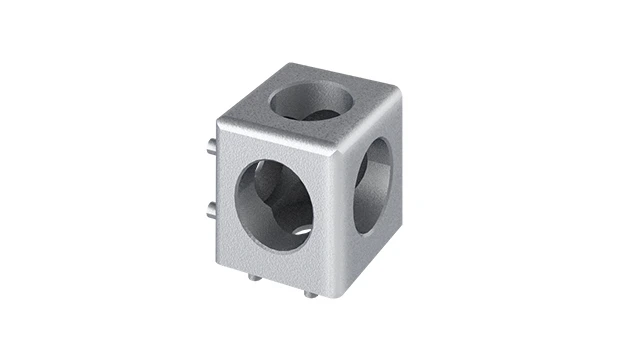
Aluminum Profile 3 Way Connector
The 3 way - squared corner connector is an external fastening method that is typically used to create a corner connection between three profiles. It is a heavy-duty connection that is simple to use and provides a polished look.
If you've spent any time in a workshop, factory, or even a DIY garage, you've probably encountered aluminum extrusion profiles. These sleek, versatile structures are the backbone of everything from workbenches and material racks to conveyor systems and machine guards. What makes them so indispensable? Their modularity. With the right connectors, you can assemble, disassemble, and reconfigure aluminum profiles into almost any shape imaginable—no welding, no heavy tools, just simple, efficient construction. But here's the thing: even the sturdiest aluminum extrusion profile is only as reliable as the connectors holding it together. And when it comes to connectors, few are as widely used (or as commonly misused) as the aluminum profile 3 way connector.
Aluminum profile 3 way connectors are the unsung heroes of modular builds. They join three lengths of aluminum extrusion profile at once, creating T-junctions, corners, or branch points that add complexity and functionality to your structure. Whether you're building a multi-tiered material rack, a workbench with side shelves, or a frame for automated machinery, these connectors keep everything aligned and stable. But misuse them, and you could end up with wobbly structures, failed load capacities, or even safety hazards. Over the years, I've seen countless projects derailed by small, avoidable mistakes with these seemingly simple components. Let's dive into the most common ones—and how to steer clear of them.
Understanding Aluminum Profile 3 Way Connectors: More Than Just a "Piece of Metal"
Before we jump into mistakes, let's make sure we're on the same page about what aluminum profile 3 way connectors are and why they matter. These connectors are designed to fit snugly into the T-slots of aluminum extrusion profiles, using screws, bolts, or friction to create a secure joint. They come in various designs: some are fixed (permanent joints), others are adjustable (allowing for angle tweaks), and a few even have built-in locking mechanisms for quick assembly. The key here is that they're engineered to distribute weight evenly across three profiles, preventing stress concentrations that could weaken the structure over time.
But here's where confusion often sets in: not all aluminum extrusion profiles are created equal, and neither are their connectors. Profiles come in different sizes (like 2020, 3030, 4040, or 4080, referring to their width and height in millimeters), wall thicknesses, and slot designs. A 3 way connector made for a 2020 profile won't work with a 4040 profile, and vice versa. Mixing and matching might seem like a quick fix in the moment, but it's a recipe for disaster. And that's just the start of the potential pitfalls.
Mistake #1: Ignoring Profile Size and Compatibility
The "One Size Fits All" Myth
Let's start with the most basic—and most costly—error: using an aluminum profile 3 way connector that's the wrong size for your aluminum extrusion profile. I once visited a small manufacturing shop where they'd built a material rack using 4040 aluminum profiles. The rack kept wobbling, and after a few weeks, one of the shelves collapsed under the weight of plastic bins. When we took it apart, we found the culprit: they'd used 3030 connectors on 4040 profiles. The connectors were loose in the T-slots, never fully gripping the profile walls, so every time the rack was loaded, the joints shifted.
Why does this happen? Often, it's a case of grabbing whatever's in the toolbox or ordering the cheapest connector online without checking specs. Maybe the supplier sent the wrong size, or someone assumed "aluminum connector" is a generic term. But aluminum extrusion profiles have precise measurements, and their T-slots (the grooves that hold connectors) vary in width and depth. A 2020 profile has a T-slot width of 6mm, while a 4040 profile might have an 8mm slot. A connector designed for a 6mm slot will rattle around in an 8mm slot, and vice versa.
| Aluminum Extrusion Profile Size | Typical T-Slot Width | Compatible 3 Way Connector Size |
|---|---|---|
| 2020 | 6mm | 2020 Series 3 Way Connector |
| 3030 | 6mm or 8mm | 3030 Series 3 Way Connector |
| 4040 | 8mm or 10mm | 4040 Series 3 Way Connector |
| 4080 | 10mm | 4080 Series 3 Way Connector |
Pro Tip: Always check the profile size (e.g., 4040) and T-slot dimensions before buying connectors. Most reputable suppliers list compatibility on their product pages—if not, ask for a spec sheet. When in doubt, test-fit a single connector with your profile before ordering in bulk.

Mistake #2: Overlooking Load Capacity Ratings
"It Looks Strong Enough, Right?"
A few years back, I helped a friend set up a home brewery. He wanted a custom workbench with a built-in shelf for fermenters, so we went with 3030 aluminum profiles and 3 way connectors to create the shelf supports. The bench looked great—until he placed a 50-gallon fermenter (full of liquid, mind you) on the shelf. The connectors bent, the shelf sagged, and we barely caught the fermenter before it hit the floor. Turns out, he'd grabbed "standard duty" connectors, not realizing they were rated for only 50kg per joint. That fermenter? It weighed over 180kg.
Load capacity is where many DIYers and even seasoned pros drop the ball. Aluminum profile 3 way connectors aren't all created equal in strength. Some are made from lightweight plastic (fine for light-duty projects like display racks), others from die-cast aluminum (better for medium loads), and heavy-duty versions from reinforced steel or thick aluminum alloy (for industrial use). Each has a maximum load rating—how much weight the connector can support without deforming or failing.
The problem is that load ratings aren't always obvious. A plastic connector might look similar to a metal one, but it can't handle a fraction of the weight. And even metal connectors vary: a 3 way connector with thin walls or small screws will fail faster than one with beefed-up construction. To make matters worse, load capacity isn't just about the connector itself—it's about how it's installed. A properly tightened connector can handle more weight than a loose one, but even then, exceeding the rated limit is a gamble.
Pro Tip: Always check the manufacturer's load rating for your aluminum profile 3 way connector. If the rating is listed as "50kg per joint," remember that's per connector—so a shelf with four connectors can technically hold 200kg, but distribute the weight evenly! For heavy loads, opt for reinforced connectors and consider adding extra supports (like diagonal braces) to reduce stress on joints.

Mistake #3: Improper Tightening—Too Loose, Too Tight, or Just Wrong
The "Crank It Until It Stops" Mentality
Let's talk about installation technique. Even if you've got the right size and load-rated connector, how you tighten it can make or break the joint. I once watched a technician assemble a workbench using 2 way and 3 way connectors. He used an impact driver to tighten the screws—ziiiiip, ziiiiip—and moved on. A week later, the workbench legs started wobbling. When we checked, the screws had stripped the threads in the T-slots. The impact driver had over-tightened them, deforming the aluminum extrusion profile from the inside.
Tightening is a balancing act. Too loose, and the connector slips; too tight, and you damage the profile or the connector itself. Most aluminum profile 3 way connectors use set screws (small screws that press against the T-slot walls) or bolt-and-nut systems. Set screws need just enough torque to grip the profile—overdo it, and you'll strip the screw, crack the connector, or indent the profile. Bolt systems, on the other hand, can handle more torque, but even they have limits.
Another common mistake is using the wrong tool. A Phillips-head screwdriver that's too small will strip the screw head, making it impossible to tighten or loosen later. An adjustable wrench might round the bolt heads. And hand-tightening? It's better than over-tightening, but unless you've got a good feel for torque, you might not get the connector snug enough.
Pro Tip: Use a torque wrench or a screwdriver with a torque limiter for set screws—most manufacturers recommend 2-3 Nm (Newton-meters) of torque for aluminum connectors. If you don't have a torque tool, go with the "finger-tight plus a quarter turn" rule: tighten the screw until it's snug with your fingers, then give it a gentle quarter turn with the tool. And always use the right size driver or wrench to avoid damaging hardware.
Mistake #4: Neglecting Aluminum Profile Accessories That Work With Connectors
Aluminum extrusion profiles and 3 way connectors don't work in a vacuum. They rely on aluminum profile accessories to perform at their best—things like end caps, T-slot nuts, washers, and rubber strips. Skipping these accessories or using the wrong ones is a mistake that can compromise your entire build.
Take T-slot nuts, for example. These small, sliding nuts fit into the T-slots of aluminum profiles and provide a threaded hole for screws (like the ones on 3 way connectors). If you use a T-slot nut that's too short or too narrow, it might slip when you tighten the connector, undoing all your hard work. Or if you forget to add a washer between the connector and the profile, the screw head might dig into the aluminum, weakening the profile over time.
Rubber strips are another often-overlooked accessory. Many aluminum extrusion profiles have sharp edges on their T-slots. A rubber strip (or "T-slot seal") lines the slot, protecting the connector's set screws from wear and reducing vibration. Without it, every time your structure is jostled (like a mobile workbench being moved), the screw rubs against the sharp aluminum edge, eventually wearing down the threads. I've seen connectors loosen after just a few months because of this—all because someone skipped the 5-cent rubber strip.
Pro Tip: Treat aluminum profile accessories as essential, not optional. When ordering aluminum profile 3 way connectors, add T-slot nuts, washers, and rubber strips to your cart. Check that the accessories are compatible with both your profile size and connector type—e.g., a 4040 profile needs 8mm T-slot nuts, not 6mm. And yes, even the small stuff matters: a missing washer can mean the difference between a joint that lasts years and one that fails in months.
Mistake #5: Ignoring Environmental Factors
When Corrosion, Heat, or Chemicals Enter the Mix
Aluminum extrusion profiles are naturally resistant to corrosion, but aluminum profile 3 way connectors? Not always. I worked with a food processing plant that used aluminum profiles to build conveyor guards in a washdown area (where equipment is regularly hosed down with water and sanitizers). They used standard die-cast aluminum connectors, and within six months, the connectors started rusting. The rust spread to the profiles, weakening the joints and creating a sanitation hazard. The fix? Switching to stainless steel 3 way connectors (rated for wet environments) and anodized aluminum profiles.
Environment matters more than you think. If your structure is outdoors, in a humid area (like a greenhouse), or exposed to chemicals (like a lab or automotive shop), standard connectors might not cut it. Moisture, salt, acids, or even extreme temperatures can degrade connectors over time. Plastic connectors might warp in high heat, while uncoated metal connectors rust in damp conditions.
Even UV light can be a problem. A plastic 3 way connector left in direct sunlight for years will become brittle, losing its grip on the profile. That's why outdoor projects (like patio furniture or garden trellises made from aluminum profiles) need UV-stabilized connectors. It's a small detail, but it's the difference between a structure that weathers the elements and one that falls apart after a few seasons.
Pro Tip: Ask: "Where will this structure live?" If it's indoors and dry (like an office shelf), standard aluminum connectors are fine. If it's outdoors, in a wet area, or near chemicals, opt for corrosion-resistant options: stainless steel connectors, anodized aluminum, or plastic connectors rated for your environment. Check the manufacturer's specs for temperature and chemical resistance—e.g., "resistant to water, oils, and mild acids" or "operating temperature: -20°C to 80°C."
Wrapping Up: Build Smarter, Not Harder
Aluminum extrusion profiles and 3 way connectors are game-changers for anyone who builds, creates, or manufactures. They let you turn ideas into structures quickly, affordably, and with minimal hassle. But as we've seen, the smallest mistakes with aluminum profile 3 way connectors can lead to big problems: wobbly workbenches, collapsed shelves, wasted time, and even safety risks.
The good news? These mistakes are easy to avoid. Start by matching your connector size to your aluminum extrusion profile. Check load ratings and tighten screws with care. Don't skip aluminum profile accessories—they're the glue that holds everything together. And always consider the environment your structure will live in. Do that, and you'll build structures that are strong, reliable, and built to last.
At the end of the day, aluminum profile 3 way connectors might seem like simple parts, but they're the heart of your modular build. Treat them with the attention they deserve, and you'll never have to ask, "Why is this wobbly?" again. Happy building!