- Company Articles
- Products and Technology
- Product knowledge
- Design Tips for Using 4040C EU Standard Aluminum Profile in Modular Workstations

Design Tips for Using 4040C EU Standard Aluminum Profile in Modular Workstations
Related Product
4040C EU Standard Aluminum Profile
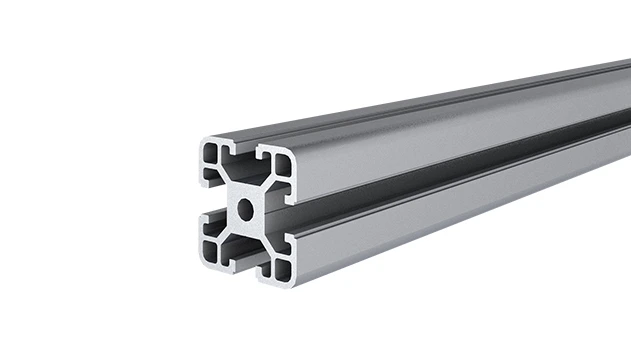
4040C is a 4.00x4.00 CM fractional 40 series square extrusion T-slot profile with four open T-slots, each side with 4.00cm face. The profile has align-a-grooves to assist in aligning connecting profiles.
Walk into any modern manufacturing plant, warehouse, or even a tech startup's workshop, and you'll likely notice a common thread: workstations that feel less like permanent fixtures and more like living, breathing systems. These are modular workstations—flexible, adaptable, and designed to grow with your needs. At the heart of many of these setups lies a unsung hero: the 4040C EU standard aluminum profile. It's not just a piece of metal; it's the backbone that turns a static workspace into a dynamic environment where efficiency, comfort, and innovation thrive. In this article, we'll dive into practical, human-centered design tips to help you make the most of 4040C aluminum profiles in your modular workstations, ensuring they work
for
your team, not against them.
Tip 1: Start with the Basics—Know Your 4040C Profile Inside Out
Before you pick up a single tool or order a single accessory, take a moment to get intimate with the 4040C EU standard aluminum profile. Why? Because understanding its strengths and limitations is like knowing the rules of a game before you play—you'll make smarter moves, avoid unnecessary mistakes, and ultimately build a workstation that lasts.
The 4040C profile gets its name from its dimensions: 40mm by 40mm, with a "C" designation that refers to its specific groove design (think of it as the profile's unique fingerprint). This groove isn't just for show; it's a universal slot that lets you attach almost any aluminum profile accessory—joints, brackets, panels, you name it—without welding or drilling. That means less time spent on permanent installations and more time adapting to new needs.
But what really sets 4040C apart is its balance of strength and lightness. Aluminum is naturally corrosion-resistant, so unlike steel, you won't have to worry about rust eating away at your workstation in humid or industrial environments. And at 40x40mm, it's sturdy enough to handle typical workshop loads—think tool storage, assembly parts, or even small machinery—without feeling bulky. I've seen teams try to cut corners with thinner profiles, only to have workstations wobble or sag under weight. The 4040C? It's the sweet spot between "overkill" and "not enough."
Another thing to note: EU standard profiles like 4040C are designed for interoperability. That means if you buy accessories from different suppliers (as long as they follow the EU standard), they'll likely fit. No more frustrating moments where a bracket from Supplier A doesn't click into a profile from Supplier B. This compatibility is a game-changer for small businesses or teams on a budget—you can mix and match parts to get exactly what you need, without being locked into one brand.
Tip 2: Design for People, Not Just Parts—Prioritize Ergonomics
A workstation made with 4040C might look sleek, but if it leaves your team with aching backs or strained wrists at the end of the day, it's failed its most important job. Ergonomics isn't just a buzzword; it's about designing spaces that support the human body's natural movements. And with 4040C's modularity, you have the power to create workstations that feel like they were custom-built for each user—even if your team has varying heights, tasks, or preferences.
Let's start with height. The average workbench height is around 800-900mm, but "average" doesn't work for everyone. A 6'4" technician and a 5'2" assembler shouldn't have to hunch or stretch to reach their tools. Here's where 4040C shines: use adjustable feet (like anti-slip adjustable leveling feet) or even caster wheels to tweak the height by a few centimeters. For example, attaching 360° swivel expanding stem casters with brakes lets you raise the workstation slightly while keeping it stable when in use. I once worked with a team where half the members needed standing desks and the other half preferred sitting. By using 4040C profiles with removable caster wheels, they could swap between setups in minutes—no tools required.
Then there's the layout. Think about how your team interacts with the workstation. Is it an assembly line where parts need to flow from left to right? A testing station where tools are used in a specific order? The 4040C's T-slot design lets you mount accessories exactly where they're needed. For a soldering workstation, you might attach a tool holder to the left of the workbench (within easy reach of the dominant hand) and a small shelf for parts to the right. No more reaching across the table or fumbling for tools—everything has a place, and that place is based on
how people actually work
.
Don't forget about clearance, too. If your team uses large equipment or needs to move around the workstation (say, for loading heavy parts), leave at least 800mm of space between workstations. The 4040C's slim profile helps here—unlike bulky wooden workbenches, it doesn't eat up unnecessary floor space, so you can fit more workstations without making the area feel cramped.

Tip 3: Unlock Flexibility with Aluminum Profile Accessories
If the 4040C profile is the backbone of your workstation, then aluminum profile accessories are the muscles and joints that let it move. These small, often overlooked parts—joints, brackets, connectors—are what turn a static frame into a system that can adapt to new tasks, team sizes, or workflows. The key is to choose accessories that solve real problems, not just look good on paper.
Let's start with joints—the unsung heroes of modularity. The internal rotatary aluminum joint, for example, is a tiny marvel. It lets you connect two 4040C profiles at almost any angle (0° to 180°) and lock them in place with a simple twist. I've seen teams use these to create corner workstations, L-shaped assembly lines, or even temporary shelves that fold down when not in use. Compare that to traditional welded frames, where changing the angle would mean cutting and rewelding—hours of work versus seconds.
Then there are the brackets and mounts. Take the roller track placon mount for aluminum profile flat, which lets you attach roller tracks directly to 4040C profiles. Why does this matter? If your workstation needs to move parts from one end to the other (like in a packaging line), you can mount a 40 steel roller track (with yellow wheels for visibility) along the edge of the workbench. Suddenly, instead of manually lifting and carrying boxes, your team can slide them smoothly—reducing fatigue and speeding up the process. And if tomorrow you need the roller track on the other side? Just loosen the placon mount, reposition, and tighten. Done.
Caster wheels are another accessory that deserves a spotlight. A good set of caster wheels (like flat swivel castor wheels with brakes) turns a stationary workstation into a mobile one. Imagine a scenario: your team needs to reconfigure the workshop for a big project. Instead of disassembling the entire workstation, they unlock the brakes, roll it to the new spot, and lock again. I've seen this save hours of downtime in busy factories. Pro tip: Opt for caster wheels with rubber or polyurethane tires—they're quieter on concrete floors and won't scratch polished surfaces, keeping the workshop peaceful (or at least less noisy).
To help you navigate the world of accessories, here's a quick reference table of must-have options for 4040C workstations:
| Accessory Name | Key Function | Best For |
|---|---|---|
| Internal Rotatary Aluminum Joint | Connects profiles at adjustable angles (0°–180°) | Corner workstations, foldable shelves |
| 90° Aluminum Crossing Joint | Joins two profiles perpendicularly (e.g., vertical and horizontal) | Workbench frames, shelf supports |
| Roller Track Placon Mount (Flat) | Attaches roller tracks to 4040C profiles | Material flow systems, assembly lines |
| Anti-Slip Adjustable Leveling Feet | Levels workstations on uneven floors; prevents sliding | Stable workbenches, heavy-load setups |
| 360° Swivel Caster Wheels with Brake | Enables mobility; locks in place when needed | Mobile workstations, temporary setups |
The takeaway? Don't skimp on accessories. A well-chosen joint or caster wheel can turn a "good" workstation into a "great" one that grows with your team.
Tip 4: Integrate Roller Tracks for Seamless Material Flow
In any workspace where materials, parts, or products move from one point to another, friction is the enemy. Friction in the form of manual lifting, awkward reaching, or slow transport not only wastes time but also increases the risk of injury. That's where roller tracks come in—and when paired with 4040C aluminum profiles, they become a force multiplier for efficiency.
Roller tracks are exactly what they sound like: tracks lined with small wheels (rollers) that let items glide across a surface with minimal effort. When mounted to 4040C profiles, they turn a static workbench into a dynamic conveyor system, whether you're moving small electronics components or larger boxes. The key is to choose the right roller track for your needs and integrate it seamlessly into the workstation.
Let's start with material. Aluminum roller tracks (like the 38 aluminum roller track series) are lightweight and corrosion-resistant, making them ideal for clean environments or areas with moisture. Steel roller tracks (such as 40 steel roller track with yellow wheels) are heavier but stronger, better for heavier loads or rough industrial settings. I once helped a team in a automotive parts shop switch from steel to aluminum tracks—they cut down on the weight of the workstation by 30%, making it easier to reposition when needed, without sacrificing durability.
Then there's the layout. Roller tracks work best when they follow the natural flow of work. For an assembly line workstation, mount the track along the edge of the workbench, sloping slightly downward (just a 2-3° angle) so parts glide toward the assembler. For a packing station, install a U-shaped track that brings empty boxes in one end and sends packed ones out the other. The 4040C's T-slot makes mounting a breeze—use roller track placon mount brackets to secure the track to the profile, and adjust the angle with shims if needed. No drilling, no welding, just a few screws and you're done.
Don't forget about edge guides, either. Plastic roller track guide rails (yellow or grey) attach to the sides of the track to keep items from sliding off. I've seen too many teams skip these, only to have parts tumble onto the floor—wasting time and risking damage. A few dollars spent on guide rails saves hours of cleanup and frustration.
And here's a pro move: mix and match roller types. Swivel roller balls (like 1 inch stainless steel swivel roller balls) are perfect for corners or areas where items need to change direction—they let parts rotate 360°, so you don't need to manually turn them. Pair these with straight roller tracks for a system that handles both linear and multidirectional movement. It's like adding a "magic corner" to your workstation, making even complex workflows feel effortless.
Tip 5: Build for the Future—Plan for Adaptability
The only constant in business is change. A workstation that works perfectly today might feel outdated in six months—maybe your team grows, your products change, or new tools require more space. That's why the best modular workstations aren't just built for now; they're built to evolve. And with 4040C aluminum profiles, adaptability isn't an afterthought—it's built in.
Start by avoiding "permanent" choices. For example, instead of bolting a workbench directly to the floor, use caster wheels or adjustable feet so you can move it later. Instead of welding a shelf to the frame, use quick-release brackets (like the parallel fixation aluminum pipe joint) that let you remove or reposition the shelf in minutes. I worked with a startup that doubled in size in a year—their initial 4040C workstations were so modular, they could add extra frames and accessories without buying entirely new setups, saving tens of thousands of dollars.
Think about vertical space, too. The 4040C profile isn't limited to horizontal workbenches—stack profiles vertically to create overhead storage, tool racks, or monitor mounts. Use 90° aluminum pipe joints inside connection to build a two-tiered workstation: tools and parts on the lower level, finished products on the upper level. When you need more space, just add another vertical section—no need to tear down and rebuild.
Another trick: leave "blank canvas" sections. When designing your workstation, include a few extra 4040C profiles or empty T-slots that aren't immediately used. These are your "future proofing" zones. Maybe next quarter you'll need to add a label printer, or a new team member will need a tool holder—those empty slots will let you attach accessories without reconfiguring the entire frame. It's like leaving extra seats at a dinner table; you never know when guests (or new tools) will arrive.
Finally, document your design. Take photos of the workstation from all angles, note which accessories are used where, and keep a list of suppliers for profiles and parts. When it's time to adapt, you won't be guessing which joint fits which profile or where to buy replacement caster wheels. A little organization now saves a lot of headaches later.
Tip 6: Safety First—Don't Overlook the Little Things
A workstation can be efficient and flexible, but if it's not safe, it's not worth building. Aluminum is generally safe, but poor design choices—sharp edges, unstable structures, or overloaded shelves—can turn even the best 4040C setup into a hazard. The good news? Safety and modularity go hand in hand when you plan ahead.
Start with edges and corners. Aluminum profiles have sharp edges right out of the box, but a quick pass with a deburring tool or a rubber edge trim (like T-slot rubber seal cover) will smooth them out. I've seen team members get minor cuts from untrimmed profiles—small injuries, but they add up to lost time and frustration. Rubber trim also adds a grip, so tools or parts are less likely to slip off the workstation.
Next, check load capacity. The 4040C profile can handle around 50-80kg per linear meter (depending on the accessory and mounting), but that doesn't mean you can stack heavy tools on a single shelf without support. Use gusset plates (like gusset alp 4040) to reinforce joints—these small metal brackets add stability to corners and prevent the frame from wobbling under weight. And when in doubt, distribute weight evenly. A shelf loaded with 100kg in one corner will stress the profile; spread that weight across the shelf, and it's a non-issue.
If your workstation uses caster wheels, invest in high-quality brakes. The last thing you want is a workstation rolling away while someone is working on it. Look for brakes that lock both the wheel and the swivel mechanism (called "total lock" brakes)—they prevent both movement and rotation, keeping the workstation rock-solid. And inspect the wheels regularly for wear; a cracked wheel can cause the workstation to tilt, risking spills or falls.
Finally, think about electrical safety. If your workstation has power tools or charging stations, use cable management accessories designed for 4040C profiles. Cable clips that slide into the T-slot keep wires off the floor (reducing trip hazards) and out of the way of moving parts. I once visited a workshop where cables were draped over roller tracks—within a week, a cable got caught in the rollers, shorting out a tool and causing a 2-hour delay. A few cable clips would have prevented it.
Conclusion: Your Workstation, Your Team, Your Success
Designing a modular workstation with 4040C EU standard aluminum profiles isn't just about putting metal together—it's about creating a space that respects your team's needs, adapts to their workflows, and grows with their ambitions. It's about turning a "workbench" into a partner in productivity.
By starting with the basics of the 4040C profile, prioritizing ergonomics, leveraging aluminum profile accessories, integrating roller tracks, planning for adaptability, and keeping safety in mind, you'll build more than a workstation. You'll build a system that makes work feel easier, more intuitive, and even a little inspiring. Because at the end of the day, the best workspaces aren't measured by how many tools they hold or how efficiently they're laid out—they're measured by how well they support the people who use them.
So grab your 4040C profiles, pick your accessories, and start building. Your team (and your future self) will thank you.