- Company Articles
- Products and Technology
- Product knowledge
- Essential Accessories for 3060 National Standard Profile A: Joints, Brackets & Connectors

Essential Accessories for 3060 National Standard Profile A: Joints, Brackets & Connectors
Related Product
3060 National Standard Profile A
Workbench, production line, logistic rack, warehouse rack Industry: Manufacturer workshop, Automobile, Electronic, Assembling, logistic
Walk into any modern factory, workshop, or logistics hub, and you'll likely spot the sleek, modular framework of aluminum profiles holding everything together—from workbenches and material racks to conveyor systems and assembly lines. Among these, the 3060 National Standard Profile A stands out as a workhorse, prized for its balance of strength, versatility, and lightweight design. But here's the thing: even the best profile is only as good as the accessories that bring it to life. Joints that lock pieces into place, brackets that stabilize structures, connectors that bridge gaps—these small but mighty components turn a pile of aluminum extrusions into a functional, efficient workspace. In this article, we'll dive into the unsung heroes of 3060 Profile A setups: the joints, brackets, and connectors that make lean manufacturing, streamlined workflows, and custom configurations possible. Whether you're building a workbench for a small garage shop or outfitting an entire production line, understanding these accessories will save you time, reduce frustration, and ensure your setup works as hard as you do.
Understanding 3060 National Standard Profile A: The Foundation of Your System
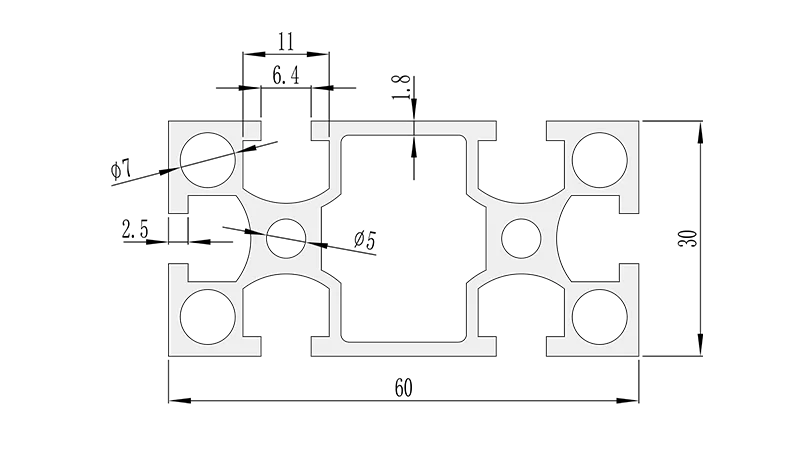
Before we jump into accessories, let's take a quick second to appreciate the star of the show: the 3060 National Standard Profile A itself. Measuring 30mm in width and 60mm in height, this aluminum extrusion is a favorite for medium-duty applications. Its T-slot design—those long, narrow grooves running along its length—lets you slide in fasteners, brackets, and other accessories without drilling holes, making adjustments and reconfigurations a breeze. Think of it as the backbone of your workspace: strong enough to support tools, materials, and even heavy equipment, yet lightweight enough to move when needed. But what really makes it shine is its compatibility with a wide range of accessories, which means you're never stuck with a "one-size-fits-all" solution. Need a taller workbench? Swap out the legs. Want to add a shelf? Slide in a bracket. It's this flexibility that has made 3060 Profile A a go-to for industries from electronics manufacturing to automotive repair.
Real-World Example:
A small electronics assembly shop in Guangdong recently upgraded from wooden workbenches to 3060 Profile A setups. By pairing the profiles with adjustable brackets and swivel casters, they reconfigured their layout three times in six months as their product line expanded—no saws, no glue, no wasted materials. "We used to spend a weekend rebuilding workbenches whenever we launched a new product," said the shop foreman. "Now, we can rearrange in an afternoon with just an Allen wrench."
Joints: The Glue That Holds It All Together (Without the Mess)
If 3060 Profile A is the backbone, joints are the joints—literally. These are the components that connect two or more profiles at specific angles, ensuring your structure stays rigid and stable. Unlike welding or bolting, which are permanent and messy, modern aluminum joints let you assemble, disassemble, and reassemble with minimal effort. For 3060 Profile A, there are a few key joint types you'll encounter regularly, each designed for specific angles and load requirements.
90° Aluminum Pipe Joints: Right Angles, Rock-Solid Stability
When you need to connect two profiles at a perfect corner—say, building the legs of a workbench or the sides of a material rack—the 90° aluminum pipe joint is your best friend. There are two main variants here: inside connection and outside connection. The 90° aluminum pipe joint inside connection fits snugly into the T-slots of the profiles, creating a clean, flush look where the two pieces meet. It's ideal for applications where space is tight or aesthetics matter, like customer-facing workstations. On the flip side, the 90° aluminum pipe joint outside connection wraps around the exterior of the profiles, offering extra strength for heavier loads. Think of it as adding a "reinforcement band" at the corner—great for material racks holding bulky items or conveyor supports that need to withstand constant vibration.
Both types are typically made from die-cast aluminum alloy, which resists corrosion and stands up to daily wear and tear. Installation is straightforward: slide the joint into the T-slots, tighten the set screws with an Allen key, and you're done. No special tools, no adhesives, no waiting for glue to dry. And if you ever need to take it apart? Just loosen the screws and pull—no damage to the profiles, so you can reuse them for another project.
45° and 135° Joints: Adding Angles for Dynamic Designs
Not every structure is made of right angles. Sometimes, you need a slope, a diagonal brace, or a corner that's more than 90°—like the side of a conveyor that feeds into a sorting station or the roof of a protective enclosure. That's where 45° and 135° joints come in. The 45° aluminum pipe joint inside connection and 135° aluminum pipe joint outside connection are designed to handle these off-angle connections, ensuring your structure stays stable even when forces pull in different directions.
For example, imagine building a material rack with a sloped top shelf to let items slide forward as they're used (a common setup in lean manufacturing to reduce waste). A 45° joint would connect the vertical posts to the sloped shelf, keeping it at the perfect angle without sagging. Similarly, a 135° joint might be used to connect a workbench to an adjacent table, creating a "corner nook" that maximizes floor space. These joints are just as easy to install as their 90° counterparts, and they open up a world of design possibilities beyond the basic square or rectangle.
Three-Way and Multi-Angle Joints: When One Connection Isn't Enough
Sometimes, you need to connect three or more profiles at a single point—like the intersection of a workbench leg, a shelf, and a cross-brace. That's where three way aluminum pipe joint and multi-angle fixed aluminum joint come into play. These accessories act like "junctions," letting you branch out in multiple directions without weakening the structure. The three-way joint, for instance, has three T-slot-compatible ends, each at 90° to the others, making it perfect for building cube-shaped frames or adding vertical supports to a horizontal shelf.
Multi-angle joints take this a step further, allowing you to adjust the angle between connected profiles (within a range, usually 0° to 180°) before locking them in place. This is a game-changer for prototypes or setups that might need tweaking. Suppose you're testing a new assembly line layout and aren't sure if a 30° or 45° angle will work better for material flow. A multi-angle joint lets you experiment, tighten it temporarily, and then lock it down once you find the sweet spot. No more drilling new holes or buying new parts—just adjust and go.
| Joint Type | Angle | Best For | Material |
|---|---|---|---|
| 90° Aluminum Pipe Joint (Inside Connection) | 90° | Flush corner connections (workbenches, frames) | Aluminum Alloy |
| 90° Aluminum Pipe Joint (Outside Connection) | 90° | Heavy-duty corner support (material racks, conveyors) | Aluminum Alloy |
| 45° Aluminum Pipe Joint (Inside Connection) | 45° | Sloped surfaces, diagonal braces | Aluminum Alloy |
| Three Way Aluminum Pipe Joint | Multiple (90° between arms) | Intersections of three profiles (shelving, workbench corners) | Aluminum Alloy |
| Multi-Angle Fixed Aluminum Joint | Adjustable (0°-180°) | Prototypes, custom angles, dynamic setups | Aluminum Alloy with Steel Screws |
Brackets: The Silent Stabilizers of Your Structure
If joints connect profiles, brackets are the "anchors" that add strength, support, and functionality. They're the reason your workbench doesn't wobble when you hammer a part, or your shelf doesn't bend under the weight of heavy tools. Brackets come in all shapes and sizes, each designed for a specific job—from holding panels and shelves to mounting casters and guide rails. Let's break down the most essential brackets for 3060 Profile A setups.
Aluminum Angle Yards: Reinforcing the Corners
Even with a strong joint, sometimes you need a little extra reinforcement at the corners—especially if your structure is holding heavy loads or subject to frequent movement. That's where 3060 aluminum angle yards (also called corner codes) come in. These L-shaped brackets fit over the outside of a 90° joint, adding an extra layer of support. Made from thick aluminum alloy, they distribute weight more evenly across the joint, reducing stress and preventing the profiles from bending over time.
For example, a workbench used for assembling car parts might have angle yards at each leg-to-frame connection. Every time a mechanic leans on the bench or drops a tool, the angle yards absorb some of the impact, protecting the joint and extending the life of the setup. They're also useful for retrofitting older structures that might have started to wobble—just bolt them on, and suddenly your wobbly shelf feels like new again. Installation is simple: align the bracket with the joint, slide T-slot nuts into the profile grooves, and tighten the bolts. No drilling, no welding—just instant stability.
Aluminum Pipe Clamps: Holding Panels, Rails, and More
Need to attach a plywood top to your workbench? Or mount a plastic roller track guide rail to a conveyor frame? Aluminum pipe clamps are your answer. These versatile brackets wrap around the profile and clamp down on panels, rails, or other flat surfaces, holding them securely in place without damaging the material. They're especially handy for non-permanent attachments—like a temporary divider on a workbench or a removable tool board.
Take the plastic roller track guide rail yellow and plastic roller track guide rail grey common in conveyor systems. These guide rails keep products moving straight along the rollers, preventing jams. To mount them to 3060 Profile A, you'd use an aluminum pipe clamp: position the rail, slide the clamp over the profile and rail, tighten the screws, and you're done. If you ever need to adjust the rail position or switch to a different color (yellow for high-visibility areas, grey for low-key setups), just loosen the clamp and move it—no need to drill new holes or replace parts.
Caster Mounting Brackets: Making Your Structure Mobile
Mobility is key in modern workspaces. Whether you need to move a workbench to a new location or roll a material cart to the assembly line, casters are a must—and caster mounting brackets are what hold them to your 3060 Profile A structure. These brackets attach to the bottom of vertical profiles, providing a stable platform for casters (like flat adjustable swivel castor wheel or 360° swivel expanding stem casters wheel with brake ).
A good caster bracket should be thick enough to handle the weight of the structure plus its load, with reinforced corners to prevent bending. For example, a turnover trolley built with 3060 Profile A might use four caster mounting brackets—one at each leg—to support the weight of tools and materials. The brackets ensure the casters stay aligned, so the trolley rolls smoothly without wobbling. And when you need to lock the trolley in place? Just engage the caster brakes—no need to mess with the brackets themselves. It's a simple accessory that transforms a static structure into a dynamic, on-the-go workspace.
Pro Tip:
When choosing brackets, always check the load rating. A small angle yard might handle 50kg, but a heavy-duty caster bracket could support 200kg or more. Matching the bracket to your needs prevents sagging, bending, or even collapse—saving you from costly repairs (or worse, accidents) down the line.
Connectors: Bridging Gaps and Building Bridges
Connectors are the problem-solvers of the accessory world. They bridge gaps between profiles, adapt different sizes, and let you extend or modify your structure without starting over. From simple T-connectors to complex roller track joints, these accessories keep your setup flexible and future-proof.
Roller Track Placon Mounts: Connecting Roller Tracks Like a Pro
Roller tracks are everywhere in lean manufacturing—they let materials glide from one workstation to the next, reducing manual lifting and speeding up workflows. But to make a roller track system work, you need to connect individual track sections smoothly, so items don't get stuck at the joints. That's where roller track placon mount for rail connection and roller track placon mount joint come in. These connectors fit into the ends of roller tracks, aligning them perfectly and ensuring a seamless transition for rolling items.
For example, a 40 steel roller track yellow wheel system used to move boxes along an assembly line might have multiple sections connected by placon mounts. Each mount ensures the tracks are level and straight, so a box rolling from one section to the next doesn't hit a bump or get caught. Some mounts even have built-in adjustability, letting you tweak the alignment if the floor isn't perfectly level. It's these small details that make a big difference in how smoothly your workflow runs.
T-Slot Connectors: Adapting to Different Profile Sizes
What if you need to connect your 3060 Profile A to a smaller profile, like a 2040 National Standard Profile, or a larger one, like a 4080? T-slot connectors (sometimes called aluminum profile 3 way connector or 90° aluminum profile connector ) let you mix and match sizes, opening up even more design possibilities. These connectors have T-slots that match different profile sizes, so you can slide them into a 3060 and a 2040, tighten the screws, and create a secure, stable connection.
Imagine building a workbench with a 3060 frame for the main structure and 2040 profiles for the shelf supports (since the shelves don't need as much strength). A T-slot connector would bridge the two sizes, ensuring the shelves are firmly attached to the frame. Or, if you're adding a small tool holder to a large material rack, you could use a connector to attach a 2020 profile to the 3060 frame, saving space and materials. These connectors are a reminder that with the right accessories, your 3060 Profile A setup doesn't have to exist in a vacuum—it can play well with others.
End Caps and Covers: The Finishing Touches
Last but not least, let's talk about the little things that make a big difference: end caps and covers. 3060 aluminum profile end cap might seem like a small accessory, but it serves two important purposes: safety and aesthetics. Without an end cap, the raw end of an aluminum profile can have sharp edges that cut hands or catch on clothing. An end cap covers that edge, making your workspace safer. It also gives your structure a clean, professional look—no more exposed aluminum ends sticking out like sore thumbs.
Similarly, T-slot rubber seal cover fits into the T-slots of your profile, protecting the grooves from dust, debris, and moisture. Over time, dirt in the T-slots can make it hard to slide in accessories or tighten screws. A rubber cover keeps them clean, ensuring your profile stays functional for years. Plus, they come in different colors, so you can add a pop of color to your setup (think red for safety zones, blue for tool areas) or keep it neutral with black or grey. These small touches might not affect the structural integrity of your setup, but they show you care about the details—and that makes a difference in how your workspace feels.
Putting It All Together: Building a Lean, Efficient Workspace
Now that we've covered joints, brackets, and connectors, let's see how they work together in a real-world setup. Imagine you're tasked with building a lean workbench for a electronics assembly line using 3060 National Standard Profile A. Here's how the accessories would come into play:
- Frame Construction: Use 3060 profiles for the legs and horizontal rails. Connect the legs to the rails with 90° aluminum pipe joints (inside connection for a clean look) and reinforce with 3060 aluminum angle yards for extra stability.
- Shelving: Add a middle shelf using shorter 3060 profiles, connected to the legs with three-way aluminum pipe joints. Use aluminum pipe clamps to attach a plywood shelf top, and cover the T-slots with rubber seal covers to keep dust out.
- Mobility: Mount flat adjustable swivel castor wheels to the bottom of the legs using caster mounting brackets, so the workbench can be rolled to different stations.
- Material Flow: Attach a plastic roller track guide rail (yellow, for high visibility) to the back of the workbench using aluminum pipe clamps, letting parts slide down to the assembler as needed.
- Finishing Touches: Add 3060 aluminum profile end caps to all exposed profile ends, and use multi-angle fixed aluminum joints to attach a small tool holder on the side.
The result? A custom workbench that's strong, mobile, and tailored to the assembly line's needs—all thanks to the right combination of joints, brackets, and connectors. And if the assembly line changes next year? No problem. Loosen the joints, swap out the brackets, and reconfigure the whole thing in a few hours. That's the power of 3060 Profile A and its accessories: they grow with your business.
Choosing the Right Accessories: What to Look For
With so many accessories on the market, how do you choose the right ones for your 3060 Profile A setup? Here are a few key factors to keep in mind:
- Material Quality: Look for accessories made from high-grade aluminum alloy or stainless steel—they'll resist corrosion, stand up to daily use, and last longer than cheap plastic or low-quality metal.
- Load Rating: Always check the load rating of brackets and joints. A bracket that holds 50kg won't work for a shelf that needs to support 150kg—overloading leads to bending, breaking, and safety risks.
- Compatibility: Not all accessories work with all profiles. Make sure the T-slot size, profile dimensions, and hole spacing match your 3060 National Standard Profile A. When in doubt, ask the supplier for specs.
- Ease of Installation: Opt for accessories that can be installed with basic tools (like an Allen wrench) and don't require drilling or welding. This saves time and makes reconfigurations easier.
- Supplier Support: Choose a reputable aluminum profile accessories supplier who can help you troubleshoot, recommend products, and provide replacement parts if needed. A good supplier is worth their weight in aluminum.
Final Thoughts: Accessories Make the Difference
At the end of the day, 3060 National Standard Profile A is an impressive piece of engineering—but it's the accessories that turn it into something extraordinary. Joints connect, brackets stabilize, connectors adapt—and together, they let you build a workspace that's as unique as your needs. Whether you're a small business owner setting up your first workshop or a plant manager revamping a production line, investing in quality joints, brackets, and connectors will pay off in efficiency, flexibility, and peace of mind.
So the next time you look at a sleek aluminum framework, take a second to appreciate the little parts holding it all together. They might not get the spotlight, but they're the reason your workspace works—hard, smart, and exactly the way you need it to.