- Company Articles
- Products and Technology
- Installation And Maintenance
- Flexible Production Lines: 3060 Aluminum Profile End Caps Integration Tips

Flexible Production Lines: 3060 Aluminum Profile End Caps Integration Tips
Related Product
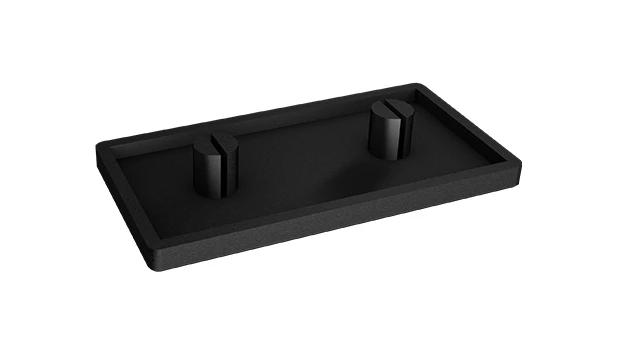
3060 Aluminum Profile End Cap
The aluminum profile end cap adds a finishing touch to your project and closes off profile ends to limit dust and debris buildup, also it can avaid some scratch for material and labor during the assemble work.
Walk into any modern manufacturing facility today, and you'll notice a shift—gone are the days of rigid, one-size-fits-all production lines. Instead, there's a buzz of adaptability: workstations reconfigured in hours, material racks adjusted to fit new parts, and conveyor systems that pivot as quickly as product designs change. This flexibility isn't magic; it's the result of smart, modular tools that let teams respond to market demands in real time. At the heart of this revolution? Aluminum extrusion profiles. And if aluminum profiles are the backbone of flexible production, then components like the 3060 aluminum profile end caps are the unsung heroes holding it all together—quietly ensuring safety, durability, and efficiency. Let's unpack why these small but mighty parts matter, and how to integrate them seamlessly into your lean system.
Why Aluminum Extrusion Profiles Are the Backbone of Flexible Production
Before we dive into end caps, let's talk about the star of the show: aluminum extrusion profiles. If you've ever seen a workbench with clean, modular frames, or a material rack that seems to "click" together without welding, you've seen these profiles in action. Made by pushing aluminum through a die to create consistent, customizable shapes—think T-slots, grooves, and channels—they're lightweight, strong, and infinitely adaptable. Unlike traditional steel structures, which require cutting, welding, or heavy tools to modify, aluminum profiles let you build, break down, and rebuild in minutes using simple connectors and accessories. That's why they're the go-to for lean systems, where minimizing waste and maximizing agility are the name of the game.
Take a typical electronics assembly line, for example. A few months ago, they were producing smartphones; today, they're shifting to tablets. With aluminum extrusion profiles, their workstations can be adjusted to fit the larger device dimensions, material racks can be reconfigured to hold new component trays, and even conveyor systems can be extended or shortened—all without halting production for days. This isn't just convenience; it's survival in a market where product lifecycles get shorter every year.
Focus on 3060 Aluminum Profiles: A Versatile Workhorse
Not all aluminum profiles are created equal. Sizes, shapes, and slot designs vary to suit different needs, and one of the most popular workhorses in factories worldwide is the 3060 aluminum profile. The numbers "3060" refer to its dimensions: 30mm in width and 60mm in height. This balance of size and strength makes it ideal for medium-duty applications—think workbenches, material racks, and lightweight conveyor frames. It's sturdy enough to hold tools, parts, and even small machinery, but not so heavy that it's hard to maneuver when reconfiguring.
What really sets 3060 profiles apart, though, is their compatibility with a wide range of accessories. From brackets and connectors to panels and, yes, end caps, there's a universe of parts designed to snap, screw, or clamp onto those T-slots. This modularity means you're never locked into one design. Need to add a shelf to your workbench? Just slide in a bracket. Want to attach a tool holder? Screw it into the slot. But here's the catch: all that versatility relies on the profiles themselves staying in top shape. And that's where end caps come in.

The Unsung Hero: 3060 Aluminum Profile End Caps
Let's be honest—when you're building a production line, end caps are easy to overlook. They're small, often made of plastic or aluminum, and they sit quietly at the ends of your profiles. But think about it: what happens if you leave the end of an aluminum profile exposed? Sharp edges could scratch workers' hands when they adjust the workstation. Dust, debris, or even small parts could get stuck in the hollow interior, gumming up the works over time. Moisture might seep in, leading to corrosion (yes, even aluminum can corrode in humid factories). And let's not forget aesthetics—exposed ends look unfinished, which might not matter to the machines, but can affect team morale. A clean, professional workspace sends a message that you care about the details, and that trickles down to how your team approaches their work.
But end caps do more than just protect and prettify. In modular systems, they help maintain structural integrity. Ever tried to slide a connector into a profile with a bent or damaged end? It's frustrating, and it slows down reconfiguration. End caps reinforce the profile's edges, preventing dents or warping that could throw off those precise T-slot measurements. They also create a smooth surface for attaching other components—like when you need to mount a panel or a handle to the end of a workbench. In short, end caps are the final piece that turns a pile of profiles into a polished, functional system.

Types of 3060 Aluminum Profile End Caps: Which One Fits Your Needs?
Not all end caps are the same, and choosing the right one depends on your application. Let's break down the most common types you'll encounter, along with their pros and cons. To make it easier, here's a quick comparison:
| End Cap Type | Material | Installation Method | Best For | Pros | Cons |
|---|---|---|---|---|---|
| Snap-Fit Plastic End Caps | Polypropylene (PP) or Nylon | Push-on; no tools needed | Light-duty workbenches, temporary setups | Quick to install/remove, affordable, available in colors | Less durable than metal; may pop off under heavy vibration |
| Screw-On Aluminum End Caps | Aluminum Alloy | Screws into pre-drilled holes in the profile | Heavy-duty racks, conveyor frames, high-traffic areas | Secure, corrosion-resistant, matches profile finish | Requires drilling; harder to reposition |
| Flanged End Caps | Plastic or Aluminum | Snap-fit or screw-on with a flange that covers the profile edge | Workstations with exposed edges, safety-focused areas | Extra protection against sharp edges, sleek appearance | Slightly bulkier; may interfere with tight connections |
| ESD-Safe End Caps | Conductive Plastic | Snap-fit or screw-on | Electronics assembly lines, cleanrooms | Prevents static discharge that could damage sensitive parts | More expensive than standard plastic caps |
As you can see, the right choice depends on your priorities. If you're setting up a temporary workbench for a short-term project, snap-fit plastic caps might be all you need. But if you're building a material rack that will see daily use in a busy warehouse, screw-on aluminum caps are worth the extra effort. And if you're working with circuit boards or microchips, ESD-safe caps aren't just a nice-to-have—they're a must.
Step-by-Step Integration Tips: Installing End Caps Like a Pro
Now that you know why end caps matter and which type to choose, let's walk through how to install them properly. Trust us—doing it right the first time saves you from headaches later. Here's a simple guide:
1. Prep the Profile Ends
Before installing end caps, make sure the ends of your 3060 profiles are clean and smooth. If you've just cut the profile to length, there might be burrs or sharp edges. Use a deburring tool or a fine-grit sandpaper to smooth them out—this prevents the end cap from getting damaged during installation and ensures a snug fit. Wipe away any dust or debris with a dry cloth; even a little dirt can keep the cap from seating properly.
2. Choose the Right Size (Yes, Size Matters!)
This might seem obvious, but it's easy to grab the wrong end cap in a hurry. 3060 profiles have specific inner dimensions, so make sure your end caps are labeled for 3060. A cap designed for a 2020 profile (20mm x 20mm) will be too small, and one for a 4080 (40mm x 80mm) will be too loose. Most manufacturers print the profile size on the end cap packaging, so double-check before you start.
3. Snap-Fit Caps: Apply Even Pressure
For snap-fit plastic caps, align the cap with the end of the profile—you'll notice it has a lip that matches the profile's inner shape. Hold the profile steady (maybe clamp it to your workbench if it's long), then press the cap firmly and evenly. Start at one corner and work your way around, or press straight down—just avoid twisting, which can bend the cap. You should hear a "click" when it's seated. If it feels loose, check for burrs or debris, then try again.
4. Screw-On Caps: Pre-Drill (If Needed) and Tighten Gently
Screw-on aluminum caps usually come with small self-tapping screws. Some 3060 profiles have pre-drilled holes for end caps, but if not, you'll need to drill a pilot hole (use a drill bit slightly smaller than the screw diameter). Place the cap on the end of the profile, align the screw holes, and tighten the screws with a Phillips-head screwdriver. Don't over-tighten—you could strip the threads or crack the cap.
5. Test for Stability
Once the cap is on, give it a gentle tug or wiggle. Snap-fit caps should stay in place; if they pop off, you might need a larger size or a tighter fit. Screw-on caps shouldn't spin or loosen. If they do, check the screws—they might need a little more tightening, but again, go easy.
Common Mistakes to Avoid
Even with the best intentions, it's easy to slip up. Here are a few mistakes we've seen (and made!) over the years, and how to steer clear:
- Ignoring sharp edges: Skipping the deburring step might save time now, but a worker could catch a hand on that sharp edge later. Safety first!
- Mixing and matching sizes: Using a 2020 cap on a 3060 profile because "it's close enough" will lead to a loose fit and possible damage. Always check the label.
- Over-tightening screws: Aluminum is strong, but it's also malleable. Cranking down too hard on screw-on caps can warp the profile or crack the cap itself.
- Forgetting end caps on temporary setups: "We'll only use this workbench for a week—no need for caps!" Famous last words. Dust and debris don't care about timelines; they'll still get inside, and sharp edges are still sharp.
Real-World Impact: How End Caps Improved One Factory's Efficiency
Let's wrap this up with a quick story to drive the point home. A few years back, we worked with a small automotive parts manufacturer that was struggling with downtime. Their production line used 3060 aluminum profiles for workstations and material racks, but they'd skipped end caps to save costs. Over time, the exposed profile ends had become dented and dirty. Workers were spending extra time cleaning debris out of the profiles when reconfiguring workstations, and a few had even nicked their hands on sharp edges, leading to minor injuries and lost productivity.
After installing snap-fit plastic end caps on all their 3060 profiles, the changes were immediate. Debris no longer collected in the profiles, so reconfiguring workstations took 30% less time. The sharp edges were gone, so there were no more hand injuries. And perhaps surprisingly, the team mentioned that the workspace "felt more put-together," which boosted their motivation. All from a few dollars' worth of end caps per profile. It's a small investment, but the returns—fewer delays, safer workers, happier teams—are huge.
Final Thoughts: Small Parts, Big Results
In the world of flexible production, it's easy to get excited about the "big" components—fancy conveyors, high-tech workbenches, or automated material racks. But as we've seen, success often lies in the details. 3060 aluminum profile end caps might not get the same attention as those flashy tools, but they're essential for keeping your lean system running smoothly, safely, and efficiently. They protect your investment in aluminum profiles, keep your team safe, and even boost morale by showing that you care about the little things.
So the next time you're building or upgrading your production line, don't skip the end caps. Choose the right type for your needs, install them carefully, and watch how those small, quiet components make a big difference in your day-to-day operations. After all, in flexible manufacturing, every detail counts—and that includes the ones at the end of your profiles.