- Company Articles
- Products and Technology
- Installation And Maintenance
- Free Flow Chain Conveyor Troubleshooting: Common Issues and Fixes

Free Flow Chain Conveyor Troubleshooting: Common Issues and Fixes
Related Product
Free Flow Chain Conveyor
The free flow conveyor system uses a free flow chain that can increase the speed of the tooling board that supports the products. This can improve the efficiency and quality of the production process, as well as reduce the wear and tear of the system.
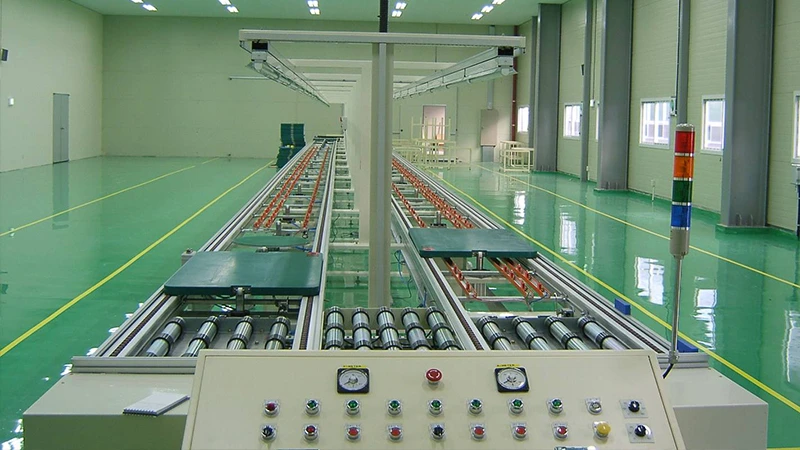
Picture this: You're standing on the factory floor, coffee in hand, ready to kick off a busy production day. The hum of machinery fills the air, and your team is lined up, the first batch of components to roll in. But then—*screech*—the free flow chain conveyor, the backbone of your assembly line, stutters to a halt. A pallet loaded with circuit boards is wedged halfway, and the clock starts ticking. Downtime isn't just frustrating; it's costly. In lean manufacturing, every second counts, and a malfunctioning conveyor can throw off your entire workflow, from material handling to final assembly.
Free flow chain conveyors are the unsung heroes of modern production. They keep materials moving smoothly, reduce manual labor, and ensure that your lean system stays, well, *lean*. But like any hardworking equipment, they're prone to wear and tear. Loose roller tracks, finicky connectors, or even a worn caster wheel can turn a seamless operation into a headache. The good news? Most common issues are fixable with a little know-how, some basic tools, and a proactive approach.
In this guide, we'll walk through the most frustrating problems you might face with your free flow chain conveyor, why they happen, and exactly how to fix them. Whether you're a seasoned maintenance tech or a production manager learning the ropes, we'll break it down in plain language—no jargon, just practical solutions. Plus, we'll share tips to keep these issues from coming back, so you can spend less time troubleshooting and more time keeping your line moving.
Understanding Your Free Flow Chain Conveyor: The Basics
Before we dive into troubleshooting, let's make sure we're on the same page about how these conveyors work. At its core, a free flow chain conveyor uses a series of rotating chains and roller tracks to move materials (like pallets, bins, or components) from one workstation to the next. Unlike powered conveyors, free flow systems often rely on gravity or gentle pushes, making them ideal for lean environments where energy efficiency and flexibility matter.
Key components include:
- Free Flow Chain: The metal chain that carries the load, with rollers that glide along the track.
- Roller Track: The aluminum or steel rail that guides the chain and supports the load. Think of it as the conveyor's "road."
- Roller Track Connectors: Small but mighty hardware that links sections of roller track together, ensuring alignment.
- Frame: Often built with aluminum profile for durability and light weight, this supports the entire system.
- Caster Wheels: On mobile units, these let you reposition the conveyor easily—handy for reconfiguring your workspace.
Now, let's get to the problems. Below are the five most common issues we see, along with step-by-step fixes.
1. Chain Jamming: When the Conveyor Grinds to a Halt
There's nothing worse than hearing that unmistakable "clunk" followed by silence. Chain jamming is one of the most frequent issues, and it usually happens when the chain gets stuck between the roller track and the load. Let's break down why this happens and how to fix it fast.
Common Causes
- Debris Buildup: Dust, metal shavings, or even small plastic pieces from packaging can get trapped in the chain links or under the roller track.
- Misaligned Roller Tracks: If sections of the roller track aren't perfectly straight (thanks to loose roller track connectors), the chain can derail or bind.
- Worn or Bent Chain Links: Over time, chain links can stretch, bend, or develop sharp edges that catch on the track.
- Overloading: Trying to move a pallet that's heavier than the conveyor's weight limit can strain the chain, causing it to jam.
How to Fix It
- Stop the Conveyor and Secure the Area: Safety first! Turn off the power (if it's motorized) and lockout/tagout to prevent accidental startup. Put on gloves to protect your hands from sharp edges.
- Clear Debris: Use a brush or compressed air to clean out the chain links and the space under the roller track. Pay extra attention to the gaps between the track and the frame—this is where gunk loves to hide.
- Check Roller Track Alignment: Grab a level and a straightedge. Place the straightedge along the top of the roller track—if there's a gap, the track is misaligned. Tighten loose roller track connectors with a wrench (a torque wrench is best to avoid over-tightening). If the track is bent, you may need to replace that section—aluminum profile tracks are durable, but heavy impacts can warp them.
- Inspect the Chain: Run your hand along the chain (with gloves!) to feel for bent or sticking links. replace any links that are damaged—most suppliers sell replacement chains by the foot, so you don't have to replace the whole thing.
- Test with a Light Load: Once you've cleaned and adjusted, place a small, empty pallet on the conveyor and gently push it. If it glides smoothly, you're good to go. If not, repeat the alignment check—sometimes a tiny adjustment makes all the difference.
Pro Tip:
Schedule a weekly "mini-clean" of the chain and roller track. A quick 5-minute brush-down with a stiff-bristled brush can prevent debris buildup and save you from major jams later.
2. Uneven Material Flow: When Pallets "Walk" or Get Stuck Mid-Run
You've fixed the jam, but now materials are moving like a drunk driver—swerving left, slowing down, or stopping entirely before they reach the next workstation. Uneven flow is frustrating because it's often intermittent, making it hard to diagnose. Let's get to the bottom of it.
Common Causes
- Uneven Roller Track Height: If one section of the roller track is higher than another (even by a few millimeters), materials will slow down or get stuck when they hit the "bump."
- Damaged Caster Wheels (on Mobile Conveyors): If your conveyor has caster wheels (to make it portable), a worn or flat caster wheel can cause the entire system to tilt, throwing off the track's level.
- Sticky Rollers: The small rollers along the chain (yes, there are rollers on the chain itself!) can get dirty or rusted, making them spin slower than others. This causes uneven friction, so materials drag on one side.
- Warped Aluminum Profile Frame: The frame that holds the roller track is usually made of aluminum profile for its strength-to-weight ratio. If the frame is bent (from, say, a forklift bump), the track will sit unevenly, even if the track itself is straight.
How to Fix It
- Check for Level: Use a 4-foot spirit level to check the roller track from end to end. Place the level across the track (side to side) and along the length (front to back). If it's not level, adjust the conveyor's feet (most have adjustable leveling feet) or, if it's mobile, check the caster wheels. replace any caster wheel that's flat, cracked, or has uneven tread—this is a cheap fix that makes a huge difference.
- Lubricate the Chain Rollers: Those tiny rollers on the chain need to spin freely! Apply a light machine oil (avoid heavy greases, which attract dust) to each roller. Spin them by hand to work the oil in—you'll feel them loosen up immediately.
- Inspect the Frame: Walk along the conveyor and look at the aluminum profile frame from the side. Does it bow in the middle? If so, the frame may be overloaded. Check the manufacturer's weight limit and reduce the load, or add a center support bracket (many suppliers sell these as accessories for long conveyor sections).
- Test with Different Loads: Try moving pallets of varying weights (within the conveyor's limit) to see if the problem persists. If only heavy loads struggle, the issue is likely frame flex—add supports. If light loads wander, it's probably caster wheels or roller lubrication.
3. Excessive Noise: When the Conveyor Sounds Like a Rock Band
Conveyors aren't silent, but they shouldn't sound like a construction site. Excessive noise (squealing, grinding, or rattling) isn't just annoying—it's a red flag that parts are rubbing, misaligned, or worn out.
Common Causes
- Dry or Dirty Bearings: The bearings in the chain rollers or roller track wheels need lubrication to spin smoothly. Without it, metal rubs on metal, creating that high-pitched squeal.
- Loose Roller Track Connectors: Remember those small connectors we talked about earlier? If they're loose, sections of the roller track can vibrate against each other, causing a rattling noise.
- Misaligned Chain and Sprockets (on Motorized Units): If your conveyor has a motor, the chain that connects to the sprocket can slip or rub if it's not aligned, creating a grinding sound.
- Worn Caster Wheels: A caster wheel with a cracked bearing will make a "thumping" noise as it rolls—you'll feel the vibration through the floor!
How to Fix It
- Identify the Noise Source: Walk along the conveyor while it's running (safely!) and listen—try to pinpoint where the noise is loudest. Is it near the motor? The middle of the track? A specific caster wheel?
- Lubricate Bearings: For chain rollers, use a spray lubricant with a narrow nozzle to target the bearings. For roller track wheels, apply a few drops of oil to each axle. Let the conveyor run for a minute after lubricating to distribute the oil evenly.
- Tighten Roller Track Connectors: Go section by section and check each connector with a wrench. Even a quarter-turn can stop rattling. If a connector is stripped (the bolt spins but doesn't tighten), replace it immediately—stripped connectors are a safety hazard.
- Align the Chain and Sprocket (Motorized Units): Turn off the power and remove the chain guard. The chain should sit centered on the sprocket teeth—no overhang on either side. Loosen the motor mount bolts, adjust the motor position until the chain is aligned, then retighten. Check chain tension too—you should be able to lift the chain about 1/2 inch from the sprocket; if it's too loose, it will slap and make noise.
- replace Worn Caster Wheels: If the thumping persists, jack up the conveyor (safely, with blocks) and spin each caster wheel by hand. A smooth wheel should spin freely; a worn one will grind or wobble. Swap it out for a new caster wheel—most are held on with a single bolt, so it's a 10-minute fix.
Pro Tip:
Keep a "noise log" for a week. Note when the noise starts (e.g., after lunch, when the line is busiest) and where it's loudest. This can help you spot patterns—like noise increasing when the conveyor is fully loaded, which might mean it's time to upgrade to a heavier-duty model.
4. Conveyor Stoppages: When It Just… Quits
You're in the middle of a rush order, and suddenly the conveyor stops. No jamming, no noise—just silence. This is scary, but it's often electrical or mechanical, and fixable without calling in a pro.
Common Causes (for Motorized Conveyors)
- Tripped Circuit Breaker: Overloading the conveyor (or a power surge) can trip the breaker.
- Faulty Photo Eye/Sensor: Many conveyors have sensors that detect when a pallet is in place. If the sensor is dirty or misaligned, it may send a "stop" signal even when there's no load.
- Broken Drive Belt: The belt that connects the motor to the chain can snap or slip, leaving the conveyor powerless.
- Seized Motor: A motor that's overheated (from lack of lubrication or overuse) can seize up.
How to Fix It
- Check the Power Supply: Head to the circuit breaker box and look for a tripped breaker. If you find one, flip it back on—but wait! If it trips again immediately, there's a short circuit. Unplug the conveyor and check the power cord for cuts or frays. If the cord is damaged, replace it before restarting.
- Clean and Align Sensors: Wipe the sensor lens with a soft cloth (dirt or oil can block the signal). Use a level to ensure the sensor is pointing directly at its reflector (if it has one). If the sensor has an LED light, check the manual—most will blink or stay solid to indicate if they're working.
- Inspect the Drive Belt: Remove the motor cover and check the belt. If it's broken, replace it with a matching belt (note the size and material—rubber vs. polyurethane). If it's loose, adjust the motor tension (like we did with the sprocket earlier) until the belt has about 1/4 inch of play when pressed.
- Check the Motor: Feel the motor housing—if it's hot to the touch, let it cool for 30 minutes. Then, try turning the motor shaft by hand (with power off!)—if it won't budge, the motor is seized. This may require a professional repair, but sometimes a few drops of motor oil in the bearings can free it up temporarily (though you'll need to replace it long-term).
5. Wear and Tear: When Components Start to Fail (and How to Prevent It)
Even with perfect maintenance, parts wear out. The key is to spot wear early and replace components before they cause downtime. Here's what to watch for.
What to Inspect Regularly
- Roller Track: Look for cracks, dents, or rust (especially on steel tracks). Aluminum profile tracks are corrosion-resistant, but the edges can chip if hit with heavy loads.
- Roller Track Connectors: Check for stripped threads or bent bolts—these are easy to replace and cheap insurance against misalignment.
- Chain Links: Stretch is normal, but if a link is longer than the others by more than 1/8 inch, it's time to replace it.
- Caster Wheels: Check tread wear (if they're rubber) or bearing play. A wheel that wobbles when spun needs to be replaced.
- Aluminum Profile Frame: Look for cracks at the joints—aluminum is strong, but repeated stress (like daily loading/unloading) can weaken welds or connections.
Preventive Maintenance Schedule
| Frequency | Tasks | Why It Matters |
|---|---|---|
| Daily | Visual inspection for jams, debris, or loose parts; wipe down sensors. | Catches small issues before they grow. |
| Weekly | Lubricate chain rollers and caster wheel bearings; tighten roller track connectors. | Reduces friction and noise; prevents misalignment. |
| Monthly | Check chain tension; inspect aluminum profile frame for bends; test caster wheels for wobble. | Ensures the conveyor stays level and stable. |
| Quarterly | replace worn chain links; clean under the conveyor (remove all debris); check electrical connections (motorized units). | Extends the conveyor's lifespan by years. |
Conclusion: Keep It Flowing
Your free flow chain conveyor is more than just a piece of equipment—it's the heartbeat of your production line. When it works well, you barely notice it. When it breaks, it's chaos. But with a little proactive maintenance and the troubleshooting steps above, you can keep it running smoothly, reduce downtime, and keep your lean system on track.
Remember: Most issues start small—loose roller track connectors, a little debris, a worn caster wheel. By checking these regularly, you'll save yourself time, money, and a lot of frustration. And when in doubt, don't hesitate to reach out to your supplier—they're experts in their products and can help diagnose tricky problems.
Now go forth, keep that conveyor moving, and let the production line sing. Your team (and your bottom line) will thank you.