- Company Articles
- Products and Technology
- Installation And Maintenance
- How to Troubleshoot Loose Aluminum Profile 3 Way Connectors

How to Troubleshoot Loose Aluminum Profile 3 Way Connectors
Related Product
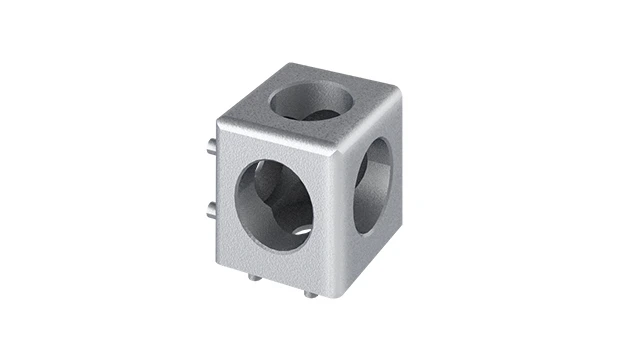
Aluminum Profile 3 Way Connector
The 3 way - squared corner connector is an external fastening method that is typically used to create a corner connection between three profiles. It is a heavy-duty connection that is simple to use and provides a polished look.
If you've ever stood in front of a wobbly workbench or a sagging material rack in your workshop, you know the frustration of loose connections. More often than not, the culprit is a small but critical component: the aluminum profile 3 way connector. These unassuming pieces are the backbone of structures built with aluminum extrusion profiles, holding together everything from assembly line workstations to warehouse shelving. When they loosen, productivity grinds to a halt, safety risks creep in, and what was once a seamless workflow becomes a series of interruptions. But fear not—troubleshooting loose 3 way connectors doesn't have to be a mystery. In this guide, we'll walk through the why, how, and what-to-do of fixing these common issues, using practical steps and real-world insights to get your setup back to solid, reliable form.
Understanding Aluminum Profile 3 Way Connectors: The Unsung Heroes of Your Workspace
Before diving into troubleshooting, let's take a moment to appreciate what these connectors do. Aluminum extrusion profiles are the building blocks of modern industrial and commercial spaces, prized for their lightweight strength, versatility, and ease of assembly. But without connectors, they're just lengths of metal. The 3 way aluminum profile connector, in particular, is a workhorse—it joins three profiles at a single point, enabling the creation of corners, T-junctions, and multi-directional structures. Think of it as the elbow joint of your workspace: small, but essential for movement and stability.
These connectors come in various designs, but most share a core function: using screws, bolts, or friction to clamp tightly onto the T-slots of aluminum profiles. High-quality models are typically made from anodized aluminum, which resists corrosion and wear, ensuring they hold up in busy environments. They're also designed to work with specific profile sizes—so a connector meant for a 2020 aluminum profile (20mm x 20mm) won't fit a 4040 profile (40mm x 40mm) properly. This compatibility is key; using the wrong connector is like trying to fit a square peg in a round hole—sooner or later, it'll loosen.
Why Do 3 Way Connectors Loosen? Common Culprits Behind the Wobble
Loose connectors rarely happen overnight. They're usually the result of one (or a combination) of several factors, each with its own telltale signs. Let's break down the most common causes:
1. Improper Installation: Rushing the "Set It and Forget It" Mentality
The number one cause of loose connectors? Cutting corners during setup. Maybe you tightened the bolts "good enough" without checking torque, or used a Phillips screwdriver when a hex key was needed. Perhaps you skipped cleaning the T-slots of debris before inserting the connector, leaving grit between the profile and the clamp. Even something as simple as misaligning the profiles before tightening can create uneven pressure—over time, that pressure weakens, and the connector starts to slip.
I once visited a small manufacturing shop where a team had built a custom assembly station in a hurry. They used 3 way connectors to join the legs and crossbars, but in their rush, they didn't bother leveling the profiles first. A month later, the entire bench leaned to one side, and the connectors were so loose they could be twisted by hand. The fix? Disassembling, cleaning the slots, realigning the profiles with a level, and retightening with the correct torque. Lesson learned: patience during installation prevents headaches later.
2. Wear and Tear: When Daily Use Takes Its Toll
Even the best-installed connectors can loosen over time, especially in high-traffic areas. Think about a material rack in a warehouse: every time someone loads or unloads boxes, the structure vibrates. Over weeks and months, those tiny vibrations act like a slow-motion wrench, gradually loosening bolts. Similarly, workbenches in production lines see constant movement—tools being set down, parts sliding across surfaces, workers leaning on edges. All that activity adds up, and connectors that were tight on day one can start to give way.
Material fatigue plays a role too. If your connector is made from low-grade aluminum (common in budget options), the metal can warp or weaken with repeated stress. The threads on the bolts might strip, or the clamping mechanism could lose its grip. This is why investing in quality aluminum profile accessories—like heavy-duty connectors from a reputable aluminum profile supplier—pays off in the long run. They're built to withstand the daily grind.
3. Environmental Factors: When the World Around You Works Against You
Your workspace isn't a vacuum, and environmental conditions can quietly sabotage your connectors. High humidity, for example, can cause rust to form on steel bolts, weakening their hold. In extreme cases, the rust can even seize the bolt, making it impossible to tighten without stripping. Temperature fluctuations are another culprit: aluminum expands when warm and contracts when cold. If your shop or warehouse sees big swings (like a garage workspace in summer vs. winter), those cycles can loosen connections as the metal shifts.
I worked with a bakery once where the production area was hot and humid near the ovens. They had a rack built with aluminum profiles to hold ingredient bins, but the 3 way connectors near the ovens kept loosening. The combination of heat (causing the profiles to expand) and moisture (corroding the bolts) was too much for the standard connectors. We switched to stainless steel bolts and heat-resistant connectors, and the problem vanished. Moral: consider your environment when choosing and installing components.
4. Overloading: When "Just a Little More" Becomes Too Much
Aluminum profiles and their connectors are strong, but they have limits. Every connector has a weight rating—exceed it, and you're asking for trouble. Maybe you added a second layer of tools to a workbench, or stacked heavier boxes on a material rack than it was designed for. The extra load puts constant stress on the 3 way connectors, causing them to flex and eventually loosen. Even dynamic loads (like dropping a heavy part onto a shelf) can shock the connectors, weakening their grip in an instant.
A furniture manufacturer I advised had this issue: they used a standard 3 way connector to support a shelf holding power tools. The shelf was rated for 50kg, but they regularly placed 70kg worth of equipment on it. Within months, the connectors bent, and the shelf sagged. The solution? Upgrading to heavy-duty connectors and reinforcing the structure with additional supports. It's a simple rule: know your load limits, and don't push them.

Signs Your 3 Way Connector Is Loose: Don't Ignore These Red Flags
Loose connectors rarely announce themselves with a loud snap—they're more subtle. But catching the signs early can prevent bigger problems (like a collapsed rack or a workbench giving way). Here's what to watch for:
Visual Cues: A Quick Glance Can Save You Time
- Gaps between profiles and connectors: If you see space where the connector meets the aluminum extrusion profile, that's a clear sign it's loosened. Even a 1mm gap can lead to wobbling.
- Misalignment: Profiles that are no longer straight or square—like a shelf that's tilted or a leg that angles outward—often point to a loose connector.
- Rust or corrosion: Orange or white deposits on bolts or connector surfaces mean moisture has gotten in, weakening the connection.
- Bent or deformed connectors: If the connector itself looks warped, dented, or cracked, it's probably been overloaded or stressed beyond its limits.
Physical Symptoms: Trust Your Senses
- Wobbling or shaking: Gently push on the structure—if it moves more than a few millimeters, connectors are likely loose.
- Creaking or squeaking: Those high-pitched sounds when you move the structure? They're friction from loose parts rubbing together.
- Loose bolts: Try turning the connector's bolts with your fingers—if they spin easily, they're definitely under-tightened.
- Profiles sliding: If one profile shifts relative to another (e.g., a crossbar moving up or down a leg), the connector isn't holding it in place.
Functional Issues: When Workflow Takes a Hit
Sometimes the first sign of a loose connector is in how you work. Maybe tools slide off a tilted workbench, or parts get stuck on a misaligned material rack. You might find yourself constantly readjusting items, or avoiding certain areas of the structure because they feel "unstable." These are more than minor annoyances—they're productivity killers, and they'll only get worse if ignored.

Step-by-Step Troubleshooting: How to Fix a Loose 3 Way Connector
Now for the hands-on part: fixing that loose connector. The process depends on the cause, but these steps will cover most scenarios. Grab your tools (we'll list what you need in a minute), and let's get to work.
Step 1: Safety First—Unload and Stabilize the Structure
Before touching anything, remove all items from the structure. A wobbly shelf with tools on it is an accident waiting to happen. If it's a workbench, clear off tools, parts, and equipment. For a material rack, empty the shelves. If the structure is large (like a production line station), consider using temporary supports (like wooden blocks) to hold it steady while you work. Safety goggles and gloves are a good idea too—metal shavings or debris in T-slots can scratch hands, and a sudden shift could send parts flying.
Step 2: Diagnose the Cause (Using Our Common Culprits List)
Take a close look at the loose connector. Is there rust? That points to environmental issues. Are the bolts loose but undamaged? Probably improper installation or wear and tear. Is the connector bent? Overloading is likely. Use the table below to match symptoms to causes—it'll guide your fix:
| Symptom | Likely Cause | Fix Direction |
|---|---|---|
| Loose bolts, no visible damage | Improper installation or vibration | Retighten bolts with correct torque |
| Rust on bolts or connector | Humidity or corrosion | replace rusted parts, apply anti-seize |
| Bent or cracked connector | Overloading or impact damage | replace connector with heavy-duty model |
| Gaps between profile and connector | Misalignment during installation | Realign profiles, clean T-slots, retighten |
| Profiles slide freely in connector | Worn clamping mechanism | replace connector, check profile compatibility |
Step 3: Gather Your Tools—You'll Need These Essentials
Having the right tools makes all the difference. Here's what you'll need for most fixes:
- Hex keys (Allen wrenches): Most connectors use hex bolts—have a set in various sizes (common sizes are 3mm, 4mm, 5mm).
- Torque wrench: For precise tightening (critical for avoiding over-tightening).
- Level: To check alignment of profiles.
- Wire brush or compressed air: To clean debris from T-slots.
- Replacement connectors/bolts: Keep spares on hand (grab them from your aluminum profile supplier).
- Anti-seize lubricant: For bolts in humid environments (prevents corrosion).
- File or deburring tool: To smooth rough edges on profiles (if needed).
Step 4: Fix the Issue—Let's Get That Connector Tight Again
Now, let's tackle the specific fixes based on the cause:
Scenario A: Loose Bolts (No Damage)
This is the easiest fix. Start by loosening the bolts completely—this breaks any friction or debris that might be preventing a tight grip. Use the wire brush or compressed air to clean the T-slots and the connector's clamping surfaces. Then, realign the profiles so they're straight and square (use the level to check). Hold the profiles in place, and start tightening the bolts gradually—alternating between bolts if there are multiple (like on a two-bolt connector) to ensure even pressure. Use the torque wrench to tighten to the manufacturer's specification (usually printed on the connector or in the manual). A good rule of thumb: tighten until the bolt resists, then add a quarter-turn—over-tightening can strip threads or warp the connector.
Scenario B: Rust or Corrosion
Rusted bolts need to go—they're weakened and won't hold properly. Use a penetrating oil (like WD-40) to loosen stuck bolts, then remove them with the hex key. If a bolt breaks, use a bolt extractor tool to remove the remaining piece. Clean the T-slots thoroughly—rust flakes can damage new bolts. replace the old bolts with stainless steel or coated bolts (resistant to corrosion), and apply a small amount of anti-seize lubricant to the threads before tightening. Reassemble the connector, align the profiles, and torque the bolts as before. For severely rusted connectors, replace the entire unit—rust weakens the metal, and it's not worth the risk of reuse.
Scenario C: Bent or Damaged Connectors
A bent or cracked connector is beyond repair—you'll need to replace it. Start by removing the old connector (this may require loosening adjacent connectors to free the profiles). Take the old connector to your aluminum profile supplier to ensure you get a compatible replacement—mismatched sizes or styles will cause more problems. When installing the new connector, clean the T-slots, align the profiles, and torque the bolts to spec. If overloading was the cause, consider upgrading to a heavy-duty connector (look for ones labeled "high-load" or "industrial grade")—they have thicker walls and stronger clamping mechanisms.
Scenario D: Misaligned Profiles
Misalignment often happens when profiles are forced together during installation. Start by loosening all connectors in the affected area (not just the loose one)—this gives you room to adjust. Use the level to straighten the profiles: check for both horizontal and vertical alignment. For a T-junction, ensure the cross-profile is perpendicular to the main profile (use a square tool if you have one). Once aligned, tighten the connectors gradually, starting with the ones farthest from the loose joint and working your way back. This distributes pressure evenly, preventing future misalignment.
Step 5: Test the Fix—Give It a Good Shake (Literally)
Once you've tightened or replaced the connector, it's time to test. Gently push and pull on the structure from different angles—if it feels solid with no movement, you're good. If it still wobbles, double-check the alignment and torque. For load-bearing structures, add a small test weight (like a 20kg box) and leave it for an hour—if the connector holds, it's ready for full use. If not, revisit the cause—you might have missed something (like a hidden crack in a profile, or a bolt that wasn't tightened enough).
Preventing Future Loosening: Pro Tips to Keep Connectors Tight
Fixing a loose connector is satisfying, but preventing it from happening again is even better. Here are our top tips for long-term stability:
1. Invest in Quality from the Start
You get what you pay for when it comes to aluminum profile accessories. Cheap connectors from unknown suppliers often use soft aluminum or weak bolts that wear out quickly. Stick with reputable brands or ask your aluminum profile supplier for recommendations. Look for connectors with anodized finishes (resist corrosion), reinforced clamping areas, and clear torque specifications. It might cost a few extra dollars upfront, but you'll save time and money on repairs later.
2. Train Your Team on Proper Installation
If multiple people assemble or adjust structures in your workspace, make sure everyone knows the basics: clean T-slots, align profiles, use the right tools, and torque bolts to spec. A 10-minute training session can prevent a world of hurt. Consider creating a quick-reference guide with photos of properly installed connectors—post it near workbenches or storage areas as a reminder.
3. Schedule Regular Inspections
Make connector checks part of your routine maintenance. Once a month (or more often for high-use structures), walk through your workspace and inspect all 3 way connectors. Tighten any loose bolts, clean T-slots, and replace damaged parts. This proactive approach catches issues early, before they turn into big problems. I've seen shops reduce downtime by 30% just by adding this simple step to their monthly checklist.
4. Use Thread Lockers for High-Vibration Areas
In spaces with constant vibration (like near machinery or production lines), standard bolts can loosen over time. A drop of thread locker (like Loctite) on bolt threads prevents this—it creates a bond that resists vibration without making bolts impossible to remove later. Just be sure to use a removable formula (not permanent) in case you need to disassemble the structure later.
5. Reinforce High-Load Areas
For structures that carry heavy loads (like material racks or tool storage), don't rely on 3 way connectors alone. Add corner brackets, gussets, or additional support beams to distribute weight. For example, a shelf held by two 3 way connectors can be reinforced with a crossbar midway between them, reducing stress on each connector. Your aluminum profile supplier can help you design reinforcements that work with your existing setup.
When to Call in the Pros: Knowing When It's More Than a Loose Connector
Most loose connectors are DIY-fixable, but some issues require professional help. If you notice any of these red flags, it's time to consult an aluminum profile specialist:
- Multiple connectors loose in the same structure: This could mean the entire assembly is misaligned or overloaded, requiring a redesign.
- Bent or cracked aluminum extrusion profiles: Profiles are the foundation—if they're damaged, replacing connectors won't solve the problem.
- Recurring looseness despite proper fixes: If a connector keeps loosening within weeks of repair, there might be an underlying issue (like a warped profile or incompatible parts).
- Structural instability that shakes the floor: This is a safety hazard—evacuate the area and call a professional immediately.
Reputable aluminum profile suppliers often offer consultation services—take advantage of them. They can assess your setup, identify weak points, and recommend solutions that go beyond quick fixes.
Final Thoughts: Your Workspace Deserves to Be Solid
Loose aluminum profile 3 way connectors might seem like a small problem, but they're a big deal. They disrupt workflow, compromise safety, and erode the trust you have in your workspace. But with the right knowledge, tools, and proactive habits, you can keep them tight and your structures strong. Remember: proper installation, regular inspections, and quality parts are the keys to long-term stability. So the next time you feel a wobble or see a gap, don't ignore it—grab your hex key, diagnose the cause, and fix it. Your future self (and your productivity) will thank you.
And if you're ever in doubt, reach out to your aluminum profile supplier. They're not just there to sell parts—they're partners in keeping your workspace running smoothly. After all, a solid structure is the foundation of a solid business.