- Company Articles
- Products and Technology
- Installation And Maintenance
- How to Troubleshoot Loose Turning Angle Code 4040 Connections

How to Troubleshoot Loose Turning Angle Code 4040 Connections
Related Product
Turning Angle Code 4040
The turning angle aluminum profile connector provides a 90 degree hidden corner connection. 4040 it is means this size is used for 40 series aluminum profile.The corner code comes with set screws that allow for quick, easy connections.
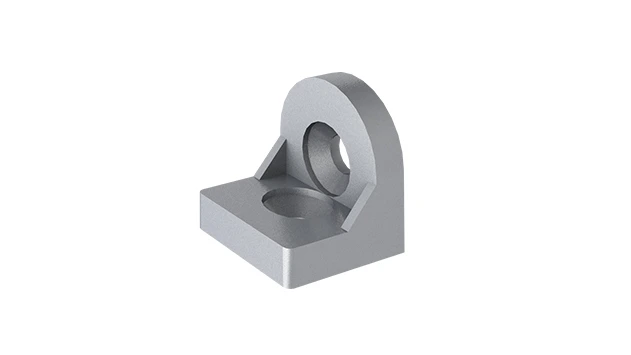
Picture this: You're standing in your workshop, adjusting tools on your trusty aluminum workbench, when you notice something off. The surface feels wobbly—subtly at first, but enough to make you pause. You press down gently, and a faint creak echoes. Following the sound, your eyes land on the corner where two silver aluminum extrusions meet. There, nestled between them, is a small but critical component: a turning angle code 4040. A quick wiggle confirms it—this tiny part is loose, and it's throwing off the entire stability of your workbench.
If you've ever worked with aluminum profile systems—whether building workbenches, material racks, or production lines—you know how vital these connections are. The turning angle code 4040 might seem, but it's the unsung hero holding your aluminum extrusion profiles together. When it loosens, the consequences range from minor annoyances (wobbly shelves) to major safety risks (collapsing racks). In this guide, we'll walk through why these connections loosen, how to diagnose the problem, and step-by-step solutions to fix and prevent it—all with the conversational clarity of a seasoned workshop pro.
First Things First: What Even Is a Turning Angle Code 4040?
Before diving into troubleshooting, let's make sure we're on the same page. The turning angle code 4040 is a specialized connector designed for 4040 aluminum extrusions—the workhorses of modular industrial structures. These extrusions, with their T-slot design, are the backbone of everything from
workbenches
and
material racks
to conveyor frames and assembly lines. The turning angle code 4040, as the name suggests, is engineered to join two 4040 aluminum profiles at a 90-degree angle (though some variants handle other angles). It's like the hinge of your structure, distributing weight and ensuring rigidity.
Think of it this way: If your aluminum profile system were a human body, the extrusions would be the bones, and the turning angle code 4040 (along with other
aluminum profile accessories
like bolts and washers) would be the joints and ligaments. Just as weak ligaments lead to wobbly knees, a loose angle code compromises the entire structure's integrity. Now, let's figure out why these "ligaments" sometimes fail.
Why Do Turning Angle Code 4040 Connections Loosen?
Loose connections rarely happen overnight. They're usually the result of a perfect storm of small issues—installation habits, environmental factors, or everyday wear and tear. Let's break down the most common culprits:
1. Improper Installation: The "Set It and Forget It" Myth
Most loose angle codes trace back to how they were installed. It's easy to assume that tightening the bolts "until they feel snug" is enough, but aluminum extrusions are surprisingly finicky. Under-tightening is a big offender—if the bolts aren't torqued to the right specs, vibration or even gravity can slowly loosen them over time. On the flip side, over-tightening is just as bad: aluminum is softer than steel, so cranking down too hard can strip the T-slot threads or warp the angle code itself, leaving it loose even when "tight."
Then there's the tools issue. Using a mismatched hex key (too small, too large, or worn) can round off bolt heads, making it impossible to get a secure grip. And let's not forget cross-threading—starting the bolt at an angle, which chews up the threads and leaves the connection perpetually loose, no matter how much you tighten it.
2. Wear and Tear: The Toll of Daily Use
Even the best-installed angle codes can loosen over time, especially in high-traffic areas. Think about a
material rack B (3 row and 3 floor)
in a warehouse: every time someone loads or unloads a box, the structure vibrates. Multiply that by hundreds of cycles a day, and those tiny vibrations act like a silent wrench, gradually undoing the bolts. The same goes for workbenches in manufacturing plants, where machinery vibrations travel through the floor and into the aluminum frame.
Metal fatigue also plays a role. The angle code itself, made of aluminum or steel, can develop micro-cracks at the stress points (where the bolts pass through) after years of use. These cracks weaken the part, making it unable to hold tension, even if the bolts are tight.
3. Environmental Factors: Heat, Cold, and Humidity
Your workshop or factory isn't a climate-controlled lab, and that matters. Aluminum expands when hot and contracts when cold—a phenomenon called thermal expansion. If your structure is near a heat source (like a welding station) or exposed to direct sunlight, the extrusions and angle code will expand, then shrink as temperatures drop. Over time, this back-and-forth can create gaps between the angle code and the extrusion, loosening the connection.
Humidity is another silent enemy. If your workspace is damp (think garages, basements, or outdoor sheds), moisture can seep into the bolt threads, causing rust. Rust doesn't just look bad—it weakens the metal, making the bolt's grip slip. In extreme cases, rust can fuse the bolt to the angle code, making it impossible to tighten or remove without damaging the part.
4. Overloading: When "Just a Little More" Breaks the Camel's Back
Aluminum profiles are strong, but they're not indestructible. Every
aluminum extrusion profile
has a weight limit, and the turning angle code 4040 is designed to handle a specific load at the joint. Stacking heavy tools on a workbench or piling boxes beyond a material rack's capacity puts extra stress on the angle code. Over time, this stress stretches the bolt holes or bends the angle code, leading to permanent looseness.

Troubleshooting Loose Turning Angle Code 4040 Connections: A Step-by-Step Guide
Now that we know why angle codes loosen, let's fix them. Troubleshooting isn't about guessing—it's about methodically diagnosing the problem, then applying the right solution. Here's how to do it like a pro:
Step 1: Inspect the Connection (The "Sleuth Work")
Start by examining the loose angle code closely. Put on a pair of gloves (to avoid sharp edges) and follow these checks:
- Visual Check: Look for gaps between the angle code and the aluminum extrusion. Are the bolts straight, or are they bent? Is there rust, corrosion, or stripped threads on the bolts or T-slot? Are the angle code's edges cracked or warped?
- Physical Test: Gently wiggle the angle code with your hand. Does it move side-to-side, or does it pivot? A side-to-side movement often means loose bolts; pivoting might indicate a warped angle code or stripped T-slot.
- Load Test: Apply light pressure to the connected profiles (e.g., push down on the workbench surface). Does the angle code shift under load? This tells you if the looseness affects structural stability.
Step 2: Diagnose the Cause (The "Why" Behind the "Wobble")
Based on your inspection, narrow down the cause. Here's how to match symptoms to issues:
If the bolts are loose but undamaged:
Likely improper installation (under-tightening) or vibration-related wear.
If the bolts are rusted or corroded:
Humidity or moisture is the culprit. Rust weakens the bolt's grip, even if it's "tight."
If the angle code has cracks or warping:
Overloading or metal fatigue from years of stress.
If the T-slot looks stripped (threads are missing or flattened):
Over-tightening during installation or using bolts that are too large.
Step 3: Fix the Issue (The "Hands-On" Part)
Now, let's solve the problem. Below are fixes for the most common causes:
Fix 1: Re-Tighten Loose (But Undamaged) Bolts
If the bolts are just loose (no rust, no stripped threads), this is the easiest fix. You'll need:
- A hex key that fits the bolt head perfectly (too small will slip; too large will round the head).
- A torque wrench (optional but recommended for precision—most aluminum profiles require 4-6 Nm of torque for M5 bolts).
- A clean cloth (to wipe away dust or debris).
Steps:
- Wipe the bolts and angle code with the cloth to remove dust or grease.
- insert the hex key into the bolt head and turn clockwise gently . Stop when you feel resistance—this is the "snug" point.
- If using a torque wrench, set it to the manufacturer's recommended torque (check the angle code or aluminum profile manual; 4 Nm is standard for most 4040 connections).
- Test the connection by wiggling the angle code again. It should stay firm, with no movement.
Pro Tip:
If the bolt spins without tightening, it might be cross-threaded. Back it out, realign it with the T-slot threads, and try again. Never force a cross-threaded bolt—it will strip the T-slot.
Fix 2: replace Rusted or Damaged Bolts
Rusty bolts won't hold tension, even if you tighten them. Here's how to replace them:
- New bolts (same size and thread pitch as the old ones—M5 or M6 are common for 4040 profiles).
- A penetrating oil (like WD-40) if the bolt is stuck.
- A hex key or socket wrench.
- Anti-seize compound (optional, but great for preventing future rust).
Steps:
- Spray penetrating oil on rusted bolts and let sit for 10-15 minutes to loosen corrosion.
- Use the hex key to remove the old bolt. If it breaks, use a bolt extractor (available at hardware stores) to remove the stuck part.
- Clean the T-slot with a small brush to remove rust flakes or debris.
- Apply a tiny amount of anti-seize compound to the new bolt's threads (this prevents rust and makes future removal easier).
- insert the new bolt and tighten to the recommended torque (as in Fix 1).
Fix 3: replace a Cracked or Warped Angle Code
If the angle code itself is damaged (cracks, warping), no amount of tightening will fix it. You'll need a new one. Here's how:
- A replacement turning angle code 4040 (match the material—aluminum or steel—to the original).
- New bolts (since old bolts might be worn too).
- Hex key, torque wrench, and clean cloth.
Steps:
- Remove the old angle code by loosening and removing all bolts.
- Align the new angle code with the T-slots of the aluminum profiles. Ensure it sits flush—no gaps between the angle code and extrusions.
- insert new bolts into the angle code's holes and hand-tighten them to hold the part in place.
- Use the torque wrench to tighten each bolt to the recommended torque, alternating between bolts (like tightening lug nuts on a car) to ensure even pressure.
- Test the connection by pushing/pulling on the profiles—no movement means success.
Fix 4: Repair Stripped T-Slots (Advanced)
Stripped T-slots (where the bolt threads have worn away) are trickier, but fixable. You'll need a T-slot repair kit (available from aluminum profile suppliers) or a helicoil insert. Here's a simplified version:
Steps:
- Clean the stripped T-slot with a brush to remove debris.
- insert the helicoil insert (a small metal coil that acts as new threads) into the T-slot using the kit's tool.
- Thread the new bolt into the helicoil—this will lock the insert in place and provide fresh threads for grip.
- Tighten to torque as usual.
Note:
If the T-slot is severely damaged, you may need to replace the entire aluminum extrusion. Prevention (avoiding over-tightening) is key here!

Preventing Loose Connections: Keep Your Angle Codes Tight for Years
Fixing a loose angle code is great, but preventing it from happening again is even better. Here's how to keep your connections tight long-term:
1. Install It Right the First Time
Proper installation is half the battle. Use these tips:
- Use the right tools: Invest in a set of high-quality hex keys (metric sizes, since aluminum profiles use metric bolts). A torque wrench is worth the splurge for critical structures like workbenches or material racks.
- Follow torque specs: Most aluminum profile manufacturers (like Bosch Rexroth or 80/20) provide torque charts. For 4040 profiles with M5 bolts, 4-5 Nm is standard. Over-tightening = stripped threads; under-tightening = loose connections.
- Align before tightening: Ensure the angle code sits flush against both profiles before tightening bolts. Misalignment leads to uneven stress and loosening.
2. Schedule Regular Maintenance Checks
Just like your car needs oil changes, your aluminum structure needs check-ups. Set a calendar reminder to inspect angle codes every 3-6 months (more often for high-use structures like production line workbenches). During checks:
- Wiggle each angle code to test for looseness.
- Look for rust, cracks, or warping.
- Re-tighten bolts to torque specs (they loosen slightly over time, even with proper installation).
3. Choose Quality Components
Not all angle codes are created equal. Cheap, low-quality ones (often made of thin aluminum or soft steel) bend or crack easily. Invest in
aluminum profile accessories
from reputable suppliers—they use higher-grade materials and tighter tolerances, ensuring a snug fit. The same goes for bolts: stainless steel or zinc-plated bolts resist rust better than plain steel.
4. Manage Loads Wisely
Respect your structure's weight limits. Check the manufacturer's specs for your aluminum extrusion profile and material rack—most 4040 systems handle 50-100 kg per linear meter, but this drops if the structure has many joints. If you need to carry heavier loads, reinforce the angle code with additional brackets or use thicker-walled extrusions.
Real-World Case Study: Fixing a Wobbly Material Rack B
A local warehouse recently reached out for help with their
material rack B (3 row and 3 floor)
—a popular design for storing small parts. Employees noticed items were shifting, and the rack swayed when loaded. Our inspection revealed six loose turning angle code 4040 connections, all on the rack's lower two levels (closest to the ground, where vibration from passing forklifts was strongest).
Diagnosis:
Vibration from daily forklift traffic had gradually loosened the bolts over six months. The bolts were undamaged but under-tightened during initial installation.
Solution:
We re-tightened each bolt to 5 Nm (slightly higher than standard, to account for vibration) using a torque wrench and applied anti-seize compound. We also added small rubber washers between the angle code and extrusion to dampen future vibration.
Result:
Three months later, the rack remains stable. The warehouse now includes angle code checks in their weekly equipment inspections.
Common Causes and Quick Fixes: A Handy Reference Table
| Cause of Looseness | Key Symptom | Immediate Fix | Long-Term Prevention |
|---|---|---|---|
| Under-tightened bolts | Bolts spin easily; angle code wiggles side-to-side | Tighten bolts to recommended torque (4-6 Nm) | Use a torque wrench during installation; check quarterly |
| Rusty/corroded bolts | Bolts are discolored (orange/brown); resistance when turning | replace with new stainless steel bolts; apply anti-seize | Keep workspace dry; use rust-resistant bolts |
| Cracked/warped angle code | Visible cracks; angle code doesn't sit flush with extrusion | replace with new angle code and bolts | Choose high-quality angle codes; avoid overloading |
| Stripped T-slot threads | Bolt spins without tightening; no resistance | Repair with helicoil insert or replace extrusion | Avoid over-tightening; use correct bolt size |
| Vibration (from machinery/forklifts) | Connections loosen gradually; worse near high-traffic areas | Re-tighten bolts; add rubber washers for damping | Schedule monthly checks in high-vibration zones |
Final Thoughts: Tight Angle Codes = Strong Structures
A loose turning angle code 4040 might seem like a small problem, but it's a warning sign. Left unaddressed, it can lead to wobbly workbenches, unstable racks, or even structural failure—all of which risk injury or downtime. By understanding why angle codes loosen, methodically troubleshooting the cause, and taking steps to prevent future issues, you'll keep your aluminum profile systems strong, safe, and reliable for years to come.
Remember: Your structure is only as strong as its weakest connection. Treat your turning angle code 4040 with care, and it will return the favor by holding everything together—one tight bolt at a time.