- Company Articles
- Products and Technology
- Installation And Maintenance
- How to Troubleshoot Turning Angle Code 3030 Connection Issues

How to Troubleshoot Turning Angle Code 3030 Connection Issues
Related Product
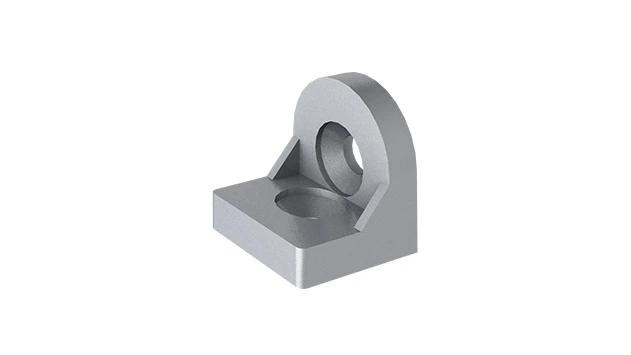
Turning Angle Code 3030
The turning angle aluminum profile connector provides a 90 degree hidden corner connection. 3030 it is means this size is used for 30 series aluminum profile.The corner code comes with set screws that allow for quick, easy connections.
A Practical Guide for Lean System Efficiency
Introduction: The Backbone of Lean Systems
In the fast-paced world of manufacturing and production, every component matters. From the largest conveyor to the smallest joint, the integrity of your workspace directly impacts efficiency, safety, and bottom-line results. This is especially true in lean systems, where the goal is to eliminate waste and streamline workflows. One often-overlooked yet critical component in these setups is the Turning Angle Code 3030 —a humble bracket that plays a giant role in holding together aluminum profiles, workbenches, material racks, and other essential structures.
If you've ever walked through a factory floor, chances are you've seen 3030 aluminum profiles in action: they form the frames of workbenches where assemblers piece together products, the shelves of material racks storing components, and the supports of flow racks guiding parts to production lines. What keeps these profiles connected at clean, sturdy angles? More often than not, it's the Turning Angle Code 3030. When these connections fail—whether due to looseness, misalignment, or wear—they don't just cause wobbly structures; they disrupt workflows, create safety hazards, and undermine the very "lean" principles your operation relies on.
In this guide, we'll dive deep into the world of Turning Angle Code 3030 connections. We'll explore common issues that arise, walk through step-by-step troubleshooting, and share preventive maintenance tips to keep your aluminum profile structures rock-solid. Whether you're a plant manager, a maintenance technician, or someone setting up a small workshop, this article will help you diagnose problems, fix them efficiently, and keep your lean system running at its best.
Understanding the Turning Angle Code 3030
Before we jump into troubleshooting, let's make sure we're all on the same page about what a Turning Angle Code 3030 is and why it matters. Simply put, it's a right-angle bracket designed to connect two 3030 aluminum profiles at a 90-degree angle. These profiles—named for their 30mm x 30mm cross-section—are workhorses in industrial setups because they're lightweight, strong, and infinitely customizable. The Turning Angle Code 3030 acts as the "glue" that turns individual profiles into functional structures like workbenches, racks, and machine guards.
Most Turning Angle Code 3030 brackets are made from metal—often aluminum or steel—with pre-drilled holes that align with the T-slots on 3030 aluminum profiles. They're typically secured using bolts, nuts, or screws from the aluminum profile accessories toolkit, such as M5 or M6 socket head cap screws. Some brackets even come with built-in reinforcement ribs to handle heavier loads, making them suitable for everything from light-duty workbenches to heavy material racks.
Think of it this way: if your aluminum profile structure is a human body, the profiles are the bones, and the Turning Angle Code 3030 (along with other aluminum profile accessories) are the joints. Just as weak joints make movement painful and inefficient, loose or faulty angle codes make your workbench or rack unstable, leading to slower production, damaged materials, and even accidents. That's why keeping these connections in top shape is non-negotiable.

Common Turning Angle Code 3030 Connection Issues
Now that we know what the Turning Angle Code 3030 does, let's look at the most common problems that can plague its connections. These issues rarely happen overnight—they're often the result of poor installation, regular wear and tear, or (neglect) of maintenance. Below are the four most frequent culprits:
| Issue | Symptoms | Common Causes |
|---|---|---|
| Loose Connections | Wobbly structure, creaking sounds, profiles shifting under load | Under-tightened screws, vibration from machinery, missing washers |
| Misalignment | Gaps between profile and bracket, uneven surfaces, stress cracks | Poor measurement during assembly, bent profiles, incorrect accessory use |
| Corrosion & Wear | Rusty brackets, stripped screw holes, seized bolts | Moisture exposure, chemical spills, friction from repeated adjustment |
| Overloading | Bracket bending, profiles warping, sudden collapse under weight | Exceeding weight limits, unevenly distributed loads |
Loose Connections: This is the most prevalent issue. Imagine walking up to your workbench and noticing it rocks slightly when you lean on it—that's a loose Turning Angle Code 3030 talking. Over time, vibrations from nearby conveyor belts or heavy machinery can gradually loosen screws, especially if they weren't tightened to the proper torque during installation. Even something as simple as repeatedly placing heavy tools on one corner of the bench can cause screws to back out.
Misalignment: Ever tried to fit a square peg into a round hole? That's what happens when your Turning Angle Code 3030 isn't aligned with the aluminum profiles. Maybe during assembly, the profiles weren't perfectly perpendicular, or the bracket was forced into place with a hammer (we've all been there). The result? The bracket takes on uneven stress, leading to cracks, gaps, or profiles that don't sit flush. This isn't just unsightly—it weakens the entire structure.
Corrosion & Wear: If your workspace is humid, or if you work with liquids (like in a food processing plant or automotive shop), metal brackets and screws are at risk of rust. Corrosion eats away at the bracket's integrity, making it brittle. Similarly, if you're constantly adjusting the structure—adding or removing shelves, for example—the screw holes can wear out, turning a tight connection into a loose one in no time.
Overloading: We've all pushed the limits—stacking one too many boxes on a material rack or placing a 50kg tool on a workbench designed for 30kg. The Turning Angle Code 3030 is rated for specific loads, and exceeding that can bend the bracket or strip the threads in the aluminum profile. Overloading is a silent killer because the damage might not show up immediately, but over weeks or months, the structure weakens until it fails.

Troubleshooting Step-by-Step
Now that we can identify the issues, let's roll up our sleeves and fix them. Below is a step-by-step guide for each common problem, complete with tools you'll need and pro tips to avoid future headaches.
Fixing Loose Connections
Tools Needed: Hex key (allen wrench) matching your screws, torque wrench (optional but recommended), thread locker (blue, removable type), washers (if missing).
Step 1: Inspect the Connection – First, visually check the Turning Angle Code 3030 and surrounding screws. Are any screws visibly loose or missing? Do you see gaps between the bracket and the profile? Gently wiggle the profiles to feel where the movement is coming from—this will pinpoint which bracket(s) need attention.
Step 2: Tighten the Screws – Using the hex key, tighten each screw in a crisscross pattern (like tightening lug nuts on a car). This ensures even pressure. If you have a torque wrench, refer to the manufacturer's specs—most aluminum profile accessories require 3-5 Nm of torque for M5 screws. Avoid over-tightening, as this can strip the threads in the profile's T-slot.
Step 3: Add Thread Locker (Optional but Recommended) – For connections prone to vibration (like near conveyors), apply a small drop of blue thread locker to the screw threads before re-tightening. This prevents future loosening without making the screws impossible to remove later.
Step 4: replace Damaged Screws or Washers – If a screw is stripped (the hex key spins without tightening), or a washer is missing (washers distribute pressure and prevent damage to the profile), replace them with new ones from your aluminum profile accessories kit. Always use screws designed for T-slots—generic hardware won't hold as well.
Correcting Misalignment
Tools Needed: Spirit level, square ruler, rubber mallet, hex key, file (for minor burrs).
Step 1: Check for Square – Place the square ruler against the corner where the Turning Angle Code 3030 connects the two profiles. The ruler should sit flush against both profiles with no gaps. If not, the angle is off.
Step 2: Loosen and Realign – Loosen the screws on the misaligned bracket (but don't remove them completely). Gently tap the profiles into place with a rubber mallet—be careful not to dent or bend them. Use the spirit level to ensure the structure is level horizontally and vertically.
Step 3: Tighten in Stages – Once aligned, tighten the screws a little at a time, alternating between them, to keep the bracket centered. Recheck with the square ruler and level to make sure alignment holds as you tighten.
Step 4: Address Bent Profiles – If the aluminum profile itself is bent (common if the structure was overloaded), you may need to replace it. A bent profile will always cause misalignment, no matter how well you adjust the bracket.
Combatting Corrosion & Wear
Tools Needed: Wire brush, sandpaper (fine-grit), anti-corrosion spray (like WD-40 Specialist Long-Term Corrosion Inhibitor), replacement brackets/screws.
Step 1: Clean the Area – For rusty brackets, use a wire brush to scrub away surface corrosion. If screws are seized, spray them with penetrating oil and let sit for 10 minutes before attempting to remove. For stripped screw holes in the profile, gently sand the edges to remove burrs—this may help a new screw grip better.
Step 2: replace Severely Damaged Parts – If the Turning Angle Code 3030 has deep rust pits or cracks, or if the screw holes in the profile are too worn to hold a screw, replace the bracket or profile section. It's tempting to patch things up, but a compromised bracket is a safety risk.
Step 3: Apply Anti-Corrosion Treatment – After cleaning or replacing parts, spray the bracket and screws with anti-corrosion spray. For extra protection in humid environments, consider using stainless steel Turning Angle Code 3030 brackets (if your budget allows)—they're more resistant to rust than standard steel.
Resolving Overloading Issues
Tools Needed: Scale (to weigh loads), additional Turning Angle Code 3030 brackets, reinforcement plates (from aluminum profile accessories).
Step 1: Check Load Limits – Refer to the manufacturer's specs for your aluminum profile and Turning Angle Code 3030. Most 3030 profiles can handle 50-100kg per linear meter, but brackets have lower limits—typically 20-30kg per connection. If you're stacking 80kg of materials on a shelf held by two brackets, that's 40kg per bracket—way over the limit.
Step 2: Redistribute or Reduce Load – The easiest fix is to remove excess weight or spread it out. For example, instead of piling all boxes on one shelf, split them between two shelves. If that's not possible, add more Turning Angle Code 3030 brackets to share the load—extra brackets at the corners or midpoints can drastically increase weight capacity.
Step 3: Reinforce the Structure – For permanent heavy loads, add reinforcement plates (flat aluminum pieces that span two brackets) or use thicker aluminum profiles (like 4040 instead of 3030). Your aluminum profile accessories supplier should have these reinforcements in stock.
Preventive Maintenance: Keep Connections Strong Long-Term
They say an ounce of prevention is worth a pound of cure, and that's never truer than with Turning Angle Code 3030 connections. By incorporating these simple habits into your routine, you'll avoid most issues before they start:
1. Monthly Inspections – Set a calendar reminder to walk through your workspace and check key structures: workbenches, material racks, flow racks. Wiggle the corners—if they move, tighten the Turning Angle Code 3030 screws. Look for rust, gaps, or bent brackets. Catching a loose screw today prevents a collapsed shelf next month.
2. Train Your Team – Make sure everyone who uses the equipment knows the basics: don't stand on workbenches, don't overload shelves, and report wobbly structures immediately. A quick chat during a team meeting can reduce accidental damage.
3. Use the Right Accessories – Always pair Turning Angle Code 3030 brackets with the correct screws, washers, and T-slot nuts from your aluminum profile accessories kit. Generic hardware might fit, but it won't hold up to industrial use. If you're unsure, ask your supplier for a compatibility chart.
4. Clean Regularly – Dust, oil, and debris can hide loose connections or corrosion. Wipe down profiles and brackets with a dry cloth monthly, and use a mild detergent if there are spills. In humid areas, a quick spray of anti-corrosion oil every quarter goes a long way.
5. Document Repairs – Keep a log of when you tighten screws, replace brackets, or adjust loads. This helps you spot patterns—maybe the workbench near the conveyor always needs tightening, indicating a need for thread locker. Over time, this data makes your maintenance more proactive.
Case Study: How One Factory Fixed a Wobbly Material Rack (and Boosted Productivity)
Let's put this all into context with a real-world example. A mid-sized electronics manufacturer was struggling with their material rack B (a 3-row, 3-floor rack used to store circuit boards). Workers complained that the top shelf wobbled, making it hard to safely retrieve components. Production slowed as employees took extra time to steady the shelf, and there was a near-miss when a box of circuit boards almost fell.
The maintenance team inspected the rack and found the root cause: the Turning Angle Code 3030 brackets at the top corners were loose and slightly misaligned. Vibration from a nearby conveyor had loosened the screws over six months, and the shelf had been overloaded with 70kg of materials (the bracket limit was 30kg per corner). The team followed the troubleshooting steps:
1. They removed the materials, tightened the screws with a torque wrench, and added blue thread locker to prevent future loosening.
2. They used a square ruler to realign the brackets, ensuring the profiles were perpendicular.
3. They added two extra Turning Angle Code 3030 brackets to the top shelf, reducing the load per bracket to 17.5kg.
The result? The shelf stabilized immediately. Workers reported faster, safer material retrieval, and the near-miss incidents stopped. By addressing the Turning Angle Code 3030 issues, the factory improved productivity by 15% in that work cell—all from a few hours of maintenance.
Conclusion: Small Component, Big Impact
The Turning Angle Code 3030 might seem like a small part of your lean system, but as we've seen, its role is huge. Loose, misaligned, or worn connections can disrupt workflows, compromise safety, and eat into your profits. But with the right troubleshooting steps—inspecting for looseness, aligning with care, combatting corrosion, and respecting load limits—you can keep these brackets (and your aluminum profile structures) strong and reliable.
Remember, lean manufacturing isn't just about eliminating waste in production—it's about maintaining the tools and structures that make efficiency possible. By taking care of your Turning Angle Code 3030 connections, you're investing in the foundation of your operation. So the next time you walk past a workbench or material rack, take a second to check those corners. A little attention today will save you a lot of trouble tomorrow.
And if you ever need help—whether it's choosing the right aluminum profile accessories, finding replacement brackets, or troubleshooting a tricky connection—don't hesitate to reach out to your aluminum profile supplier. They're experts in these components and can provide tailored advice for your specific setup. After all, a strong lean system is a team effort—from the biggest conveyor to the smallest Turning Angle Code 3030.