- Company Articles
- Products and Technology
- Product knowledge
- How to Use Turning Angle Code 4040 in Modular Educational Lab Workstations

How to Use Turning Angle Code 4040 in Modular Educational Lab Workstations
Related Product
Turning Angle Code 4040
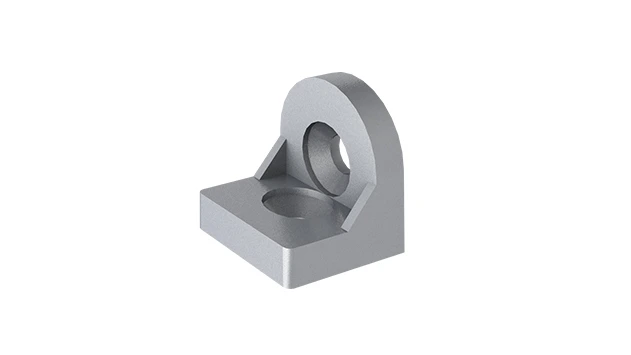
The turning angle aluminum profile connector provides a 90 degree hidden corner connection. 4040 it is means this size is used for 40 series aluminum profile.The corner code comes with set screws that allow for quick, easy connections.
Walk into a modern high school science lab, and you'll notice something different from the rigid, fixed furniture of the past. Today's labs are dynamic spaces—tables reconfigured for group projects, equipment stations adjusted for different experiments, and workbenches that grow with student needs. At the heart of this flexibility lies modular design, and one component quietly holding it all together: the Turning Angle Code 4040 . This unassuming piece of hardware might not grab headlines, but it's the unsung hero that turns static lab setups into adaptable, student-centered environments. In this guide, we'll explore what Turning Angle Code 4040 is, why it matters in educational labs, and how to use it effectively to build workstations that keep up with the pace of learning.
What Is Turning Angle Code 4040?
Let's start with the basics. Turning Angle Code 4040 is a type of aluminum profile accessory designed to connect and reinforce aluminum profiles at 90-degree angles. Think of it as a sturdy "corner bracket" with a twist—literally. Unlike fixed brackets, this angle code allows for precise alignment and secure fastening, ensuring that the aluminum frames of workbenches, shelving, and equipment stations stay stable even under the daily wear and tear of a busy lab.
Made from high-grade aluminum alloy, Turning Angle Code 4040 is lightweight yet surprisingly strong. Its design features pre-drilled holes that align perfectly with the T-slots of 4040 series aluminum profiles (a common standard in modular setups), making assembly straightforward. Whether you're building a new workbench or modifying an existing one, this accessory acts as the "glue" that holds the structure together, balancing flexibility with reliability.
Why Turning Angle Code 4040 Matters in Educational Labs
Educational labs aren't just spaces for experiments—they're hubs of collaboration, creativity, and hands-on learning. That means the furniture and equipment need to keep up with diverse activities: one day, a biology class might need long, flat workbenches for dissections; the next, a robotics team could reconfigure those same benches into U-shaped stations for building prototypes. Here's why Turning Angle Code 4040 is critical in this context:
- Adaptability: Labs change constantly. With Turning Angle Code 4040, you can disassemble and reassemble workstations without damaging the aluminum profiles. No more permanent fixtures—just tools-free adjustments that let educators tailor the space to their lesson plans.
- Safety First: Students (and teachers!) rely on stable surfaces. A loose workbench or wobbly shelf isn't just inconvenient—it's a hazard. Turning Angle Code 4040's secure fastening system ensures that even heavy equipment (like microscopes, centrifuges, or 3D printers) stays put, reducing the risk of accidents.
- Durability for the Long Haul: Labs see heavy use. Scratches, bumps, and constant movement can weaken lesser materials, but Turning Angle Code 4040's aluminum construction resists corrosion and wear. It's built to last through years of student projects, making it a cost-effective choice for schools working with tight budgets.

Step-by-Step Guide to Using Turning Angle Code 4040
Using Turning Angle Code 4040 might seem technical, but with the right tools and a little patience, it's a straightforward process. Let's walk through building a basic modular workbench—something you might find in a chemistry or engineering lab—using 4040 aluminum profiles and Turning Angle Code 4040.
Tools You'll Need:
T-slot bolts (M6 or M8, depending on your profile), hex keys (Allen wrenches), a rubber mallet (for gentle alignment), a level (to ensure straightness), and a tape measure.
Step 1: Plan Your Workbench Dimensions
Start by sketching your ideal workbench. For a standard lab setup, a height of 80cm (31.5 inches) is comfortable for most students, with a width of 60cm (23.6 inches) and length of 120cm (47.2 inches). Adjust based on your needs—remember, modular design means you can always expand later!
Step 2: Cut Aluminum Profiles to Size
Using a hacksaw or miter saw, cut your 4040 aluminum profiles to match your dimensions. You'll need four vertical legs, two horizontal front/back rails, and two horizontal side rails. Smooth any rough edges with sandpaper to avoid snags.
Step 3: Position the Turning Angle Code 4040
Lay the horizontal front rail on a flat surface. Take one vertical leg and align its end with the rail's T-slot. Slide the Turning Angle Code 4040 over the corner where the leg and rail meet—its L-shape should fit snugly against both profiles. The pre-drilled holes in the angle code will line up with the T-slots in the profiles.
Step 4: Secure with T-Slot Bolts
insert T-slot bolts into the aligned holes. Use a hex key to tighten them until the angle code is firmly attached. Don't over-tighten—you want a snug fit, not stripped threads! Repeat this for all four corners of the workbench frame.
Step 5: Level and Reinforce
Stand the frame upright and use a level to check for wobbles. If the workbench leans, adjust the bolts or add adjustable leveling feet to the bottom of the legs (these screw into the profile ends and let you tweak height on uneven floors). For extra stability, add cross-braces along the back or sides, securing them with additional Turning Angle Code 4040 brackets.
Step 6: Add the Worktop
Once the frame is stable, attach a worktop (plywood, laminate, or even aluminum honeycomb panel for durability). Use T-slot nuts and bolts to secure it to the frame—no drilling required! Now you have a fully functional, modular workbench that can be reconfigured anytime.

Compatibility with Other Components
Turning Angle Code 4040 doesn't work in isolation—it's part of a larger ecosystem of modular components. To get the most out of your lab setup, it's important to pair it with compatible parts:
4040 EU Standard Aluminum Profiles
These are the "backbone" of your modular system. 4040 profiles have a square cross-section (40mm x 40mm) with T-slots running along all four sides, making them perfect for attaching accessories like Turning Angle Code 4040, shelves, and cable management clips. Look for profiles with a smooth anodized finish to resist scratches and corrosion.
Workbenches and Shelving
Many modular workbenches, like the "Workbench E (single deck-without caster)" from some suppliers, are designed to use 4040 profiles and Turning Angle Code 4040. These workbenches often come with pre-drilled holes or T-slots, making it easy to add shelves, tool hooks, or even monitor arms using the same angle codes.
Adjustable Leveling Feet
No lab floor is perfectly even. Adjustable leveling feet screw into the bottom of aluminum profile legs, letting you stabilize the workbench on uneven surfaces. They pair seamlessly with Turning Angle Code 4040, ensuring the entire structure stays level and secure.
Accessories for Functionality
Want to add a tool rack or a paper towel holder to your workbench? Use T-slot nuts and bolts with Turning Angle Code 4040 to attach these extras. The possibilities are endless—cable organizers, bin holders, even small plant shelves for biology labs can all be integrated into the frame.
Turning Angle Code 4040 vs. Other Angle Codes: A Comparison
Not all angle codes are created equal. While Turning Angle Code 4040 is ideal for 4040 profiles, there are smaller versions (like 3030 or 2020) designed for narrower profiles. Here's how they stack up in an educational lab context:
| Angle Code Type | Compatible Aluminum Profile | Load Capacity (per joint) | Best For | Key Advantage |
|---|---|---|---|---|
| Turning Angle Code 4040 | 4040 EU Standard Profile | Up to 150kg (330 lbs) | Heavy-duty workbenches, equipment stations, shelving with heavy tools | Highest load capacity; ideal for labs with bulky equipment |
| Turning Angle Code 3030 | 3030 EU Standard Profile | Up to 80kg (176 lbs) | Lightweight workstations, mobile carts, small shelving units | More compact; better for tight spaces like classroom corners |
| Turning Angle Code 2020 | 2020 EU Standard Profile | Up to 30kg (66 lbs) | Display shelves, small parts storage, prototype frames | Ultra-lightweight; great for student projects or temporary setups |
In most educational labs, Turning Angle Code 4040 is the go-to choice for primary workbenches and equipment stations, while 3030 or 2020 angle codes might be used for secondary storage or student-built projects. Mixing and matching is encouraged—just ensure the angle code matches the profile size for a secure fit!
Real-World Applications: Turning Angle Code 4040 in Action
To see Turning Angle Code 4040 in action, let's look at three common scenarios in educational labs:
1. Science Lab Workbench for Group Experiments
A middle school science teacher wants to host a "lab Olympics" where students rotate through stations (pH testing, density measurements, chemical reactions). Using 4040 profiles and Turning Angle Code 4040, they build six identical workbenches. Each bench has a laminate top, a shelf for chemicals, and a rod for hanging goggles. After the event, the benches can be disassembled and stored, freeing up space for the next activity.
2. Robotics Workshop with Adjustable Stations
A high school robotics team needs flexible workstations: some students assemble circuit boards (needing flat surfaces), others build robot frames (needing vice mounts), and a few test prototypes (needing open floor space). Using Turning Angle Code 4040, the team builds a U-shaped frame with removable panels. When testing day arrives, they detach the panels, creating an open area—no tools needed!
3. Maker Space Storage and Display
A university maker space has limited square footage but needs to store 3D printers, laser cutters, and materials (wood, plastic, metal sheets). Using 4040 profiles and Turning Angle Code 4040, they build tall, narrow shelving units that reach the ceiling. The angle codes ensure the shelves can hold heavy rolls of filament or metal sheets without bowing, maximizing vertical storage space.
Maintenance Tips for Longevity
Like any tool, Turning Angle Code4040 works best when properly maintained. Here's how to keep your angle codes (and the entire modular system) in top shape:
- Regular Tightening: Over time, vibrations from daily use can loosen T-slot bolts. Every few months, do a quick check with a hex key to ensure all angle codes are snug. Don't overtighten—just enough to prevent wobbling.
- Clean with Mild Detergent: Labs can get messy (spills happen!). Wipe down angle codes and aluminum profiles with a damp cloth and mild soap to remove chemicals, dust, or grease. Avoid abrasive cleaners, which can scratch the anodized finish.
- Inspect for Wear: Check angle codes for cracks, bent edges, or stripped threads. If a code is damaged, replace it immediately—compromised hardware puts the entire structure at risk.
- Store Spare Parts: Keep extra Turning Angle Code 4040, T-slot bolts, and leveling feet on hand. This way, you can quickly repair or expand your setup without waiting for shipments.
Troubleshooting Common Issues
Even with proper installation, you might run into hiccups. Here's how to solve the most common problems:
Issue: Workbench Wobbles After Assembly
Cause: Misaligned angle codes or loose bolts. Solution: Use a level to check if the frame is straight. Tighten any loose bolts with a hex key. If the wobble persists, add diagonal cross-braces using 4040 profiles and Turning Angle Code 4040 for extra stability.
Issue: Angle Code Doesn't Align with Profile T-Slots
Cause: Using the wrong angle code size (e.g., 3030 angle code on 4040 profile). Solution: Double-check that the angle code matches the profile size (4040 angle code for 4040 profile). If you're unsure, measure the profile's width—4040 profiles are 40mm x 40mm.
Issue: Bolts Strip When Tightening
Cause: Using the wrong bolt size or overtightening. Solution: Use M6 or M8 bolts (check the profile's T-slot size). Tighten until the bolt is snug, then stop—aluminum is strong but can strip if forced.
Conclusion: Building Labs That Grow with Students
Modular design is transforming educational labs from static spaces into dynamic hubs of learning—and Turning Angle Code 4040 is at the center of that transformation. By connecting aluminum profiles with strength, flexibility, and ease, this simple accessory empowers educators to create environments that adapt to student needs, foster collaboration, and prioritize safety.
Whether you're building a single workbench or overhauling an entire lab, remember: the best setups are those that grow with your students. With Turning Angle Code 4040, you're not just building furniture—you're building a foundation for curiosity, innovation, and hands-on discovery. So grab your hex key, gather your profiles, and start creating a lab that's as dynamic as the minds using it.