- Company Articles
- Products and Technology
- Product knowledge
- 3030a EU Standard Aluminum Profile for Computer Peripheral Production

3030a EU Standard Aluminum Profile for Computer Peripheral Production
Related Product
3030A EU Standard Aluminum Profile
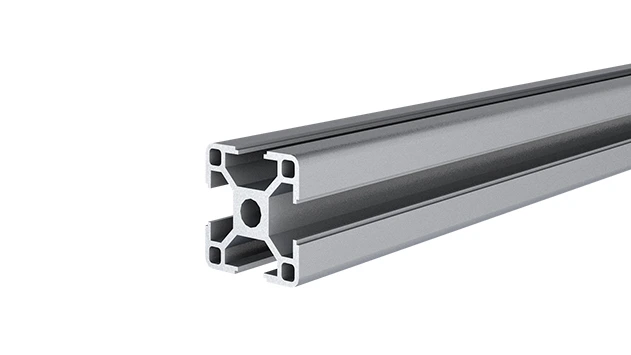
3030 is a 3.00 x 3.00CM fractional 30 series square extrusion T-slot profile with four open T-slots, each side with 3.00cm face. The profile has align-a-grooves to assist in aligning connecting profiles.
Walk into any modern computer peripheral factory, and you'll likely be met with a symphony of precision: tiny circuit boards gliding along conveyor belts, robotic arms assembling keyboard switches with millimetric accuracy, and workers hunched over workbenches, carefully fitting rubber feet onto wireless mice. It's a world where speed, flexibility, and reliability aren't just buzzwords—they're the difference between meeting tight production deadlines and falling behind in a market that churns out new models faster than ever. Yet, for all the advanced technology on display, one unsung hero often goes unnoticed: the humble aluminum profile. Specifically, the 3030a EU Standard Aluminum Profile, a workhorse that quietly transforms chaotic assembly lines into streamlined, adaptable ecosystems.
Computer peripherals—think keyboards, mice, webcams, printers, and monitors—might seem simple compared to the laptops or desktops they accompany, but their production is a study in complexity. These devices are packed with delicate components: microchips smaller than a fingernail, springs that control key travel, sensors that track movement with pinpoint precision. Assembling them requires workstations that can accommodate tiny parts without sacrificing stability, material racks that keep components organized yet accessible, and conveyors that move products smoothly from one stage to the next. Perhaps most importantly, in an industry where a new keyboard design or ergonomic mouse can render old assembly setups obsolete overnight, these systems need to be flexible . Rigid, fixed workbenches or one-size-fits-all conveyor tracks? They're relics of a bygone era.
This is where the 3030a EU Standard Aluminum Profile shines. Born from the need for modular, durable, and cost-effective industrial solutions, this profile has become a cornerstone of lean manufacturing in computer peripheral production. But what makes it so special? Why not just use steel, wood, or another aluminum profile? Let's dive in.
What Is the 3030a EU Standard Aluminum Profile, Anyway?
First things first: "3030a" isn't just a random string of numbers and letters. It's a code that tells you exactly what you're dealing with. The "3030" refers to the profile's cross-section dimensions: 30 millimeters wide by 30 millimeters tall, forming a perfect square. The "a" denotes a specific design variant within the EU standard lineup—think of it as the "standard" version, optimized for balance between strength, weight, and versatility. And "EU Standard"? That's your guarantee of quality. EU standards for aluminum profiles are strict, covering everything from material composition to dimensional accuracy and surface treatment, ensuring compatibility across brands and accessories.
At its core, the 3030a is made from aluminum alloy 6063-T5, a material prized for its excellent combination of strength, corrosion resistance, and machinability. The "T5" designation means it's been heat-treated to enhance hardness, making it tough enough to withstand the daily grind of a factory floor without bending or warping. Its surface is typically anodized—electrochemically treated to form a protective oxide layer that resists scratches, fingerprints, and even mild chemicals (handy when cleaning workbenches after spills of lubricant or isopropyl alcohol). The result? A profile that's lightweight (about a third the weight of steel), easy to handle, and built to last decades, even in high-traffic production environments.
But the real magic lies in its T-slot design. Run your finger along the length of a 3030a profile, and you'll notice evenly spaced grooves (or "slots") running along each of its four sides. These slots are the key to its modularity. Using simple accessories like T-slot nuts, bolts, and brackets, you can attach almost anything to the profile—shelves, tool holders, conveyor tracks, even monitors or lighting—without drilling, welding, or specialized tools. Need to reposition a shelf to make room for a new component bin? Loosen a few bolts, slide it into place, and tighten. Want to add a cable management arm to a workbench? Snap on a bracket, secure it with a nut, and you're done. This flexibility is a game-changer for computer peripheral manufacturers, where production lines are constantly evolving.
Why 3030a Stands Out in Computer Peripheral Production
Computer peripheral factories have unique needs, and the 3030a checks almost every box. Let's break down its biggest advantages:
1. The Perfect Size for Small-Part Assembly Computer peripherals are often compact, and their assembly requires workstations that are neither too bulky nor too flimsy. The 3030a's 30x30mm cross-section hits the sweet spot. It's sturdy enough to support workbenches loaded with tools, component trays, and even small assembly jigs (we're talking up to 50kg per linear meter for horizontal spans, and more for vertical supports), but not so large that it wastes space on the factory floor. Compare that to a 4040 profile (40x40mm), which might be overkill for a workstation assembling wireless mouse PCBs, or a 2020 profile (20x20mm), which might flex under the weight of a monitor and tool organizer. The 3030a is the Goldilocks of profiles—just right.
2. Compatibility with a Universe of Accessories What good is a modular profile if you can't find the right accessories? Luckily, the 3030a, being EU standard, plays nice with a vast ecosystem of aluminum profile accessories. Need to connect two profiles at a 90° angle? Grab a 90° aluminum profile connector. Want to add a shelf to a material rack? Use angle brackets and T-slot bolts. Even specialized parts like aluminum profile rubber strips (to deaden noise from clattering components) or 3030 aluminum profile end caps (to cover sharp edges and prevent dust buildup) are widely available. This means factories don't have to wait for custom parts—they can order what they need and reconfigure workstations in hours, not weeks.
3. Lightweight Yet Durable Steel might be stronger, but it's heavy. Moving a steel workbench across the factory floor requires a forklift or a team of people. The 3030a? A single worker can carry a 2-meter length with ease. This light weight makes installation and reconfiguration a breeze, reducing downtime when rearranging lines. And don't let the weight fool you—thanks to its aluminum alloy construction and T-slot design, it's more than tough enough for the job. A 3030a workbench can easily support a day's worth of keyboard assemblies, and a material rack built with 3030a can hold hundreds of plastic mouse casings without sagging.
4. Lean System Integration Lean manufacturing—focused on minimizing waste and maximizing value—is the backbone of modern production, and the 3030a is a lean manager's dream. Its modularity supports core lean principles like 5S (Sort, Set in Order, Shine, Standardize, Sustain) by making it easy to organize tools and materials exactly where they're needed. Need to implement a "visual workplace"? Attach label holders to the T-slots to mark component bins. Want to reduce motion waste? Reconfigure a workbench so that the most-used tools are within arm's reach. The 3030a doesn't just enable lean systems—it embodies them.

How 3030a Transforms Key Stages of Computer Peripheral Production
Enough theory—let's get practical. How does the 3030a actually get used in making computer peripherals? Let's walk through three critical stages: assembly workstations, material handling, and quality control.
1. Assembly Workstations: Where Precision Meets Flexibility
Picture an assembly line for wireless keyboards. Each workstation is dedicated to a specific task: installing key switches, soldering ribbon cables, attaching the backplate, testing for functionality. Each task has unique needs. The soldering station needs a heat-resistant surface and a fume extractor mount. The testing station needs a stable platform for plugging in the keyboard and running diagnostic software. And when the factory switches to a new keyboard model with a different layout? The workstation needs to adapt—fast.
Enter the 3030a workbench. A typical setup might start with a frame built from 3030a profiles: four vertical legs, connected by horizontal rails at the top and bottom for stability. The desktop could be a plywood or aluminum panel, attached to the frame using angle brackets and T-slot bolts. Need a shelf for component bins? Add two more horizontal 3030a profiles halfway up the legs, and mount a shelf between them. Want to attach a monitor arm for the testing software? Slide a T-slot nut into one of the vertical legs, bolt on the arm, and you're ready. Even accessories like LED task lights or anti-fatigue mat holders can be clamped onto the profile with minimal effort.
One factory we worked with (let's call them "PeriphTech") recently switched all their keyboard assembly workstations to 3030a. Previously, they'd used wooden workbenches that were nailed together—reconfiguring them meant sawing and hammering, which took hours and left the benches wobbly. With 3030a, they can now reposition shelves, add tool hooks, or even adjust the height of the workbench (using telescoping legs with 3030a-compatible connectors) in under 30 minutes. "We launched a new ergonomic keyboard last quarter," said their production manager, "and instead of building new workstations from scratch, we just modified the existing ones. Saved us weeks of downtime and thousands in materials."
2. Material Handling: From Storage to Assembly, Without the Headaches
In computer peripheral production, materials don't just sit—they flow. Plastic keycaps need to move from injection molding to the keyboard assembly line. Circuit boards for mice need to go from SMT (surface-mount technology) machines to testing stations. And finished products need to be transported to packaging without getting scratched or damaged. This flow is only as efficient as the material handling systems that support it—and 3030a is a star here, too.
Take material racks, for example. A typical 3030a material rack might have three or four levels, each with adjustable shelves (thanks to T-slots) to accommodate different component sizes. PeriphTech uses such racks to store keycap trays—each shelf is set to the exact height of the tray, so they stack neatly without wasting vertical space. When a new keycap design comes in with a taller tray? They simply loosen the shelf brackets, slide them up, and retighten. No more buying new racks.
Then there are conveyors. While heavy-duty conveyors might use steel frames, smaller, flexible conveyor systems (like those moving circuit boards between workstations) often rely on 3030a. The profile's lightweight nature makes it easy to mount conveyor tracks (like plastic roller track guide rails) overhead or at waist height, and its modularity means you can add curves, merges, or diverters by swapping out sections. One PeriphTech line uses a 3030a-framed roller conveyor to move mouse PCBs from the soldering station to testing—if a PCB gets stuck, they can quickly remove a section of the track (held in place by roller track placon mount brackets) to clear the jam, then snap it back in. No tools, no fuss.
3. Quality Control: Stability for Precision Inspections
Computer peripherals might be mass-produced, but they demand precision. A keyboard with a sticky key or a mouse with inconsistent tracking is a returned product—and lost revenue. That's why quality control (QC) stations are non-negotiable. These stations need to be rock-solid: a wobbly workbench could cause an inspector to misread a measurement or miss a scratch on a monitor bezel.
3030a's rigidity makes it ideal for QC setups. A typical QC workstation might include a magnifying glass arm, a digital caliper holder, and a lightbox for inspecting printed circuit boards. All of these can be securely mounted to a 3030a frame, ensuring they stay in place during inspections. The anodized surface also resists scratches, so the workstation itself doesn't become a source of contamination (no flaking paint or splinters to stick to delicate components).
3030a vs. Other Profiles: When to Choose What?
We've sung the praises of the 3030a, but it's not the only aluminum profile in town. Sometimes, a smaller or larger profile might be a better fit. To help you decide, here's a quick comparison of common EU standard profiles for computer peripheral production:
| Profile Type | Dimensions (mm) | Typical Load Capacity (Horizontal) | Best For | When to Avoid |
|---|---|---|---|---|
| 2020 EU Standard | 20x20 | 20-30 kg/m | Light-duty applications: small component storage, shelf dividers, lightweight tool holders | Heavy workbenches, load-bearing racks, or anything requiring stability for precision tasks |
| 3030a EU Standard | 30x30 | 40-60 kg/m | Assembly workstations, medium-duty material racks, conveyor frames, QC stations | Extremely heavy loads (e.g., pallet storage) or applications where minimal weight is critical (e.g., mobile carts with strict weight limits) |
| 4040 EU Standard | 40x40 | 80-100 kg/m | Heavy-duty racks, workbenches with multiple tools/monitors, industrial conveyor systems | Small workspaces, lightweight applications, or where cost is a primary concern (4040 is pricier than 3030a) |
As you can see, the 3030a is the most versatile of the bunch, covering the majority of tasks in computer peripheral production. It's not the cheapest, but its balance of performance and flexibility often makes it the most cost-effective choice in the long run—especially when you factor in how easily it can be repurposed.
The Future of Computer Peripheral Production: Why 3030a Will Remain a Staple
The computer peripheral industry isn't slowing down. If anything, it's accelerating. Wireless technology, ergonomic designs, and the rise of gaming peripherals (with their customizable RGB lighting and mechanical switches) are driving demand for more diverse, more complex products. Factories need to be agile to keep up—and agility is what the 3030a is all about.
Consider the trend toward "mass customization." Today's consumers want keyboards with unique keycaps, mice with adjustable weights, and webcams with custom skins. This means production lines can't just crank out identical products—they need to handle small batches, frequent changeovers, and specialized components. A 3030a workbench or conveyor system can adapt to these changes without requiring a complete overhaul, saving time and money.
Sustainability is another growing concern. Aluminum is infinitely recyclable, and the 3030a's long lifespan means less waste from replacing worn-out equipment. Many factories are also using 3030a to build energy-efficient systems, like LED lighting mounted directly to profile frames, reducing electricity usage. In an industry under pressure to reduce its carbon footprint, the 3030a is a step in the right direction.
Final Thoughts: More Than Just a Profile—A Production Partner
At the end of the day, the 3030a EU Standard Aluminum Profile isn't just a piece of metal. It's a tool that empowers factory workers, engineers, and managers to do their jobs better. It turns frustrating, rigid production lines into spaces where innovation thrives. It helps companies meet deadlines, adapt to change, and stay competitive in a fast-paced market.
So the next time you type on your keyboard, click your mouse, or adjust your monitor, take a moment to appreciate the unseen hero that helped build it. The 3030a might not have a brand name or a flashy design, but in the world of computer peripheral production, it's the quiet champion that keeps things moving—one T-slot, one workbench, one conveyor at a time.