- Company Articles
- Products and Technology
- Product knowledge
- 4040F EU Standard Aluminum Profile in Communication Equipment Racks: Design & Installation

4040F EU Standard Aluminum Profile in Communication Equipment Racks: Design & Installation
Related Product
4040F EU Standard Aluminum Profile
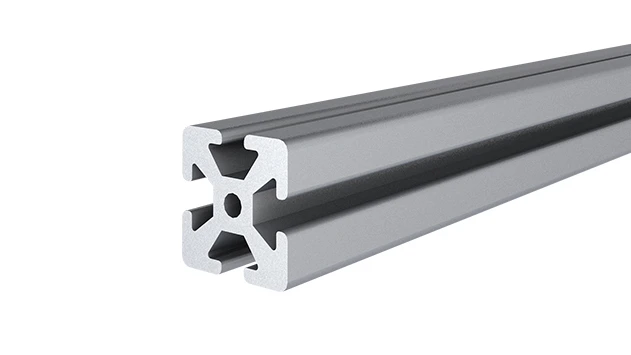
4040F is a 4.00x4.00 CM fractional 40 series square extrusion T-slot profile with four side open T-slots, each side with 4.00cm face. The profile has align-a-grooves to assist in aligning connecting profiles.
In today's hyper-connected world, communication equipment racks are the unsung heroes of our digital lives. They house the servers, routers, switches, and storage units that keep data flowing, businesses running, and conversations happening. But not all racks are created equal. The best ones balance strength, flexibility, and adaptability—qualities that become critical when technology evolves faster than ever. Enter the 4040F EU Standard Aluminum Profile: a game-changer in rack design that's redefining how we build, upgrade, and maintain communication infrastructure. Let's dive into why this aluminum extrusion profile has become a go-to choice for engineers and IT managers, and how to make the most of it in your next rack project.
Understanding the 4040F EU Standard Aluminum Profile: More Than Just Metal
First things first: What exactly is the 4040F? At its core, it's an aluminum extrusion profile—a product of pushing heated aluminum billet through a precision die to create a consistent, hollow structure with a 40mm x 40mm cross-section. The "F" in its name isn't just a random letter; it denotes a specific T-slot design, with deeper, wider slots than some of its siblings (like the 4040A or 4040B). These slots are the profile's secret weapon, allowing you to attach, adjust, and reconfigure components without drilling, welding, or starting from scratch.
Aluminum extrusion profile technology has come a long way, and the 4040F is a testament to that progress. Unlike generic steel racks, aluminum offers an unbeatable strength-to-weight ratio. It's lightweight enough to maneuver during installation but sturdy enough to support heavy servers and equipment—often handling 80-100 kg per linear meter, depending on the setup. And let's not forget aluminum's natural resistance to corrosion, a must in environments where humidity or temperature fluctuations are common (looking at you, data centers and telecom rooms).
But what really sets the 4040F apart is its compatibility with aluminum profile accessories. Think of the profile as a blank canvas, and the accessories as your paintbrushes: corner brackets, shelf supports, cable clips, end caps, and even casters. These small but mighty parts snap into the T-slots, turning a simple frame into a fully functional rack tailored to your needs. Need to add a shelf for a new router? Slide in a bracket. Want to route cables neatly? Clip on a cable management arm. It's modularity at its finest, and it's why the 4040F is a favorite for lean system integration—more on that later.
Designing with 4040F: Key Considerations for Communication Racks
1. Load Capacity: Know Your Equipment's Weight
Before you start assembling, take a hard look at what you're putting in the rack. Servers, UPS units, and battery backups can get heavy—really heavy. The 4040F is strong, but overloading it is a recipe for sagging or even failure. Check the manufacturer's specs for vertical and horizontal load limits (usually listed per meter) and factor in dynamic loads, too—like when you're sliding equipment in or out. Pro tip: Distribute weight evenly across the rack, and use reinforced brackets for extra-heavy items.
2. Thermal Management: Let the Aluminum Breathe
Communication equipment generates heat, and heat kills performance. Luckily, aluminum is an excellent thermal conductor, meaning it helps dissipate heat away from sensitive components. When designing your rack, leave gaps between equipment for airflow, and consider adding ventilation panels (another aluminum profile accessory!) if needed. You can even mount small fans directly to the T-slots—no extra drilling required.
3. Cable Management: Tame the Tangles
If you've ever opened a poorly designed rack, you know the horror: a spaghetti mess of cables, making it impossible to trace connections or replace a faulty wire. The 4040F's T-slots are a cable manager's dream. Use cable ties, clips, or dedicated cable trays that slide into the slots to keep everything organized. Labeling helps too, but with the 4040F, even reconfiguring cables is a breeze—just loosen the clips, adjust, and retighten.
4. ESD Protection: Guard Against Static
Sensitive electronics hate static electricity. While aluminum itself isn't inherently ESD-safe, many 4040F profiles come with anodized finishes that can be treated with ESD coatings. Pair that with ESD-safe aluminum profile accessories (like conductive brackets or anti-static end caps), and you've got a rack that protects your equipment from unexpected voltage spikes. It's a small detail, but it can save you from costly downtime.

How 4040F Stacks Up: A Quick Comparison with Other Profiles
Not sure if the 4040F is right for you? Let's compare it to other common aluminum profiles to see how it stands out.
| Profile Type | Dimensions (mm) | Load Capacity (kg/m) | Slot Depth (mm) | Best For |
|---|---|---|---|---|
| 4040F EU Standard | 40x40 | 80-100 | 8-10 | Heavy communication racks, servers, lean system integration |
| 4040A EU Standard | 40x40 | 60-75 | 5-6 | Light to medium racks, workbenches, shelving |
| 3030 EU Standard | 30x30 | 40-50 | 5-6 | Smaller equipment, wall-mounted racks, tight spaces |
| 2020 EU Standard | 20x20 | 15-25 | 3-4 | Light-duty use, prototype racks, hobby projects |
As you can see, the 4040F hits the sweet spot for communication racks: it's large enough to handle heavy gear, has deep slots for secure accessory attachment, and offers the flexibility to grow with your needs. For most professional setups, it's the Goldilocks of profiles—not too big, not too small, just right.
Installing Your 4040F Rack: A Step-by-Step Guide
Now that you're sold on the 4040F, let's walk through installing a basic communication rack. Don't worry—you don't need to be a master craftsman, just a few tools and a little patience.
Tools You'll Need
- Measuring tape and pencil (for marking cuts)
- Fine-tooth saw or miter saw (to cut the profile cleanly)
- Deburring tool or file (to smooth edges after cutting)
- Hex keys (Allen wrenches) in various sizes (most accessories use M5 or M6 bolts)
- Level (to ensure your rack is straight)
- Rubber mallet (for gently tapping accessories into place)
- Safety gear: gloves, goggles, and a dust mask (aluminum dust can be irritating)
Step 1: Plan Your Rack Layout
Start by measuring the space where the rack will live. Note the height, width, and depth available—you don't want to build a rack that's too tall for the ceiling or too deep for the room. Sketch a rough layout: how many vertical posts? How many horizontal supports? Where will shelves go? This is also the time to list your aluminum profile accessories: corner brackets for the frame, shelf supports, cable clips, and maybe casters if you want mobility.
Step 2: Cut the 4040F Profiles to Length
Using your measurements, mark the profiles with a pencil. For vertical posts, aim for standard rack heights (19" is common for communication equipment, but adjust as needed). For horizontal supports, space them 40-60cm apart vertically to ensure stability. When cutting, go slow with the saw to avoid bending the profile or creating jagged edges. After cutting, use the deburring tool to smooth any burrs—sharp edges are not only dangerous but can damage accessories or cables later.
Step 3: Assemble the Frame
Lay out the vertical posts on a flat surface. Attach horizontal supports using corner brackets (aluminum profile accessories) and hex bolts. Slide the brackets into the T-slots, align them with the vertical posts, and tighten the bolts until snug—don't over-tighten, as you can strip the threads. Use the level to check that the frame is square and upright. If it's wobbly, double-check the bracket alignment or add diagonal braces for extra stability (another accessory win!).
Step 4: Add Shelves and Accessories
Now for the fun part: customizing your rack. Slide shelf supports into the T-slots at your desired heights, then place shelves on top (plywood, metal, or even aluminum honeycomb panels work well). Secure the shelves with bolts through the supports to prevent sliding. For cable management, clip cable trays or rings into the slots—position them near the back of the rack to keep wires out of the way. End caps? Pop them onto the profile ends to cover sharp edges and give the rack a polished look.
Step 5: Integrate into Your Lean System
Here's where the 4040F truly shines: lean system compatibility. Lean systems focus on minimizing waste—whether that's time, space, or resources. With the 4040F, you can reconfigure your rack as your needs change. Need to add a new server? Remove a shelf and adjust the supports. Switching to a smaller router? Reposition the brackets to free up space. No need to buy a whole new rack—just swap out a few accessories. It's sustainable, cost-effective, and perfect for businesses that grow quickly.
Real-World Success: 4040F in Action
Still on the fence? Let's look at a real example. A mid-sized telecom company in Germany was struggling with outdated steel racks that were heavy, hard to modify, and prone to rust. They switched to 4040F aluminum extrusion profile racks, and the results spoke for themselves:
- Faster upgrades: Adding new 5G equipment took 2 hours instead of a full day (thanks to quick accessory adjustments).
- Lower cooling costs: Aluminum's thermal conductivity reduced server temperatures by 3-5°C, cutting AC usage.
- Less downtime: Modular design meant technicians could work on one section of the rack without powering down the entire system.
Another example: a data center in Singapore used 4040F racks with ESD-treated aluminum profile accessories to house sensitive storage units. After a year, they reported zero equipment failures due to static discharge—a problem that had plagued them with their old steel racks.
Maintaining Your 4040F Rack: Keep It Running Smoothly
Like any equipment, your 4040F rack needs a little TLC to stay in top shape. Here's how to keep it performing for years:
- Dust regularly: Wipe down the profiles and accessories with a soft, damp cloth to prevent dust buildup (dust traps heat, which is bad for equipment).
- Check bolts and brackets: Every 6 months, tighten any loose hex bolts—vibration from equipment can loosen them over time.
- replace worn accessories: If an end cap cracks or a bracket bends, swap it out immediately. Aluminum profile accessories are affordable, and a small fix now prevents bigger issues later.
- Watch for corrosion: While aluminum resists rust, salt air or chemical exposure can cause pitting. If you notice discoloration, clean the area with a mild detergent and apply a protective coating.
Conclusion: Why 4040F is the Future of Communication Racks
Communication equipment racks are the backbone of our digital world, and the 4040F EU Standard Aluminum Profile is redefining what a backbone can be. Its blend of strength, flexibility, and compatibility with aluminum profile accessories makes it ideal for modern IT environments—whether you're running a small office server room or a large data center. Add in its lean system integration and low maintenance needs, and it's clear: the 4040F isn't just a profile; it's a long-term investment in reliability and adaptability.
So, the next time you're designing or upgrading your communication infrastructure, remember: the right rack can make all the difference. And with the 4040F, you're not just building a rack—you're building a system that grows with you.