- Company Articles
- Products and Technology
- Product knowledge
- 4080A EU Standard Aluminum Profile in 3D Printing Workstations: Structural Support

4080A EU Standard Aluminum Profile in 3D Printing Workstations: Structural Support
Related Product
4080A EU Standard Aluminum Profile
4080A is a 4.00x8.00 CM fractional 40 series square extrusion T-slot profile with two side open T-slots, each side with 4.00cm face, two side with 8.00cm face. The profile has align-a-grooves to assist in aligning connecting profiles.
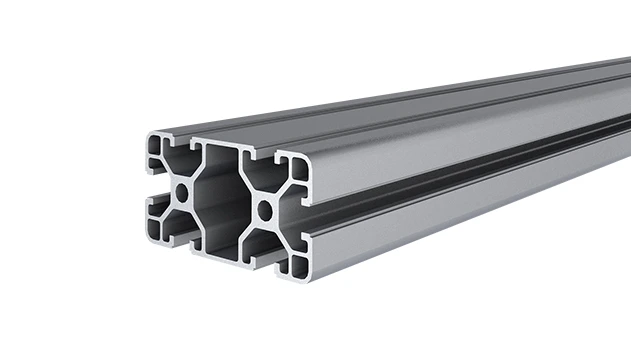
Exploring how this versatile aluminum extrusion profile becomes the backbone of stable, adaptable, and efficient 3D printing workspaces
The Rise of 3D Printing Workstations: Why Structural Support Matters More Than Ever
Walk into any modern maker space, industrial lab, or small-batch manufacturing facility today, and you'll likely find a corner dedicated to 3D printing. What started as a niche hobby for tech enthusiasts has exploded into a critical tool for industries ranging from aerospace to healthcare, and even custom jewelry design. As 3D printers have grown more powerful—with larger build volumes, faster print speeds, and heavier frames—the workstations that house them have had to evolve, too. A flimsy table or a rickety shelf just won't cut it anymore.
Think about it: A mid-sized industrial 3D printer can weigh 50kg or more. Add spools of filament (each 1-2kg), post-processing tools like sanders or curing stations, and maybe a computer monitor for monitoring prints, and you're looking at a setup that demands serious structural stability. Even a slight wobble during a 12-hour print can ruin a part, wasting time, material, and money. That's where the right structural support comes in—and why 4080A EU Standard Aluminum Extrusion Profile has become a go-to choice for engineers, workshop owners, and hobbyists alike.
In this article, we'll dive into why 4080A aluminum extrusion profile stands out as a foundation for 3D printing workstations. We'll break down its design, material benefits, and how it integrates with aluminum profile accessories to create workspaces that are not just sturdy, but also adaptable. Whether you're setting up a single printer in your garage or outfitting a lab with a dozen machines, understanding what makes 4080A tick could save you from costly mistakes—and help you build a workstation that grows with your needs.
What Is 4080A EU Standard Aluminum Extrusion Profile, Anyway?
Before we get into why it's perfect for 3D printing, let's start with the basics: What exactly is 4080A EU Standard Aluminum Extrusion Profile? At its core, it's a length of aluminum alloy shaped through an extrusion process—think of it like squeezing toothpaste through a tube, but with extreme precision. The "4080A" refers to its cross-sectional dimensions: 40mm in width and 80mm in height. The "EU Standard" tag means it meets strict European quality and safety guidelines, ensuring consistent performance and durability.
But numbers alone don't tell the story. What makes 4080A special is its design. Like most aluminum extrusion profiles, it features T-slots—long, narrow grooves running along its length—that allow you to attach accessories without welding or drilling. Picture a series of built-in "tracks" where bolts, brackets, or shelves can slide into place and lock securely. This modularity is a game-changer for workstations that need to adapt—say, adding a shelf for filament spools one month and a side table for post-processing the next.
The material itself is no slouch, either. 4080A is typically made from 6063-T5 aluminum alloy, a blend known for its excellent strength-to-weight ratio. Aluminum is naturally lightweight (about a third the weight of steel), which makes assembling and moving workstations easier, but it's also surprisingly rigid. T5 tempering—heat treatment followed by artificial aging—gives it even more structural integrity, meaning it can handle heavy loads without bending or warping over time. And unlike steel, aluminum resists corrosion, so you won't have to worry about rust eating away at your workstation, even in humid workshop environments.

Why 4080A Stands Out for 3D Printing Workstations: It's All About the Support
So, why choose 4080A over other materials or even other aluminum profiles? Let's start with the most critical factor for 3D printing: load-bearing capacity . A typical desktop 3D printer might weigh 10-20kg, but industrial models—like those used for printing metal parts or large prototypes—can tip the scales at 80kg or more. Add in the weight of the workstation's own frame, plus tools and materials, and you need a profile that can handle static loads (the weight sitting still) and dynamic loads (small vibrations from the printer's motors).
4080A excels here. Thanks to its 40x80mm cross-section and thick walls (usually 2-3mm), it can support upwards of 200kg per linear meter when properly braced. That's more than enough for even the heaviest consumer or prosumer 3D printers. Compare that to a smaller profile like 2020 (20x20mm), which might max out at 50kg per meter—great for lightweight shelves but risky for a printer that could shake during operation.
| Profile Type | Dimensions (mm) | Est. Max Load (kg/m)* | Best For 3D Printing | Limitations |
|---|---|---|---|---|
| 4080A EU Standard | 40 x 80 | 180-220 | Heavy industrial printers, multi-printer setups, workbenches with storage | Larger footprint; overkill for small desktop printers |
| 3030 EU Standard | 30 x 30 | 80-100 | Mid-sized desktop printers, single-printer workstations | Limited storage; may wobble with heavy dynamic loads |
| 2020 EU Standard | 20 x 20 | 40-60 | Lightweight hobby printers, filament storage racks | Not suitable for printers over 20kg; low rigidity |
| 4040A EU Standard | 40 x 40 | 120-150 | Medium industrial printers, dual-printer setups | Less vertical space for T-slot accessories vs. 4080A |
*Load estimates based on horizontal beam applications with proper bracing; actual capacity may vary by manufacturer and alloy type.
But 4080A isn't just about raw strength. Its T-slot design is where the magic happens for customization. Let's say you're building a workbench for your 3D printer. With 4080A, you can attach a plywood or metal top using T-slot nuts and bolts, no drilling required. Need a shelf above the printer to hold filament? Slide a pair of angle brackets into the T-slots and secure them with screws. Want to add a bar for hanging tools? A simple bracket and a length of aluminum pipe do the trick. This flexibility means your workstation isn't a one-and-done project—it can evolve as your needs change.
Take Sarah, a small-batch manufacturer who prints custom phone cases. When she started, she had one desktop printer on a 4080A workbench. As her business grew, she added a second printer, then a curing station. Using aluminum profile accessories like 90° angle codes and end caps, she expanded the workbench to double its original size, added a shelf for curing lights, and even mounted a small fan to keep the printers cool—all without replacing the frame. "It's like building with giant Lego blocks," she laughs. "I don't have to be an engineer to make it work."
Aluminum Profile Accessories: The Secret to 4080A's Versatility
A great profile is only as good as the accessories that bring it to life. 4080A's T-slots are designed to work seamlessly with a wide range of aluminum profile accessories, turning a simple frame into a fully functional workstation. Let's break down some of the most useful ones for 3D printing setups:
1. Connectors and Brackets: Keeping It All Together
The backbone of any aluminum extrusion build, connectors and brackets ensure your frame stays square and stable. For 4080A, common options include 90° angle codes (for joining profiles at right angles), 135° brackets (for corner reinforcements), and three-way connectors (for adding vertical supports). Most are made from die-cast aluminum or steel, so they're strong enough to handle the stress of a loaded workstation. Pro tip: Look for brackets with rubber gaskets if you want to reduce vibration—handy for minimizing printer shake during operation.
2. End Caps: Safety and Finishing Touches
Aluminum extrusion profiles have open ends, which can be sharp and unsightly. End caps—plastic or rubber covers that snap or screw into the ends of the profile—solve both problems. They protect hands from cuts during assembly and give the workstation a polished look. For 3D printing environments, where you might be reaching around the printer to adjust settings, this small detail can make a big difference in safety.
3. T-Slot Nuts and Bolts: The Unsung Heroes of Modularity
These tiny components are what make T-slot profiles so adaptable. T-slot nuts slide into the grooves of the 4080A profile, and bolts thread into them to secure accessories like shelves, tables, or tool holders. The beauty? You can reposition them anytime. If you decide your filament shelf would work better 6 inches to the left, just loosen the bolts, slide the nuts, and retighten. No need to drill new holes or patch old ones—perfect for anyone who likes to tinker with their setup.
4. Casters: Mobility When You Need It
Not every workstation needs to be stationary. If you occasionally need to move your 3D printer—say, to clean behind it or make space for a new machine—casters (wheel attachments) can turn your 4080A frame into a mobile cart. Look for heavy-duty casters with locking brakes to keep the workstation stable during prints. Just be sure to check the load rating: a set of four casters should handle at least 1.5 times the total weight of your setup to be safe.
4080A and Lean Systems: Building Workstations That Work Smarter, Not Harder
If you've spent any time in manufacturing or workshop design, you've probably heard of "lean systems"—the philosophy of minimizing waste and maximizing efficiency. 3D printing workstations are no exception: a cluttered, disorganized space wastes time (hunting for tools, untangling filament) and increases the risk of errors (knocking over a spool mid-print). 4080A aluminum extrusion profile plays surprisingly well into lean principles, thanks to its modularity and adaptability.
Take "5S," a key lean methodology focused on sorting, setting in order, shining, standardizing, and sustaining. With 4080A, "setting in order" becomes a breeze. You can design your workstation to keep everything within arm's reach: printers at waist height, filament spools on a shelf above, tools hung on a pegboard attached to the frame, and post-processing supplies in bins below. No more walking across the room for a pair of pliers or digging through a drawer for a scraper. Everything has a place, and the T-slot system makes it easy to adjust that place if your workflow changes.
Mark, a lab manager at a university 3D printing facility, swears by 4080A for this reason. "We have 12 printers, each with different materials and post-processing needs," he explains. "With 4080A frames, we can standardize the height of each workstation, so students don't have to bend or stretch. We added custom shelves for each printer's specific filament type, and tool hooks labeled with color-coded tags. It's cut down on setup time by 30%—and we rarely lose tools anymore."
Another lean principle is "flexibility," and 4080A delivers here, too. If your lab starts printing larger parts and needs a bigger workbench, you don't have to buy a whole new setup—just add more 4080A profiles and accessories. If a printer gets replaced with a smaller model, you can reconfigure the shelf heights or repurpose the extra space for storage. This adaptability reduces waste (no more throwing out old workbenches) and ensures your workstation grows with your capabilities.
Real-World 4080A Workstations: From Garage Hobbyists to Industrial Labs
To really understand how 4080A shines, let's look at a few real-world setups. These examples show how the profile adapts to different needs, budgets, and printer types.
Example 1: The Hobbyist's Dream Garage Setup
Jake, a mechanical engineer by day and 3D printing enthusiast by night, wanted a workstation that could handle his two desktop printers (a resin printer and an FDM printer) plus storage for filaments, resin bottles, and tools. He went with a 4080A frame measuring 120cm wide, 80cm deep, and 150cm tall. The base holds the FDM printer on a plywood top, with a shelf below for resin printer supplies (gloves, isopropyl alcohol, curing station). Above the FDM printer, he added a 4080A shelf for filament spools, using aluminum brackets and T-slot nuts. On the side, he mounted a pegboard for tools and a small LED light strip for better visibility.
"The best part is how solid it feels," Jake says. "My resin printer vibrates a bit during printing, but the 4080A frame doesn't budge. And when I upgraded to a larger FDM printer last month, I just adjusted the shelf height—no need to buy a new workstation."
Example 2: The Small-Batch Manufacturing Workbench
Maya runs a startup that prints custom orthopedic braces. She needed a workstation that could hold a heavy industrial printer (75kg), a vacuum forming machine for post-processing, and bins of finished products. Her 4080A setup is a 200cm-wide frame with a steel top, reinforced with cross-braces for extra stability. The printer sits on one end, the vacuum former on the other, and a 4080A shelf above holds material rolls and a computer for monitoring prints. She added casters with brakes so she can move the entire setup when deep-cleaning the workshop, and aluminum end caps to protect her team from sharp edges during long shifts.
"We print 8-10 braces a day, and the last thing I need is a workstation that slows us down," Maya says. "The 4080A frame is rock-solid—even when the vacuum former is running, there's no vibration transfer to the printer. And because it's so easy to add accessories, we've been able to expand storage as we've grown."
Building Your Own 4080A Workstation: Tips for Success
Ready to dive in and build your own 4080A workstation? Here are some practical tips to ensure your project goes smoothly, whether you're a DIY novice or a seasoned builder:
1. Plan Your Layout First (Measure Twice, Cut Once)
Before ordering profiles, sketch your workstation on paper or use a 3D modeling tool like SketchUp. Measure your printers, tools, and available space carefully. Remember to account for clearance: printers need room for ventilation, and you'll want space to access the front, sides, and back of each machine. A good rule of thumb: add 10-15cm of extra width and depth to your measurements to avoid a cramped setup.
2. Invest in Quality Accessories (You Get What You Pay For)
Cheap brackets or flimsy T-slot nuts can undo all the benefits of 4080A's strength. Stick with reputable brands for aluminum profile accessories—look for connectors made from die-cast aluminum (not plastic) and bolts with high tensile strength. It might cost a few extra dollars upfront, but it'll save you from a wobbly workstation or a collapsed shelf later.
3. Use a Spirit Level During Assembly (No Wobbles Allowed)
Even the strongest frame will wobble if it's not level. As you assemble your 4080A workstation, use a spirit level to check that the top, shelves, and vertical supports are perfectly horizontal and vertical. If your floor is uneven, adjustable feet (another handy aluminum profile accessory) can help level things out. Take your time here—rushing assembly is the biggest cause of unstable workstations.
4. Don't Overlook Cable Management
3D printers, monitors, curing stations—they all come with cords. Use T-slot cable clips or cable management channels (available as aluminum profile accessories) to keep wires organized and out of the way. Not only does this make your workstation look neater, but it also reduces the risk of tripping or accidentally yanking a cable out mid-print.
Conclusion: 4080A EU Standard Aluminum Profile—The Backbone of Tomorrow's 3D Printing Workstations
As 3D printing continues to evolve—with larger printers, more complex materials, and higher production demands—the workstations that support this technology need to keep pace. 4080A EU Standard Aluminum Extrusion Profile isn't just a trend; it's a solution built on decades of engineering and a deep understanding of what workshop owners and manufacturers need: strength without weight, rigidity without inflexibility, and customization without complexity.
Whether you're a hobbyist building your first setup or a lab manager outfitting a fleet of printers, 4080A delivers. Its ability to handle heavy loads, integrate with a wide range of aluminum profile accessories, and adapt to changing workflows makes it more than just a structural support—it's a foundation for innovation. And in a field like 3D printing, where innovation is everything, that's priceless.
So the next time you're planning a 3D printing workstation, don't settle for a rickety table or a one-size-fits-all shelf. Invest in a frame that can grow with you, support your goals, and maybe even inspire your next big project. After all, the best 3D prints start with a solid foundation—and 4080A is as solid as they come.