- Company Articles
- Products and Technology
- Application Cases
- Turning Angle Code 3030 for Computer Peripheral Production: Case Studies

Turning Angle Code 3030 for Computer Peripheral Production: Case Studies
Related Product
Turning Angle Code 3030
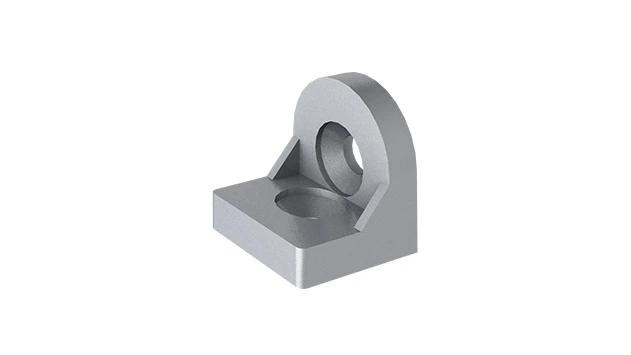
The turning angle aluminum profile connector provides a 90 degree hidden corner connection. 3030 it is means this size is used for 30 series aluminum profile.The corner code comes with set screws that allow for quick, easy connections.
In the world of computer peripheral manufacturing, where precision meets speed, every component on the production floor plays a silent but critical role. From the smallest screw in a keyboard to the conveyor belts moving monitors, each part contributes to the final product's quality and the line's efficiency. Today, we're shining a spotlight on an unsung hero of modern manufacturing: the Turning Angle Code 3030 . This unassuming metal component, paired with 3030 aluminum profiles , has quietly revolutionized how factories build, adapt, and optimize their production systems. Let's explore how three leading computer peripheral manufacturers leveraged this dynamic duo to solve real-world challenges, boost productivity, and stay ahead in a competitive market.
Understanding the Basics: What is Turning Angle Code 3030?
Before diving into the case studies, let's get familiar with the star of the show. The Turning Angle Code 3030 is a specialized connector designed for use with 3030 aluminum profiles—those sleek, modular metal rails that form the backbone of workbenches, flow racks, and material handling systems in factories worldwide. Think of it as the "hinge with muscle": it joins 3030 profiles at precise angles (often 90 degrees, but adjustable for custom setups), adding rigidity, stability, and flexibility to structures that need to withstand daily wear and tear.
What makes this angle code stand out? Unlike traditional welding or fixed brackets, it's bolt-on and reusable. Need to reconfigure a workbench for a new keyboard model? Loosen the bolts, adjust the angle code, and tighten—no cutting, no welding, no downtime. It's a perfect fit for lean systems , where minimizing waste (time, materials, effort) is key. And because it's made from high-grade aluminum, it's lightweight yet strong enough to support heavy components like monitor screens or metal tool holders.
Now, let's meet the companies that turned this simple component into a game-changer.
Case Study 1: TechKey Keyboards – Adapting to Rapid Product Iterations
The Challenge: Static Workstations Struggle with New Keyboard Designs
TechKey, a mid-sized manufacturer known for ergonomic keyboards, faced a common problem in the tech industry: rapid product updates. In 2023 alone, they launched three new keyboard models—each with different key layouts, wireless modules, and accessory compartments. Their old production line, however, was built with fixed wooden workbenches and welded steel frames. To accommodate a new model, workers had to manually drill holes, add makeshift shelves, or even swap out entire workstations—a process that took 8-10 hours per line and often led to errors (think misaligned tool holders or unstable part bins).
"We were losing a full shift every time we launched a new keyboard," recalls Maria Gonzalez, TechKey's Production Manager. "Our team was frustrated, and our lead times were slipping. We needed a way to reconfigure workstations in hours, not days."
The Solution: Modular Workstations with Turning Angle Code 3030 and 3030 Aluminum Profiles
TechKey's engineering team turned to modular aluminum systems. They replaced their fixed workbenches with frames built from 3030 aluminum profiles, connected using Turning Angle Code 3030. Here's how it worked:
- Adjustable Tool Racks: Using angle codes, they mounted vertical 3030 profiles on the workbench edges. Tool holders (for screwdrivers, pliers, etc.) were then bolted to these profiles. When a new keyboard model required tools in different positions, workers simply slid the holders along the profiles or repositioned the angle codes to tilt racks at a better angle.
- Removable Part Bins: Horizontal 3030 profiles, secured with angle codes, served as rails for plastic bins. Bins could be added, removed, or rearranged in minutes—no drilling required. For example, a keyboard with extra USB-C ports needed a bin for USB-C connectors; workers just clipped a new bin onto the rail.
- Height-Adjustable Work Surfaces: By adding extra angle codes at the base of the workbench legs, TechKey could raise or lower the entire surface by 2-3 inches to match worker heights, reducing fatigue during long shifts.
The Results: 30% Faster Changeovers and Happier Teams
The impact was immediate. When TechKey launched their fourth keyboard model in late 2023, reconfiguring the entire production line took just 2 hours—down from 8. Error rates dropped by 25% because tools and parts were always in the right place. And perhaps most importantly, worker satisfaction spiked. "Our team went from dreading model launches to actually getting excited," Gonzalez says. "They felt empowered to tweak their workstations to fit their style, which made them more engaged and productive."
By the end of the year, TechKey's production output increased by 18%, and they were able to take on two additional client orders—all thanks to the flexibility of Turning Angle Code 3030 and 3030 profiles.

Case Study 2: ErgoGrip Mice – Taming the "Jam Monster" in Flow Racks
The Challenge: Unpredictable Material Flow Cripples Conveyor Efficiency
ErgoGrip, a manufacturer of high-end gaming mice, prides itself on precision. Their mice feature custom sensors, ergonomic grips, and RGB lighting—all assembled in a multi-step process. A critical part of their line is the flow rack system: gravity-fed roller tracks that move mouse shells, PCBs, and final assemblies from one workstation to the next. But there was a problem: the flow racks were prone to jams. Several times a day, mouse components would get stuck halfway down the track, causing backups that rippled through the entire line.
"We traced the issue to the racks themselves," explains Raj Patel, ErgoGrip's Plant Engineer. "Our old racks were made from flimsy steel rails with plastic connectors. Over time, the connectors would warp or loosen, making the tracks uneven. A mouse shell might hit a bump, tip to the side, and suddenly—jam. Our maintenance team was spending 20% of their day unjamming tracks instead of fixing real problems."
The Solution: Reinforced Flow Racks with Turning Angle Code 3030
Patel's team decided to rebuild the flow racks using 3030 aluminum profiles and Turning Angle Code 3030. Here's why this combo was the perfect fix:
Stability First: The 3030 profiles, with their square cross-section and internal reinforcing ribs, provided a much sturdier base than steel rails. The Turning Angle Code 3030, bolted at the joints where the vertical supports met the horizontal tracks, eliminated "play" (wobbling) in the structure. Even when loaded with heavy batches of mouse shells, the racks stayed perfectly level.
Smooth Roller Alignment: ErgoGrip added roller tracks (another key component in flow systems) to the 3030 profiles. The angle codes ensured the tracks were mounted at a consistent 5-degree incline—just enough gravity to move parts, not so much that they crashed into each other. The aluminum profiles also reduced vibration, so parts glided smoothly instead of bouncing and tipping.
Quick Repairs: When a roller did wear out (inevitable with daily use), workers could remove the affected section by loosening the angle code bolts, swap in a new track, and reattach—all in 10 minutes. No more waiting for a welder or cutting torch.
The Results: 40% Fewer Jams and a 15% Boost in Throughput
After installing the new racks, ErgoGrip's jam rate plummeted by 40%. "We went from 8-10 jams a day to 3-4," Patel reports. "Our maintenance team finally has time to focus on preventive work, like lubricating rollers or upgrading sensors." The smoother flow also meant parts arrived at workstations more consistently, reducing idle time for assemblers. By the end of the quarter, the line was producing 15% more mice per shift—all without adding extra workers or overtime.

Case Study 3: ClearView Monitors – Stabilizing Heavy Loads for Safer, Faster Assembly
The Challenge: Wobbly Workbenches Threaten Safety and Quality
ClearView, a producer of 27-inch and 32-inch monitors, faced a different kind of problem: weight. A single monitor screen, plus its metal backplate and internal components, can weigh 15-20 pounds. When workers assembled these on the factory's old workbenches—made from particleboard with metal legs—the surfaces would wobble under the load. This wasn't just annoying; it was dangerous. A misstep while lifting a screen could lead to a fall, and the instability made it hard to align screws or connect delicate ribbon cables, leading to rework.
"We had two near-misses in one month—workers nearly dropping screens because the bench shifted," says Sarah Chen, ClearView's Safety Manager. "We needed workbenches that could handle the weight without shaking, but we also couldn't afford to replace them every time we launched a larger monitor."
The Solution: Reinforced Workbenches with Turning Angle Code 3030 and 3030 Profiles
Chen's team partnered with an industrial design firm to create a custom workbench solution centered on 3030 aluminum profiles and Turning Angle Code 3030. The result was a "double-frame" structure:
Lower Frame (Base Support): A square frame of 3030 profiles, connected with Turning Angle Code 3030 at each corner, formed the base. This frame sat on heavy-duty casters (for mobility) and was bolted to the floor at key points to prevent sliding.
Upper Frame (Work Surface): A second square frame, also using 3030 profiles and angle codes, was mounted 36 inches above the base. Between the two frames, diagonal 3030 "braces" (connected with angle codes) added triangular stability—engineers call this "truss design," and it's why bridges don't wobble.
Reinforced Top Surface: The work surface itself was a 1-inch thick aluminum honeycomb panel (lightweight but strong) bolted to the upper frame. Even with a 20-pound monitor on one corner, the surface barely flexed.
The Results: Zero Accidents and a 20% Jump in Assembly Speed
The impact was immediate. Six months after installing the new workbenches, ClearView reported zero safety incidents related to unstable surfaces. Workers, no longer worrying about wobbles, could focus on precision. "Assembling the backplate used to take 5 minutes per monitor—now it takes 3," says Chen. "The stability means screws go in straight the first time, and ribbon cables connect without bending. We've cut rework by 25%."
Plus, when ClearView launched a new 34-inch ultrawide monitor (25 pounds), they didn't need new workbenches. They simply added extra diagonal braces (using, you guessed it, Turning Angle Code 3030) to the existing frames, reinforcing them for the heavier load.
Beyond the Case Studies: Why Turning Angle Code 3030 and 3030 Profiles Work for Everyone
These three stories highlight just a few ways Turning Angle Code 3030 and 3030 aluminum profiles add value, but their benefits extend far beyond computer peripherals. Here's why they've become staples in modern manufacturing:
1. Flexibility That Keeps Up with Demand
In an industry where product lifecycles get shorter every year, factories can't afford "one-and-done" infrastructure. The Turning Angle Code 3030 lets you adapt on the fly—whether you're adding a new workstation, shrinking a flow rack, or reconfiguring a conveyor. It's like building with Lego blocks for adults: the same components can create endless structures.
2. Cost Savings in the Long Run
Yes, aluminum profiles and angle codes cost more upfront than particleboard or welded steel. But consider this: TechKey saved $15,000 in labor costs alone by cutting changeover time. ErgoGrip reduced maintenance expenses by 30%. ClearView avoided potential workers' compensation claims (which average $40,000 per incident). Over 2-3 years, the ROI is clear.
3. Compatibility with Lean Systems
Lean manufacturing is all about eliminating waste, and nothing wastes more than idle time or redundant equipment. By using modular components, factories can repurpose old workbenches or flow racks instead of throwing them away. When TechKey phased out a keyboard model, they disassembled the workbench, sorted the angle codes and profiles, and used them to build a test station for new prototypes.
By the Numbers: A Comparison of the Three Case Studies
| Company | Challenge | Solution with Turning Angle Code 3030 | Key Results |
|---|---|---|---|
| TechKey Keyboards | Static workstations couldn't adapt to new keyboard models, causing 8-10 hour changeovers. | Modular workbenches with 3030 profiles and angle codes for adjustable tool racks, part bins, and height settings. |
• 30% faster changeovers (2 hours vs. 8-10 hours)
• 25% reduction in assembly errors • Improved worker morale |
| ErgoGrip Mice | Flow rack jams due to warped steel rails and unstable connectors, slowing throughput. | Reinforced flow racks with 3030 profiles and angle codes to stabilize roller tracks and reduce vibration. |
• 40% fewer jams (3-4 per day vs. 8-10)
• 15% increase in daily production • 30% lower maintenance costs |
| ClearView Monitors | Wobbly workbenches threatened safety and quality when assembling heavy monitors. | Double-frame workbenches with 3030 profiles, angle codes, and diagonal braces for stability. |
• Zero safety incidents
• 20% faster assembly time • 25% reduction in rework |
Looking Ahead: The Future of Modular Manufacturing
As computer peripherals become more complex—think foldable keyboards, wireless charging mice, or curved monitors—the need for flexible, durable production systems will only grow. Turning Angle Code 3030 and 3030 aluminum profiles are poised to play an even bigger role, especially as factories adopt Industry 4.0 technologies like IoT sensors or collaborative robots (cobots). Imagine a workbench that, thanks to its modular design, can easily integrate a cobot arm (mounted via angle codes) to assist with heavy lifting, or a flow rack with built-in sensors (attached to 3030 profiles) that alerts managers when parts are running low.
The bottom line? In manufacturing, success isn't just about the products you make—it's about how you make them. Turning Angle Code 3030 and 3030 aluminum profiles aren't just tools; they're enablers. They let factories be agile, safe, and efficient in a world that waits for no one. So the next time you type on your keyboard, click your mouse, or stare at your monitor, take a moment to appreciate the silent strength of the angle code and profile working behind the scenes—making sure your device was built with care.