- Company Articles
- Products and Technology
- Product knowledge
- Turning Angle Code 4040 Design Tips for Modular Lean Workstations

Turning Angle Code 4040 Design Tips for Modular Lean Workstations
Related Product
Turning Angle Code 4040
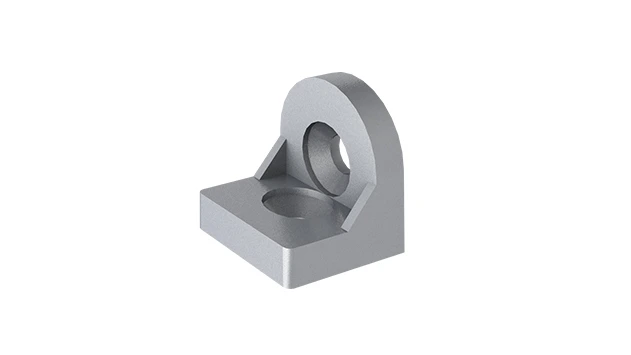
The turning angle aluminum profile connector provides a 90 degree hidden corner connection. 4040 it is means this size is used for 40 series aluminum profile.The corner code comes with set screws that allow for quick, easy connections.
Walk into any modern manufacturing facility, and you'll likely notice a common thread: workstations that feel less like permanent fixtures and more like living, breathing systems. These are modular lean workstations—flexible, adaptable, and engineered to evolve with the needs of production lines. At the heart of their versatility lies a small but mighty component: the Turning Angle Code 4040. Often overlooked, this unassuming connector is the silent architect of efficient workflows, sturdy structures, and seamless customization. Whether you're building a lean pipe workbench for assembly tasks or reconfiguring a material handling system, mastering the design principles of the Turning Angle Code 4040 can transform good workstations into great ones. In this guide, we'll dive into practical tips, real-world applications, and key considerations to help you leverage this component to its full potential, ensuring your modular setups are not just functional, but also ergonomic, durable, and ready for whatever the factory floor throws next.
Why Modular Lean Workstations Matter
Before we zoom in on the Turning Angle Code 4040, let's ground ourselves in why modular lean workstations have become indispensable in modern manufacturing. Traditional fixed workstations often trap teams in rigid layouts, forcing them to adapt to the space rather than the other way around. When production needs change—new product lines, updated processes, or shifts in demand—these setups become costly roadblocks, requiring full overhauls or expensive replacements.
Modular systems flip the script. By using components like aluminum profiles , connectors, and adjustable accessories, they let you build, break down, and rebuild workstations in hours, not weeks. This agility cuts downtime, reduces waste (a core tenet of lean manufacturing), and empowers teams to iterate on layouts until they find the perfect flow. But none of this is possible without reliable, versatile connectors—and that's where the Turning Angle Code 4040 shines.
Think of modular workstations as a puzzle. The aluminum profile s are the pieces, but the Turning Angle Code 4040 is the cornerstone that holds them together. It's the difference between a wobbly structure that falls apart at the first bump and a stable, secure setup that can handle daily wear and tear. In short, if modular workstations are the future of manufacturing efficiency, the Turning Angle Code 4040 is the key to unlocking that future.
The Role of Turning Angle Code 4040 in Modular Design
So, what exactly is a Turning Angle Code 4040? At its simplest, it's a right-angle connector designed to join two aluminum profiles at a 90-degree angle. But its true value lies in its precision and adaptability. Unlike generic brackets, it's engineered to fit snugly with 40mm x 40mm profiles (hence the "4040" in its name), creating a connection that's both strong and easy to adjust. This makes it ideal for everything from lightweight shelving units to heavy-duty assembly tables.
One of the biggest advantages of the Turning Angle Code 4040 is its compatibility. It works seamlessly with standard T-slot aluminum profiles, which means you can mix and match accessories—shelves, tool holders, roller tracks , and more—without worrying about mismatched parts. Need to add a second tier to your workstation? Just slide in a few more profiles and secure them with angle codes. Want to reposition a roller track for better material flow? Loosen the codes, adjust, and retighten. It's this flexibility that makes modular workstations truly "lean."
Durability is another standout feature. Most Turning Angle Code 4040 components are made from high-grade aluminum or zinc alloy, striking a balance between strength and weight. Aluminum, in particular, resists corrosion—a must in environments where spills, humidity, or chemicals are common—while keeping the overall workstation light enough to reconfigure without heavy machinery. For even tougher conditions, some manufacturers offer steel versions, though these add weight and may require more effort to adjust.

5 Design Tips for Mastering Turning Angle Code 4040
Now that we understand the "what" and "why," let's get into the "how." These five tips will help you design modular lean workstations that are stable, ergonomic, and built to last—all while making the most of your Turning Angle Code 4040 components.
1. Prioritize Material Compatibility
The first rule of using Turning Angle Code 4040? Match it with the right aluminum profile . While the "4040" label suggests it's designed for 40mm x 40mm profiles, not all profiles are created equal. Some have thicker walls, others feature different slot sizes or shapes (T-slot vs. V-slot), and material grades can vary. A loose fit between the angle code and profile leads to wobbly structures; a tight fit can stress the profile or strip threads during installation.
Start by checking the profile's specifications. Look for "4040" in the product name (e.g., "4040 EU Standard Aluminum Profile") and confirm the slot width (typically 8mm or 10mm for industrial profiles). Most Turning Angle Code 4040 components are designed for standard T-slots, but double-checking with your supplier ensures compatibility. If you're using a lean pipe workbench with mixed materials—say, aluminum profiles for the frame and steel accessories—opt for angle codes with corrosion-resistant coatings to prevent galvanic corrosion between dissimilar metals.
Pro Tip:
When testing compatibility, do a "dry fit" before tightening. Slide the angle code onto the profile and check for play. It should fit snugly without requiring excessive force. If it's too loose, add a shim or switch to a profile with a tighter tolerance; if it's too tight, verify that both components are from the same manufacturer (many brands have proprietary sizing).
2. Optimize Load Distribution for Stability
A workstation is only as good as its ability to support the tools, materials, and workers who use it. The Turning Angle Code 4040 plays a critical role here, but its effectiveness depends on how you distribute weight across the structure. Even the strongest angle code will fail if overloaded or paired with a flimsy profile.
Start by calculating your workstation's maximum load. For example, a workbench used for electronics assembly might need to support 50kg (tools, PCBs, bins), while a material rack could handle 200kg or more. Once you have that number, distribute the load evenly across multiple Turning Angle Code 4040 connections. Avoid cantilevering heavy items—extending a shelf or tool holder far beyond the frame without additional support creates torque that can bend profiles or loosen connectors over time.
Torque settings matter too. Over-tightening bolts can strip the threads in the angle code or profile, while under-tightening leaves connections loose. Most manufacturers recommend a torque range (e.g., 3-5 Nm for M6 bolts in aluminum profiles). Use a torque wrench to ensure consistency, and retighten connections after the first week of use—initial vibration from daily operations can cause bolts to settle.
3. Integrate Ergonomics from the Start
A workstation that's stable but uncomfortable is a productivity killer. Ergonomics—designing for human comfort and efficiency—should be baked into your modular setup, and the Turning Angle Code 4040 makes this easier than ever. By adjusting the height, depth, and layout of your workstation using angle codes and aluminum profiles , you can reduce strain, minimize errors, and keep teams focused.
Start with height. The ideal working height for a seated operator is typically 750-800mm, while standing workstations range from 900-1100mm. Use the Turning Angle Code 4040 to set the frame height, then add adjustable feet or caster wheels (if mobility is needed) to fine-tune. For example, a "Workbench E (Single Deck-Without Caster)" from many suppliers can be raised or lowered by swapping out the vertical profiles and repositioning the angle codes that attach the deck to the frame.
Next, think about material flow. Adding a roller track to your workstation—using angle codes to mount it at a slight incline—lets parts or tools glide smoothly to the operator, reducing reaching and bending. Position the track at elbow height, and angle it so materials land within easy grasp. The Turning Angle Code 4040's low profile makes it easy to mount tracks flush with the workstation surface, avoiding awkward gaps that catch on gloves or tools.
Real-World Example:
A automotive parts manufacturer recently redesigned their assembly workstations using Turning Angle Code 4040 and
roller tracks
. By angling the tracks at 5 degrees and mounting them 150mm below the work surface, they reduced operator reaching by 40% and cut part-dropping incidents by 65%. The angle codes ensured the tracks stayed secure even with constant vibration from nearby machinery.
4. Embrace Customization with Accessories
The beauty of modular workstations lies in their ability to grow with your needs—and the Turning Angle Code 4040 is the gateway to endless customization. From shelves and tool hooks to monitor arms and bin holders, this connector lets you add accessories without drilling, welding, or permanently altering the frame.
Start with the basics: shelves. Use two Turning Angle Code 4040 components per shelf bracket to attach horizontal profiles to the workstation frame. For heavier items (like power tools), add a third angle code in the middle for extra support. If you need to adjust shelf height later, simply loosen the bolts, slide the angle codes up or down the aluminum profile , and retighten—no new holes or tools required.
For material handling, pair angle codes with roller tracks or conveyor sections. Many roller track systems come with brackets designed to fit T-slot profiles, but if not, use the Turning Angle Code 4040 as an adapter. Mount the angle code to the profile, then attach the track bracket to the angle code's threaded holes. This works for everything from small plastic roller guides (yellow or grey, as listed in common inventory) to heavy-duty steel roller tracks for pallets.
Don't forget mobility. Adding caster wheels to a workstation turns it into a mobile cart, perfect for moving materials between stations or clearing floor space during deep cleaning. Use heavy-duty angle codes to mount caster plates to the workstation legs, ensuring the wheels are positioned at the corners for stability. Look for casters with brakes to lock the workstation in place during use—critical for preventing accidents during assembly tasks.
5. Plan for Maintenance and Longevity
Modular workstations are built to last, but they're not maintenance-free. The Turning Angle Code 4040, like any mechanical component, will wear over time—especially in high-vibration environments or with frequent reconfigurations. A little proactive care can extend its lifespan and keep your workstation safe and functional.
Start with regular inspections. Check angle codes for signs of wear: stripped threads, bent flanges, or corrosion. Tighten loose bolts using a torque wrench (refer to the manufacturer's specs) to prevent further damage. For workstations near moisture or chemicals, clean angle codes with a mild detergent and apply a corrosion-resistant spray (e.g., WD-40 Specialist Long-Term Corrosion Inhibitor) to protect against rust.
When reconfiguring, avoid over-tightening. Repeatedly torquing bolts beyond their limit can stretch or damage the angle code's threads. If you need to disassemble a workstation, label components (e.g., "Left Front Leg – Angle Code A") to avoid mixing and matching during reassembly—even slight differences in wear can affect fit.
Maintenance Checklist:
• Weekly: Tighten loose bolts on high-use workstations (e.g., assembly lines).
• Monthly: Inspect angle codes for corrosion or deformation.
• Quarterly: Clean and lubricate threads (if using adjustable angle codes).
• Annually: replace any angle codes with stripped threads or bent flanges.
• Weekly: Tighten loose bolts on high-use workstations (e.g., assembly lines).
• Monthly: Inspect angle codes for corrosion or deformation.
• Quarterly: Clean and lubricate threads (if using adjustable angle codes).
• Annually: replace any angle codes with stripped threads or bent flanges.

Turning Angle Code 4040 vs. Other Connectors: When to Choose What
The Turning Angle Code 4040 is versatile, but it's not the only connector in the modular toolkit. Understanding when to use it versus alternatives like 90-degree brackets, corner cubes, or hinge connectors will help you design more efficient workstations. Let's break down the key differences:
| Connector Type | Best For | Load Capacity | Adjustability | Cost |
|---|---|---|---|---|
| Turning Angle Code 4040 | 90-degree fixed joints, aluminum profile frames, workbench legs | Medium-High (50-150kg per joint) | Moderate (height/depth adjustments via profile slots) | Low-Medium |
| Corner Cube Connector | Multi-axis joints (3+ profiles), complex structures | High (100-200kg per joint) | Low (fixed angles) | Medium-High |
| Hinge Connector | Folding workstations, adjustable shelves | Low-Medium (20-80kg per joint) | High (360-degree rotation) | Medium |
| Flange Bracket | Attaching non-profile components (wooden tops, metal panels) | Medium (40-100kg per bracket) | Low (fixed position) | Low |
As the table shows, the Turning Angle Code 4040 strikes a sweet spot between load capacity, adjustability, and cost—making it ideal for most modular lean workstations. Save corner cubes for heavy-duty structures (e.g., material racks with 3 rows and 3 floors) and hinge connectors for foldable setups; stick with angle codes for everything else.
Final Thoughts: Building Workstations That Grow with You
Modular lean workstations are more than just a trend—they're a commitment to efficiency, adaptability, and respect for the people who use them. The Turning Angle Code 4040, though small, is a big part of that commitment. By prioritizing material compatibility, optimizing load distribution, integrating ergonomics, embracing customization, and planning for maintenance, you can design workstations that don't just meet today's needs, but also tomorrow's.
Remember: the best modular systems are built with both precision and flexibility in mind. The Turning Angle Code 4040 gives you both—letting you create sturdy, reliable structures that can evolve as your production lines do. Whether you're assembling a lean pipe workbench , installing a roller track for material flow, or mounting caster wheels for mobility, these tips will help you get the most out of this unsung hero of modular design. Now go build something that works as hard as your team does.