- Company Articles
- Products and Technology
- Product knowledge
- Using Aluminum Profile 3 Way Connectors for Ergonomic Workstations

Using Aluminum Profile 3 Way Connectors for Ergonomic Workstations
Related Product
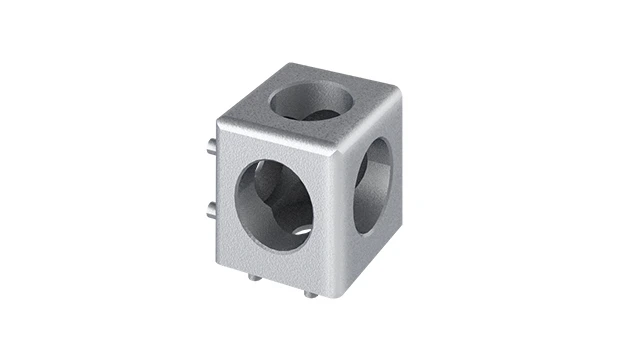
Aluminum Profile 3 Way Connector
The 3 way - squared corner connector is an external fastening method that is typically used to create a corner connection between three profiles. It is a heavy-duty connection that is simple to use and provides a polished look.
Walk into any modern workshop, manufacturing plant, or even a well-organized home office, and you'll likely notice something common: workstations that feel almost tailor-made for the people using them. No more hunched backs over clunky desks, no more stretching to reach tools, no more wasted time searching for materials. These aren't just lucky accidents—they're ergonomic workstations, designed with intention to prioritize comfort, efficiency, and health. And at the heart of many of these setups? Aluminum extrusion profiles and the unsung heroes holding them together: aluminum profile 3 way connectors. In this article, we'll dive into how these simple yet versatile components can transform a basic workspace into an ergonomic haven, whether you're assembling electronics on a production line or typing away at a home office desk.
The Hidden Cost of Ignoring Workstation Ergonomics
Before we jump into the solutions, let's talk about why ergonomics matters in the first place. Think about the average workday: 8 hours (or more) spent at a workstation. If that workstation is poorly designed—too low, too high, cluttered, or rigid—those hours add up. The result? Chronic back pain, neck strain, carpal tunnel syndrome, and even decreased productivity. A study by the Bureau of Labor Statistics found that musculoskeletal disorders (MSDs) account for over 30% of workplace injuries, many of which stem from uncomfortable workstations. For businesses, this translates to lost workdays, increased healthcare costs, and a dip in employee morale. For individuals, it means coming home exhausted, with aches that make it hard to enjoy time outside of work. The good news? Ergonomic workstations don't have to be expensive or complicated. With the right tools—like aluminum extrusion profiles and 3 way connectors—you can build a setup that adapts to you , not the other way around.
Aluminum Extrusion Profiles: The Foundation of Flexible Workstations
When it comes to building ergonomic workstations, the material you choose matters. Traditional options like wood or steel have their pros, but they lack one key feature: flexibility. Wood is heavy and hard to modify; steel is durable but cumbersome to adjust. Enter aluminum extrusion profiles. These lightweight, hollow metal beams—often with a T-slot design along their length—are a game-changer for workspace design. Why? Let's break it down:
Lightweight yet strong: Aluminum is about 1/3 the weight of steel, making it easy to assemble and reconfigure without heavy machinery. But don't let the lightness fool you—aluminum extrusion profiles are surprisingly strong, able to support tools, materials, and even equipment without bending or warping.
Customizable by design: The T-slot grooves running along the profiles are like built-in tracks for accessories. You can slide in brackets, shelves, monitor arms, or tool holders anywhere along the slot, no drilling or welding required. This means if you need to raise a shelf by 2 inches or add a new component, you can do it in minutes, not days.
Durable and low-maintenance: Aluminum resists corrosion, so it holds up well in busy environments like factories or garages. It's also easy to clean—just wipe it down with a damp cloth—and doesn't require painting or sealing to stay looking new.
But aluminum extrusion profiles alone are just pieces of metal. To turn them into a functional workstation, you need a way to connect them securely at different angles. That's where connectors come in—and among the most versatile of these is the aluminum profile 3 way connector.

Aluminum Profile 3 Way Connectors: The Swiss Army Knife of Workstation Building
Imagine trying to build a table with just straight pieces of wood and no way to join the legs to the top. Frustrating, right? Connectors are the glue (literally, in some cases) that hold a workstation together. And while there are many types of connectors—90-degree joints, straight couplers, hinges—the 3 way connector stands out for its ability to add complexity and adaptability to a design. So, what exactly is an aluminum profile 3 way connector?
At its core, it's a small, often L-shaped or T-shaped component designed to join three aluminum extrusion profiles at once, typically at 90-degree angles. Picture a T-junction: one profile runs straight, and another branches off perpendicular to it. Or an L-shape with a third profile extending upward. These connectors slide into the T-slots of the profiles and are secured with screws, creating a tight, wobble-free connection. Some are made of aluminum (matching the profiles for a seamless look), others of reinforced plastic or steel for extra strength. But regardless of material, their purpose is the same: to turn simple beams into a 3D structure that can be customized to fit any need.
Why 3 Way Connectors Are a Must for Ergonomics
Ergonomics is all about adjustability. A workstation that works for a 6-foot-tall person might be agony for someone who's 5'2". With 3 way connectors, you can build in that adjustability from the ground up. Here's how:
Multi-angle support: Need a workstation with a main desk surface, a side shelf for tools, and a vertical rack for materials? A 3 way connector can join the horizontal desk profile, the side shelf profile, and the vertical rack profile in one spot, creating a stable, integrated unit. No more wobbly add-ons or mismatched heights.
Easy height adjustments: Let's say your workbench is too low. With 3 way connectors, you can loosen the screws, slide the vertical profiles up or down, and retighten—no need to disassemble the entire setup. This is a lifesaver for shared workspaces where multiple people use the same station.
Adding layers without complexity: Ergonomic workstations often need multiple levels—think a lower shelf for keyboards, a main deck for monitors, and an upper shelf for reference materials. 3 way connectors let you stack these layers securely, ensuring each level is at the perfect height for easy access.
Take, for example, the Workbench E (single deck-without caster) from many supplier catalogs. On its own, it's a basic flat surface. But with 3 way connectors, you can add a side extension for a mouse pad, a vertical frame for a monitor arm, and a lower shelf for storing a keyboard tray. Suddenly, that "basic" workbench becomes a fully ergonomic desk tailored to your posture and workflow.

Designing Your Ergonomic Workstation: A Step-by-Step Guide with 3 Way Connectors
Building an ergonomic workstation with aluminum extrusion profiles and 3 way connectors isn't rocket science, but it does require some planning. Let's walk through the process, from assessing your needs to putting it all together.
Step 1: Map Out Your Workflow
Start by answering a simple question: What do I do at this workstation? If you're assembling small parts (say, in production assemble), you'll need space for tools, a flat surface for the product, and easy access to materials. If you're a graphic designer, you might prioritize monitor height, keyboard placement, and storage for sketchbooks. Jot down every task you perform regularly, and note where tools, materials, and equipment need to be positioned. For example: "I need my screwdrivers within arm's reach," or "My monitor should be at eye level to avoid neck strain."
Step 2: Choose Your Aluminum Extrusion Profiles
Aluminum extrusion profiles come in different sizes, typically measured by their width and height (e.g., 2020, 3030, 4040, where "4040" means 40mm by 40mm). For most workstations, a 3030 or 4040 profile is a good starting point—large enough to support weight but not so big that it feels bulky. If you're building a heavy-duty setup (like a workbench for power tools), go with a larger profile, like 4080. Make sure the profiles have T-slots wide enough to fit your connectors (most standard connectors work with 6mm or 8mm slots).
Step 3: Plan Your Structure with 3 Way Connectors
Now, sketch out your workstation design. Think about the main components: the base (legs), the work surface, and any add-ons (shelves, racks, tool holders). Here's where 3 way connectors shine. For example:
- Workbench legs: Use 3 way connectors to join vertical leg profiles to horizontal cross-braces, adding stability and preventing wobbling.
- Side shelves: Attach a horizontal shelf profile to the main workbench frame using a 3 way connector, positioning it at elbow height for easy access.
- Material racks: Build a multi-tiered material rack (like the Material Rack B (3 row and 3 floor) from supplier lists) by connecting vertical support profiles to horizontal shelf rails with 3 way connectors, ensuring each shelf is spaced to fit your materials.
Pro tip: Don't be afraid to overestimate the number of 3 way connectors you'll need. It's better to have extras than to pause mid-assembly to order more.
Step 4: Assemble and Adjust
Once you have your profiles and connectors, assembly is straightforward. Slide the connectors into the T-slots of your profiles, align the pieces at the desired angle, and tighten the set screws with an Allen wrench. The beauty of this system is that it's modular —if something doesn't feel right, you can loosen the screws, reposition the connector, and try again. For example, if your workbench is too low, adjust the height of the leg profiles using the 3 way connectors at the base. If a shelf is too deep, shorten the horizontal profile and reattach it with the connector.
| Workstation Component | Aluminum Profile Size | 3 Way Connector Use | Ergonomic Benefit |
|---|---|---|---|
| Single Deck Workbench (Workbench E) | 4040 Aluminum Profile | Join legs to tabletop frame; add side shelves | Adjustable height to match user's elbow level |
| Material Rack B (3 row, 3 floor) | 3030 Aluminum Profile | Connect vertical supports to horizontal shelf rails | Materials at eye/hand level, reducing bending |
| Monitor Stand Attachment | 2020 Aluminum Profile | Attach vertical pole to workbench frame; add crossbar for monitors | Monitor height adjustable to eye level, reducing neck strain |
| Tool Holder Rack | 3030 Aluminum Profile | Create T-junctions for tool hooks and bins | Tools within arm's reach, minimizing movement |
Beyond the Basics: Enhancing Ergonomics with Aluminum Profile Accessories
3 way connectors are powerful, but they're even better when paired with other aluminum profile accessories. These add-ons turn a basic frame into a fully functional workstation tailored to your needs. Let's explore a few key ones:
Caster Wheels for Mobility
Ever wished you could move your workstation to a different spot in the workshop? Add caster wheels (and caster accessories) to the base of your aluminum profile legs. Most caster wheels attach via a plate that slides into the T-slot, secured with a connector. Look for swivel casters with brakes for stability when you need it and mobility when you don't.
Aluminum Guide Rails for Material Flow
If you're working with parts that need to slide from one area to another (like in production assemble), aluminum guide rails are a must. These rails—often paired with roller tracks—create a smooth surface for materials to glide on. Use 3 way connectors to attach the guide rails to your workstation frame, positioning them at a slight angle to let gravity do the work. For example, mount a guide rail above your workbench to slide components down to your hands, reducing the need to bend or reach.
Adjustable Feet for Uneven Floors
Not every workspace has perfectly level floors. Adjustable leveling feet (like anti-slip adjustable leveling feet) screw into the bottom of your aluminum profile legs, letting you tweak each leg's height to keep the workstation stable. This is crucial for ergonomics—an uneven workstation can lead to leaning, which strains the back and shoulders.
Real-World Examples: From Factory Floors to Home Offices
To truly understand the impact of aluminum profile 3 way connectors, let's look at how they're used in real settings:
Case Study 1: Electronics Assembly Line
A small electronics manufacturer was struggling with slow production times and high employee turnover due to uncomfortable workstations. Workers were hunched over static benches, reaching across cluttered surfaces to grab components. The solution? They switched to aluminum extrusion profiles and 3 way connectors. Each workstation was customized: a 4040 profile frame with 3 way connectors supporting a main work surface, a side shelf for tools, and a overhead rack for component bins. Caster wheels made it easy to reconfigure the line for different products, and adjustable feet kept the benches stable on the factory's uneven concrete floor. Within three months, production speed increased by 15%, and employee complaints about back pain dropped by 40%.
Case Study 2: Home Office Workstation
A freelance writer was dealing with chronic neck pain from working at a dining room table. They wanted a home office setup that could grow with their needs but didn't want to spend thousands on a pre-built desk. Using 3030 aluminum profiles, 3 way connectors, and a simple wooden tabletop, they built a standing desk. The 3 way connectors joined the vertical legs to horizontal cross-braces, and a second set of connectors supported a lower shelf for the keyboard. By adjusting the height of the leg profiles, they could switch between sitting and standing throughout the day. The T-slots let them add a monitor arm and a small bookshelf later, turning a basic desk into a fully functional workspace.
Choosing the Right Aluminum Profile 3 Way Connectors and Suppliers
Not all 3 way connectors are created equal. To ensure your workstation is sturdy, safe, and long-lasting, pay attention to these key factors when shopping:
Material quality: Look for connectors made of die-cast aluminum or reinforced plastic. Avoid cheap zinc alloys, which can crack under pressure. Aluminum connectors are ideal for most applications—they're strong, lightweight, and resistant to rust.
Fit precision: The connector should slide smoothly into the T-slot of your aluminum profile and grip tightly when the set screw is tightened. A loose fit can lead to wobbling, which defeats the purpose of an ergonomic setup.
Load capacity: Check the manufacturer's specs for how much weight the connector can support. For heavy components like tool shelves, opt for heavy-duty connectors rated for 50+ pounds per joint.
When it comes to suppliers, choose one that specializes in aluminum extrusion profiles and accessories. A good supplier will offer a range of connector types (including 3 way), provide technical support if you're unsure about sizing, and have a track record of quality. Many also offer pre-cut profiles, which saves you time (and saw blades) if you don't have the tools to cut them yourself.
Investing in Ergonomics: The Gift That Keeps Giving
Building an ergonomic workstation with aluminum extrusion profiles and 3 way connectors isn't just about buying parts—it's about investing in yourself or your team. Think of it this way: every dollar spent on a better workstation is a dollar saved on healthcare costs, lost productivity, and employee turnover. And unlike fixed, one-size-fits-all furniture, an aluminum profile workstation grows with you. Need to add a second monitor? Just attach a new arm with a 3 way connector. Switching from assembling small parts to larger equipment? Reconfigure the frame in an afternoon. The flexibility is endless.
So, whether you're a business owner looking to boost factory efficiency or a remote worker craving a more comfortable home office, don't overlook the power of aluminum profile 3 way connectors. They may be small, but they're the key to building a workstation that works for you—supporting your body, streamlining your workflow, and making every workday a little easier. After all, your best work deserves the best workspace.