- Company Articles
- Products and Technology
- Product knowledge
- Using Aluminum Profile 3 Way Connectors for Mobile Workstations

Using Aluminum Profile 3 Way Connectors for Mobile Workstations
Related Product
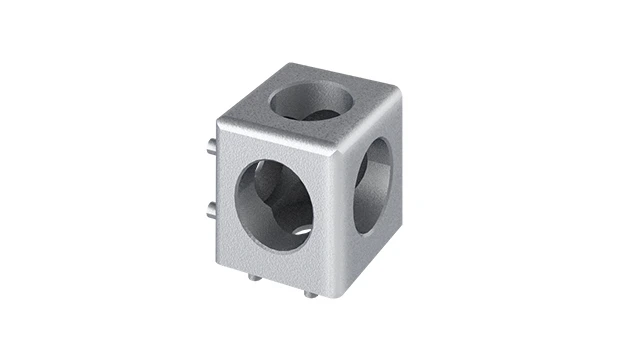
Aluminum Profile 3 Way Connector
The 3 way - squared corner connector is an external fastening method that is typically used to create a corner connection between three profiles. It is a heavy-duty connection that is simple to use and provides a polished look.
In today's fast-paced manufacturing, warehousing, and even office environments, the ability to adapt quickly isn't just a luxury—it's a necessity. Static workspaces, once the norm, now feel like relics of a bygone era. Teams need workstations that can shift with production demands, move effortlessly between departments, and reconfigure in hours (not days) to meet new challenges. Enter the mobile workstation: a modular, agile solution designed to keep up with the rhythm of modern work. And at the heart of these versatile setups? Aluminum profiles and the unsung heroes holding them together—aluminum profile 3 way connectors. Let's dive into how these components work in harmony to create workspaces that are as flexible as the teams using them.
Why Aluminum Profiles? The Backbone of Modular Workstations
Before we zoom in on connectors, let's talk about the foundation: aluminum profiles. If mobile workstations were a house, aluminum profiles would be the framing studs—strong, reliable, and adaptable. But why aluminum, and not steel, wood, or plastic? The answer lies in a rare combination of properties that make aluminum uniquely suited for this role.
First, aluminum is lightweight. A 40mm x 40mm aluminum profile (a common size for workbenches) weighs roughly half as much as a steel profile of the same dimensions. This lightness is critical for mobility—after all, a workstation on casters needs to be easy to push, even when loaded with tools or materials. But don't let the weight fool you: aluminum is surprisingly strong. Thanks to alloys like 6063-T5, which are heat-treated for durability, these profiles can support heavy loads (think 100kg+ on a properly built shelf) without bending or warping.
Then there's corrosion resistance. Unlike steel, aluminum doesn't rust, which means it holds up in humid factories, cleanrooms, or outdoor loading docks. This longevity reduces replacement costs over time—a key consideration for businesses focused on lean system principles, where waste reduction (including waste from frequent repairs) is a top priority.
But perhaps the biggest advantage is modularity. Aluminum profiles come in standardized sizes—20x20mm, 30x30mm, 40x40mm, and so on—with T-slots running along their length. These slots act as built-in attachment points for aluminum profile accessories: connectors, brackets, shelves, and even tools. This modularity means you're not stuck with a "one-and-done" design. Need to add a shelf? Slide in a bracket. Want to raise the work surface? Swap out the leg profiles for longer ones. It's this flexibility that makes aluminum profiles the go-to choice for mobile workstations.
The Role of 3 Way Connectors: More Than Just "Joining Pieces"
If aluminum profiles are the framing, then connectors are the nails, screws, and glue that hold everything together. But not all connectors are created equal. When building a mobile workstation, you'll encounter a range of options: 90° angle brackets, 45° slope connectors, and perhaps most versatile of all, the 3 way aluminum profile connector. As the name suggests, these connectors join three profiles at once, enabling T-junctions, Y-shapes, or multi-directional branching—designs that are essential for creating stable, functional workspaces.
Think about a typical mobile workbench. The frame alone requires joints where vertical legs meet horizontal rails, and horizontal rails meet cross-braces for stability. A simple rectangular frame might use 90° connectors, but add a shelf halfway up, and suddenly you need to attach vertical supports to the horizontal frame—enter the 3 way connector. It allows the shelf's support rail to branch off from the main leg, creating a sturdy T-junction without weakening the structure. Without 3 way connectors, you'd either have to weld pieces together (killing modularity) or use multiple smaller brackets (adding bulk and reducing load capacity).
But their utility goes beyond basic frames. Need a workstation with a side table for tools? Use 3 way connectors to branch off from the main frame. Building a multi-tiered material rack? 3 way connectors let you add vertical dividers between shelves. Even angled structures—like a sloped bin holder for easy part access—can be achieved by combining 3 way connectors with angled brackets. In short, 3 way connectors turn "linear" aluminum profiles into three-dimensional building blocks, unlocking designs that would be impossible with simpler connectors.

Key Features of Aluminum Profile 3 Way Connectors: What to Look For
Not all 3 way connectors are built the same. To ensure your mobile workstation is stable, durable, and easy to assemble, keep an eye out for these critical features:
Material Matters: Aluminum Alloy Construction – The best 3 way connectors are made from the same high-grade aluminum alloy as the profiles themselves (often 6061 or 6063-T5). This ensures compatibility in terms of strength and corrosion resistance. Avoid plastic connectors—they may be cheaper, but they'll warp under heavy loads or crack in cold environments. Even steel connectors can be problematic; they add unnecessary weight and may corrode if not coated, creating a messy, rust-stained workstation over time.
Design: Internal vs. External – 3 way connectors come in two main styles: internal and external. Internal connectors slide into the T-slots of the profiles, creating a clean, flush look with no protruding parts. They're ideal for workstations where aesthetics or space (e.g., tight corners) matter. External connectors, on the other hand, clamp around the outside of the profiles. They're often easier to install (no need to disassemble the frame to insert) and can handle slightly higher loads, making them a favorite for heavy-duty applications like industrial workbenches.
Load Capacity: Know Your Limits – A connector's job is to transfer weight from one profile to another, so load capacity is non-negotiable. Most quality 3 way connectors can handle 50-150kg per joint, depending on size and design. For example, a 40mm external 3 way connector might support 120kg, while a smaller 20mm internal connector could manage 60kg. Always check the manufacturer's specs—overloading a connector is a recipe for wobbling workstations or, worse, collapse.
Tool-Free (or Low-Tool) Assembly – One of the perks of modular systems is avoiding complex tools. Many 3 way connectors use set screws or cam levers that can be tightened with a hex key (Allen wrench) or even by hand. This speeds up assembly and makes reconfiguration a breeze. Imagine needing to adjust a shelf height mid-shift—with tool-free connectors, you can loosen a few screws, slide the shelf, and retighten in minutes. Welding? That would take hours and require a specialist.
Reusability: Build, Break, Rebuild – Lean system principles emphasize reducing waste, and that includes waste from single-use components. High-quality 3 way connectors are designed to be disassembled and reused repeatedly. Unlike glue or welds, which ruin the profiles when removed, connectors with set screws or bolts can be loosened, and the profiles can be cut to new lengths or repurposed for other projects. This reusability lowers long-term costs and aligns with sustainable manufacturing practices.

Building Your Mobile Workstation: A Step-by-Step Guide with 3 Way Connectors
Now that we understand why 3 way connectors matter, let's walk through how to use them to build a basic mobile workstation. We'll focus on a simple but practical design: a 1200mm (L) x 600mm (W) x 850mm (H) workbench with a lower shelf and locking caster wheels. This is a common setup for assembly lines, packaging stations, or even lab workbenches.
Step 1: Plan Your Design (Measure Twice, Cut Once) – Start by sketching your workstation. Note the dimensions, where the shelves will go, and how much weight each part needs to support. For our example, the main frame will use 40x40mm aluminum profiles (sturdy enough for most tasks), with 30x30mm profiles for the lower shelf. List out the parts you'll need: 4 vertical legs (850mm long), 2 front/back rails (1200mm), 2 side rails (600mm), 4 shelf supports (300mm each), and of course, 3 way connectors (we'll need 8: 4 for the main frame corners, 4 for the shelf supports).
Step 2: Gather Your Materials – Along with the profiles and 3 way connectors, you'll need aluminum profile accessories like end caps (to cover sharp edges), hex keys (for tightening connectors), a rubber mallet (to seat profiles in connectors), and a miter saw or hacksaw (to cut profiles to length, if not pre-cut). Don't forget the caster wheels—opt for locking caster wheel models (with brake levers) to keep the workstation stationary when in use.
Step 3: Assemble the Main Frame – Start with the base: attach 3 way connectors to the bottom of each vertical leg (these will connect to the side rails). Then, connect the front and back rails to the legs using 90° connectors (or 3 way connectors if you want to add cross-braces later). Tighten the set screws just enough to hold the profiles in place—you can fully tighten once the frame is square. Use a square tool to ensure the corners are 90°, then fully tighten all screws.
Step 4: Add the Lower Shelf – Now, attach the shelf supports. Using 3 way connectors, bolt the 300mm shelf rails to the vertical legs, about 300mm from the bottom. Make sure the supports are level (use a spirit level), then connect the front and back shelf rails to the supports. Again, check for square and tighten all screws.
Step 5: Mount the Worktop – Cut a worktop to size (plywood, MDF, or even an aluminum honeycomb panel for lightweight durability). Use T-slot nuts and bolts to attach the top to the frame—this keeps it secure but allows for removal if you need to replace it later.
Step 6: Install the Casters – Flip the frame upside down and attach the caster wheels to the bottom of the vertical legs. Most casters come with mounting plates that bolt directly to the profile ends (use end caps with pre-drilled holes for easy installation). Make sure the casters are all facing the same direction (swivel casters work best for maneuverability) and that the locking brakes engage smoothly.
Step 7: Test and Adjust – Stand the workstation upright and give it a gentle push. It should roll smoothly without wobbling. If it leans, check that all connectors are tight and the legs are cut to equal lengths. Test the shelf by placing a weighted box on it—no sagging means you're good to go!
Comparing Connector Types: When to Use 3 Way vs. Other Connectors
3 way connectors are versatile, but they're not the only option. Depending on your design, you might need 90° angle connectors, 45° slope connectors, or even multi-way connectors for complex junctions. To help you choose, here's a quick comparison of common connector types:
| Connector Type | Best For | Load Capacity (Typical) | Assembly Difficulty | Common Use Cases |
|---|---|---|---|---|
| 3 Way Aluminum Profile Connector | Branching structures (T-junctions, Y-shapes) | 60-150kg (varies by size) | Easy (hex key tightening) | Shelf supports, side tables, multi-tiered racks |
| 90° Aluminum Profile Connector | Right-angle joints (frame corners) | 80-200kg (varies by size) | Easy (hex key or cam lever) | Workbench frames, vertical leg-to-rail connections |
| 45° Aluminum Profile Connector | Angled structures (sloped shelves, ramps) | 40-100kg (varies by size) | Moderate (requires precise angle alignment) | Sloped bin holders, inclined roller tracks |
| Multi-Way Connector (4+ ways) | Complex junctions (central support posts) | 100-250kg (heavy-duty models) | Moderate (requires careful spacing) | Central support for large worktables, multi-directional material racks |
As you can see, 3 way connectors strike a balance between versatility and simplicity, making them a staple in most mobile workstation builds. For example, if you're designing a workstation with both a side shelf and a lower shelf, 3 way connectors let you handle both with a single part type, reducing the number of components you need to stock.
Integrating Casters: Turning a Static Bench into a Mobile Workstation
A workstation isn't truly "mobile" without casters, and the connection between the aluminum frame and caster wheel is critical. Casters come in two main types: swivel (360° rotation for maneuverability) and rigid (fixed direction for straight-line movement). For most workstations, a mix works best: two swivel casters with brakes and two rigid casters for stability.
When attaching casters to an aluminum profile frame, use mounting plates that bolt directly to the profile ends. Many casters come with pre-drilled plates that align with the T-slots in the profiles, making installation a matter of inserting T-nuts and bolts. For extra stability, add a reinforcing plate (a small square of aluminum) between the caster and the profile—this distributes the weight and prevents the profile from cracking under heavy loads.
Pro tip: Choose casters with a load rating that exceeds your expected weight. If your workstation will hold 150kg of tools and materials, opt for casters rated for 50kg each (4 casters x 50kg = 200kg total, leaving a 50kg safety margin). And don't skimp on brakes—look for "total lock" brakes that lock both the wheel and the swivel, preventing the workstation from rolling or spinning when in use.
Real-World Applications: How 3 Way Connectors Solve Common Workflow Challenges
To see the impact of 3 way connectors in action, let's look at a few real-world scenarios where they've transformed static workspaces into agile, mobile solutions.
Scenario 1: Electronics Assembly Line (Lean System in Action) – A small electronics manufacturer produces both smartphones and tablets, which require different tools and component layouts. With static workbenches, switching between products meant hours of reconfiguring—unbolting shelves, moving tools, and readjusting lighting. By switching to aluminum profile workstations with 3 way connectors, they can now swap out "modules" (pre-built side shelves with tool holders) in 15 minutes. The 3 way connectors allow the modules to branch off from the main frame, so workers simply loosen a few screws, remove the smartphone module, and bolt on the tablet module. Downtime between product runs dropped from 4 hours to 30 minutes—a game-changer for meeting tight deadlines.
Scenario 2: Warehouse Picking Station – A third-party logistics (3PL) provider handles seasonal spikes in orders (think holiday shopping). During peak times, they need extra picking stations near the shipping area; during lulls, those stations take up valuable space. Using mobile workstations built with 3 way connectors, they can deploy 10 extra stations in a morning by rolling them from storage. The 3 way connectors allow each station to have a custom setup: some with 2-tier shelves for small parts, others with larger bins for bulk items. When the season ends, the workstations are disassembled (using the same 3 way connectors) and stored flat, freeing up 500 sq ft of floor space.
Scenario 3: Medical Device Lab – A medical device lab needed workstations that could be sanitized easily and moved between cleanrooms. Wooden workbenches were porous and hard to clean; steel benches were heavy and prone to rust. Aluminum profile workstations with 3 way connectors solved both issues. The smooth aluminum surfaces wipe clean with disinfectant, and the lightweight frame (on locking casters) can be rolled between rooms. 3 way connectors allowed them to add adjustable microscope arms and tool hooks, customizing each workstation to the researcher's needs without welding or drilling.
Maintenance Tips: Keeping Your Mobile Workstation in Top Shape
Like any tool, your aluminum profile workstation will last longer with proper care. Here's how to keep it (and its 3 way connectors) in peak condition:
Check Tightness Regularly – Vibration from moving the workstation can loosen set screws over time. Every month, give each connector a quick turn with a hex key to ensure it's tight. This prevents wobbling and extends the life of the profiles.
Clean Profiles and Connectors – Dust, oil, and debris can build up in T-slots and connector threads, making disassembly difficult. Wipe profiles with a damp cloth monthly, and use a small brush (like a toothbrush) to clean out T-slots. For stubborn grime, a mild degreaser (like isopropyl alcohol) works wonders.
Lubricate Casters – Keep caster wheels rolling smoothly by applying a drop of lubricating oil to the axle every 3 months. This prevents squeaking and reduces wear on the wheel bearings.
replace Worn Parts Promptly – If a connector's set screw strips, or a caster wheel develops a flat spot, replace it immediately. Most aluminum profile accessories are inexpensive, and delaying replacement can lead to bigger issues (like a wobbly workstation that damages products).
Conclusion: 3 Way Connectors – Small Parts, Big Impact
Mobile workstations are more than just a trend—they're a reflection of how work itself is changing: faster, more flexible, and focused on adaptability. And at the center of this revolution are aluminum profiles and 3 way connectors. These small, unassuming parts turn rigid metal into a canvas for creativity, allowing teams to build, break down, and rebuild workspaces that grow with their needs.
Whether you're assembling electronics, picking orders, or conducting lab research, the right combination of aluminum profiles, 3 way connectors, and casters can transform your workflow from frustratingly static to seamlessly mobile. And the best part? You don't need to be an engineer to design one. With modular components and a little planning, anyone can build a workstation that's as unique as their work.
So, the next time you're stuck with a workstation that can't keep up, remember: the solution might be as simple as a few aluminum profiles and the versatile 3 way connectors that bring them to life. After all, in a world that moves fast, your workspace should too.