- Company Articles
- Products and Technology
- Product knowledge
- What Size Aluminum Profile Rubber Strip Fits Standard 20x20 Aluminum Extrusions?

What Size Aluminum Profile Rubber Strip Fits Standard 20x20 Aluminum Extrusions?
Related Product
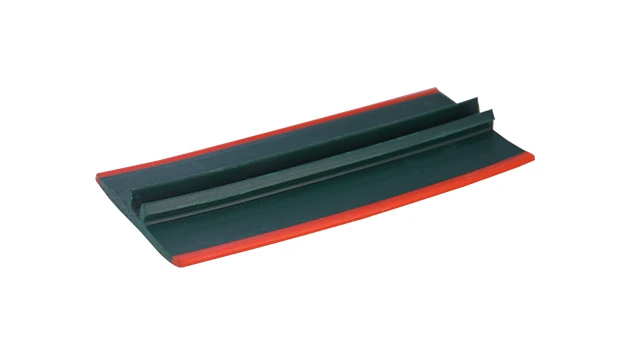
Aluminum Profile Rubber Strip
The tread strip fits into a T-slot channel and provides an anti-slip ribbed surface. It has a key pad that presses into a T-slot and is commonly used for adding traction on steps or as padding for doors. Tread strip can be ordered by rolls. The high quali
Let's start with a familiar scenario: You've just unboxed a set of 20x20 aluminum extrusions, eager to build that custom workbench for your garage or the material rack your workshop has been missing. You line up the profiles, tighten the brackets, and step back to admire your handiwork—only to notice something off. The edges feel sharp, there's a tiny gap between the connected profiles, and when you run your finger along the t-slot, you can almost hear the dust and debris that'll soon find their way in. That's where aluminum profile rubber strips come in. These small but mighty accessories are the unsung heroes of aluminum extrusion projects, turning rough edges into smooth finishes and gaps into sealed, professional-looking joints. But here's the question: with so many sizes and types available, how do you know which rubber strip fits your standard 20x20 aluminum profile? Let's dive in.
First Things First: What Exactly Is a 20x20 Aluminum Profile?
Before we talk rubber strips, let's make sure we're all on the same page about the star of the show: the 20x20 aluminum profile. When we say "20x20," we're referring to the cross-sectional dimensions—20 millimeters in width and 20 millimeters in height. These extrusions are part of the larger family of aluminum extrusion profiles, which are created by pushing heated aluminum through a die to form consistent, uniform shapes. What makes them so popular? Their versatility. 20x20 profiles are lightweight yet surprisingly strong, making them ideal for everything from small-scale projects like 3D printer frames to larger setups like workbenches, shelving units, and even industrial material racks.
A key feature of these profiles is the t-slot—a groove that runs along the length of the extrusion. This slot is what allows you to attach accessories: brackets, panels, shelves, and yes, rubber strips. The t-slot's dimensions vary slightly between manufacturers, but for standard 20x20 profiles, the slot is typically around 6mm wide and 4mm deep (though this can vary by 0.5-1mm depending on the specific design). This slot is where the rubber strip will live, so understanding its size is critical to finding the right fit.
A key feature of these profiles is the t-slot—a groove that runs along the length of the extrusion. This slot is what allows you to attach accessories: brackets, panels, shelves, and yes, rubber strips. The t-slot's dimensions vary slightly between manufacturers, but for standard 20x20 profiles, the slot is typically around 6mm wide and 4mm deep (though this can vary by 0.5-1mm depending on the specific design). This slot is where the rubber strip will live, so understanding its size is critical to finding the right fit.
Why Bother with Rubber Strips, Anyway?
You might be thinking, "Do I really need a rubber strip? Can't I just leave the t-slot as is?" Let's break down why these small accessories matter. First,
sealing
. The t-slot, while functional, is a tiny channel that can collect dust, dirt, and even small tools if you're not careful. A rubber strip blocks that channel, keeping your profile clean and reducing maintenance. Second,
protection
. Bare aluminum edges can be sharp—especially if the extrusion wasn't deburred properly. A rubber strip softens those edges, reducing the risk of cuts when you're working near the profile. Third,
noise reduction
. If you've ever built a rack with aluminum profiles, you know they can rattle a bit when items are placed on them. Rubber strips dampen vibrations, making your setup quieter. Finally,
aesthetics
. Let's be honest: a profile with a clean, colored rubber strip looks more polished than one with an exposed, empty t-slot. It's a small detail that elevates the entire project.
When shopping for aluminum profile accessories, you'll often come across terms like "t-slot rubber seal cover" or "rubber insert"—these are just fancy names for the rubber strips we're discussing. They're made from materials like EPDM, silicone, or PVC, each with its own benefits (EPDM for temperature resistance, silicone for flexibility, PVC for affordability). But regardless of the material, the first step is getting the size right.
When shopping for aluminum profile accessories, you'll often come across terms like "t-slot rubber seal cover" or "rubber insert"—these are just fancy names for the rubber strips we're discussing. They're made from materials like EPDM, silicone, or PVC, each with its own benefits (EPDM for temperature resistance, silicone for flexibility, PVC for affordability). But regardless of the material, the first step is getting the size right.

Key Factors That Determine the Right Rubber Strip Size
Not all 20x20 profiles are identical, and neither are their t-slots. To find the perfect rubber strip, you'll need to consider three main factors:
t-slot width
,
t-slot depth
, and
rubber material flexibility
. Let's unpack each.
T-slot width is the most critical measurement. Standard 20x20 profiles usually have a t-slot width of 5-7mm. Some manufacturers stick to a tight 5mm, others opt for 6mm, and a few might go up to 7mm for easier accessory installation. The rubber strip's width needs to match this closely—too narrow, and it'll slide out; too wide, and it'll bulge or tear when inserted.
T-slot depth is the second measurement. This is how deep the slot is from the top edge of the profile to the bottom of the slot. For 20x20 profiles, depth typically ranges from 3-5mm. A rubber strip that's too shallow won't fill the slot, leaving gaps; too deep, and it might compress too much, losing its sealing ability.
Material flexibility plays a role too. Softer rubbers (like silicone) can stretch to fit slightly larger slots, while firmer materials (like hard PVC) need a more precise fit. If you're unsure about your slot's exact dimensions, a flexible material gives you a bit of wiggle room.
T-slot width is the most critical measurement. Standard 20x20 profiles usually have a t-slot width of 5-7mm. Some manufacturers stick to a tight 5mm, others opt for 6mm, and a few might go up to 7mm for easier accessory installation. The rubber strip's width needs to match this closely—too narrow, and it'll slide out; too wide, and it'll bulge or tear when inserted.
T-slot depth is the second measurement. This is how deep the slot is from the top edge of the profile to the bottom of the slot. For 20x20 profiles, depth typically ranges from 3-5mm. A rubber strip that's too shallow won't fill the slot, leaving gaps; too deep, and it might compress too much, losing its sealing ability.
Material flexibility plays a role too. Softer rubbers (like silicone) can stretch to fit slightly larger slots, while firmer materials (like hard PVC) need a more precise fit. If you're unsure about your slot's exact dimensions, a flexible material gives you a bit of wiggle room.

Common Rubber Strip Sizes for 20x20 Aluminum Extrusions
After checking with manufacturers and scouring forums for real-world user experiences, we've found that three sizes stand out as the most compatible with standard 20x20 profiles. Let's break them down, and we'll include a table later to compare their specs.
3x3mm Rubber Strips : These are the "universal" option for many 20x20 profiles. The 3mm width fits slots around 5-6mm (since the rubber compresses slightly when inserted), and the 3mm depth works well for shallower t-slots (3-4mm). They're made from flexible EPDM or PVC, so they're easy to install—just press them into the slot with your thumb. Users love them for basic projects like workbenches or small shelving units where sealing and edge protection are priorities but heavy-duty performance isn't necessary.
4x2mm Rubber Strips : If your 20x20 profile has a narrower t-slot (closer to 5mm), a 4x2mm strip might be the better fit. The 4mm width ensures a snug seal, while the 2mm depth keeps the strip from protruding too far. These are popular for profiles used in electronics workbenches, where a lower profile (less) is preferred to avoid interfering with tools or components. They're also a good choice if you plan to use the t-slot for other accessories later—since they're thinner, they leave more space for bolts or brackets if you decide to remove the strip.
5x4mm Rubber Strips : For profiles with wider t-slots (6-7mm) or deeper slots (4-5mm), a 5x4mm strip is the way to go. These are thicker and more durable, making them ideal for industrial setups like material racks or production line workstations. They provide a tighter seal and better vibration dampening, but they're stiffer, so installation might require a bit more force (a rubber mallet can help tap them into place).
3x3mm Rubber Strips : These are the "universal" option for many 20x20 profiles. The 3mm width fits slots around 5-6mm (since the rubber compresses slightly when inserted), and the 3mm depth works well for shallower t-slots (3-4mm). They're made from flexible EPDM or PVC, so they're easy to install—just press them into the slot with your thumb. Users love them for basic projects like workbenches or small shelving units where sealing and edge protection are priorities but heavy-duty performance isn't necessary.
4x2mm Rubber Strips : If your 20x20 profile has a narrower t-slot (closer to 5mm), a 4x2mm strip might be the better fit. The 4mm width ensures a snug seal, while the 2mm depth keeps the strip from protruding too far. These are popular for profiles used in electronics workbenches, where a lower profile (less) is preferred to avoid interfering with tools or components. They're also a good choice if you plan to use the t-slot for other accessories later—since they're thinner, they leave more space for bolts or brackets if you decide to remove the strip.
5x4mm Rubber Strips : For profiles with wider t-slots (6-7mm) or deeper slots (4-5mm), a 5x4mm strip is the way to go. These are thicker and more durable, making them ideal for industrial setups like material racks or production line workstations. They provide a tighter seal and better vibration dampening, but they're stiffer, so installation might require a bit more force (a rubber mallet can help tap them into place).
A Closer Look: Rubber Strip Sizes for 20x20 Profiles (with Comparison Table)
To make it easier to compare, here's a breakdown of the most common sizes, their best uses, and compatibility with standard 20x20 profiles:
A quick note: Some manufacturers sell "universal" rubber strips that claim to fit all 20x20 profiles. While these can work, they're often a compromise. For example, a 4x3mm "universal" strip might be too loose in a 5mm slot and too tight in a 6mm slot. If possible, measure your profile's t-slot first—that's the only way to guarantee a perfect fit.
| Rubber Strip Size (Width x Depth, mm) | Ideal T-Slot Width (mm) | Ideal T-Slot Depth (mm) | Material Type | Best For | Installation Difficulty |
|---|---|---|---|---|---|
| 3x3mm | 5-6mm | 3-4mm | EPDM/PVC | Workbenches, small shelving, DIY projects | Easy (press-fit with thumb) |
| 4x2mm | 5mm | 2-3mm | Silicone/PVC | Electronics workbenches, tight spaces | Moderate (needs steady pressure) |
| 5x4mm | 6-7mm | 4-5mm | Heavy-duty EPDM | Industrial racks, production lines, high-vibration setups | Slightly difficult (may need rubber mallet) |
A quick note: Some manufacturers sell "universal" rubber strips that claim to fit all 20x20 profiles. While these can work, they're often a compromise. For example, a 4x3mm "universal" strip might be too loose in a 5mm slot and too tight in a 6mm slot. If possible, measure your profile's t-slot first—that's the only way to guarantee a perfect fit.
How to Measure Your 20x20 Profile's T-Slot (Step-by-Step)
Measuring the t-slot might sound intimidating, but it's actually straightforward—you just need a ruler or caliper (digital calipers are best for precision, but a standard ruler works too). Here's how:
Step 1: Locate the t-slot . On a 20x20 profile, the t-slot runs along one or more edges (most have slots on all four sides, but some have fewer). It looks like a narrow groove with a wider opening at the top (the "t" shape).
Step 2: Measure the width . Place your ruler or caliper across the opening of the t-slot (the top part of the "t"). Measure from one inner edge to the other. This is the slot width. For example, if the opening is 6mm across, that's your width.
Step 3: Measure the depth . Now, measure how deep the slot is from the top edge of the profile to the bottom of the slot. insert the ruler vertically into the slot and note the measurement. Most 20x20 profiles have depths between 3-5mm.
Step 4: Write it down . Jot down the width and depth (e.g., "6mm width, 4mm depth"). This is your key to finding the right rubber strip.
Pro tip: If you don't have calipers, use a piece of paper. Cut a small strip, slide it into the t-slot, and mark where it bends—this will give you a rough depth measurement. For width, fold the paper until it fits snugly in the slot, then measure the folded paper's width. It's not perfect, but it's better than guessing!
Step 1: Locate the t-slot . On a 20x20 profile, the t-slot runs along one or more edges (most have slots on all four sides, but some have fewer). It looks like a narrow groove with a wider opening at the top (the "t" shape).
Step 2: Measure the width . Place your ruler or caliper across the opening of the t-slot (the top part of the "t"). Measure from one inner edge to the other. This is the slot width. For example, if the opening is 6mm across, that's your width.
Step 3: Measure the depth . Now, measure how deep the slot is from the top edge of the profile to the bottom of the slot. insert the ruler vertically into the slot and note the measurement. Most 20x20 profiles have depths between 3-5mm.
Step 4: Write it down . Jot down the width and depth (e.g., "6mm width, 4mm depth"). This is your key to finding the right rubber strip.
Pro tip: If you don't have calipers, use a piece of paper. Cut a small strip, slide it into the t-slot, and mark where it bends—this will give you a rough depth measurement. For width, fold the paper until it fits snugly in the slot, then measure the folded paper's width. It's not perfect, but it's better than guessing!
Compatibility with Other Accessories: 2020 Aluminum Profile End Caps
You might be wondering: "If I install a rubber strip, will it interfere with other accessories like end caps?" Great question. 2020 aluminum profile end caps are small covers that fit over the ends of the extrusion, hiding the raw cut and adding a finished look. Most end caps are designed to snap onto the profile without touching the t-slot, so they won't conflict with rubber strips. However, some end caps have small tabs that might overlap with the slot—if that's the case, you'll want to trim the rubber strip slightly at the end of the profile to make space. It's a minor adjustment, but worth checking before you start installing.
Another accessory to consider: t-slot nuts . These are used to attach brackets or shelves to the profile. If you plan to use t-slot nuts, you'll need to remove the rubber strip in the section where the nut will go—since the strip blocks the slot. That's why many users opt for partial strip installation: they leave the strip in areas where they don't need nuts and remove it where they do. It's a flexible solution that lets you have both sealing and functionality.
Another accessory to consider: t-slot nuts . These are used to attach brackets or shelves to the profile. If you plan to use t-slot nuts, you'll need to remove the rubber strip in the section where the nut will go—since the strip blocks the slot. That's why many users opt for partial strip installation: they leave the strip in areas where they don't need nuts and remove it where they do. It's a flexible solution that lets you have both sealing and functionality.
Installation Tips: Getting the Rubber Strip to Stay Put
You've measured the slot, bought the right size strip—now how do you install it without it slipping out? Here are some pro tips:
Clean the slot first . Dust or oil in the t-slot can prevent the rubber strip from adhering properly. Wipe it out with a dry cloth or a cotton swab to remove debris.
Start at one end . Press the strip into the slot at one end of the profile, making sure it's seated evenly. Then, slowly work your way down the length, pressing firmly with your thumb. For longer profiles, a rubber roller (like the kind used for applying decals) can help ensure even pressure.
Trim excess length . Most rubber strips come in 1-2 meter rolls. Measure your profile, add a few extra millimeters, and cut the strip with sharp scissors or a utility knife. A clean cut ensures the strip doesn't fray.
Use a little soap and water (for tight fits) . If the strip is stiff and won't slide into the slot, dip the end in soapy water—it acts as a lubricant. Wipe off excess water after installation, and the strip will grip once dry.
Check for gaps . After installation, run your finger along the strip to ensure it's fully seated. If you see a gap, press that section again or use a small flathead screwdriver (wrapped in tape to avoid scratching the profile) to push the strip into place.
Clean the slot first . Dust or oil in the t-slot can prevent the rubber strip from adhering properly. Wipe it out with a dry cloth or a cotton swab to remove debris.
Start at one end . Press the strip into the slot at one end of the profile, making sure it's seated evenly. Then, slowly work your way down the length, pressing firmly with your thumb. For longer profiles, a rubber roller (like the kind used for applying decals) can help ensure even pressure.
Trim excess length . Most rubber strips come in 1-2 meter rolls. Measure your profile, add a few extra millimeters, and cut the strip with sharp scissors or a utility knife. A clean cut ensures the strip doesn't fray.
Use a little soap and water (for tight fits) . If the strip is stiff and won't slide into the slot, dip the end in soapy water—it acts as a lubricant. Wipe off excess water after installation, and the strip will grip once dry.
Check for gaps . After installation, run your finger along the strip to ensure it's fully seated. If you see a gap, press that section again or use a small flathead screwdriver (wrapped in tape to avoid scratching the profile) to push the strip into place.
Troubleshooting: What If the Strip Doesn't Fit?
Even with careful measuring, you might run into issues. Let's troubleshoot the most common problems:
Strip is too loose and falls out : This means the width is too small for your slot. If you bought a 3x3mm strip and it's sliding around, try a 4x2mm or 5x4mm instead. Alternatively, you can wrap a thin layer of electrical tape around the strip to increase its width—this is a temporary fix, but it works in a pinch.
Strip is too tight and won't insert fully : The width is too large. If you're struggling to push a 5x4mm strip into a 5mm slot, switch to a 3x3mm or 4x2mm. Avoid forcing it—stretching the rubber can cause it to tear over time.
Strip bulges out of the slot : The depth is too great. For example, a 5x4mm strip in a 3mm deep slot will stick out. Opt for a shallower strip (like 4x2mm) to fix this.
Strip cracks or hardens over time : This is a material issue, not a size issue. If you're using the profile outdoors or in high temperatures, switch to EPDM or silicone strips—PVC can degrade in extreme conditions.
Strip is too loose and falls out : This means the width is too small for your slot. If you bought a 3x3mm strip and it's sliding around, try a 4x2mm or 5x4mm instead. Alternatively, you can wrap a thin layer of electrical tape around the strip to increase its width—this is a temporary fix, but it works in a pinch.
Strip is too tight and won't insert fully : The width is too large. If you're struggling to push a 5x4mm strip into a 5mm slot, switch to a 3x3mm or 4x2mm. Avoid forcing it—stretching the rubber can cause it to tear over time.
Strip bulges out of the slot : The depth is too great. For example, a 5x4mm strip in a 3mm deep slot will stick out. Opt for a shallower strip (like 4x2mm) to fix this.
Strip cracks or hardens over time : This is a material issue, not a size issue. If you're using the profile outdoors or in high temperatures, switch to EPDM or silicone strips—PVC can degrade in extreme conditions.
Final Thoughts: It's All About the Details
Choosing the right rubber strip for your 20x20 aluminum extrusion might seem like a small decision, but it's the details that make a project feel professional. Whether you're building a workbench, a shelving unit, or an industrial rack, the right strip will seal, protect, and enhance your setup. Remember: measure your t-slot width and depth first, choose a size that fits snugly (3x3mm, 4x2mm, or 5x4mm are the go-tos), and don't forget to consider compatibility with other aluminum profile accessories like end caps or t-slot nuts.
At the end of the day, aluminum profiles are all about customization—they let you build exactly what you need. Rubber strips are just one more way to tailor that build to your preferences. So grab your ruler, pick the right strip, and get ready to take your 20x20 project from "good" to "great."
At the end of the day, aluminum profiles are all about customization—they let you build exactly what you need. Rubber strips are just one more way to tailor that build to your preferences. So grab your ruler, pick the right strip, and get ready to take your 20x20 project from "good" to "great."