- Company Articles
- FAQ
- FAQ
- Common Problems with Turning Angle Code 4040 and How to Solve Them

Common Problems with Turning Angle Code 4040 and How to Solve Them
Related Product
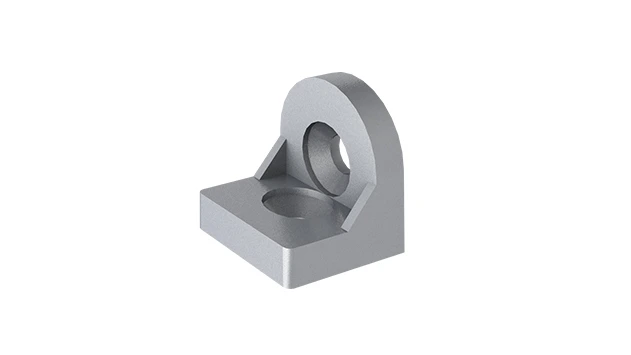
Turning Angle Code 4040
The turning angle aluminum profile connector provides a 90 degree hidden corner connection. 4040 it is means this size is used for 40 series aluminum profile.The corner code comes with set screws that allow for quick, easy connections.
Introduction: The Unsung Hero of Aluminum Profile Setups
Walk into any modern factory, warehouse, or workshop, and you'll likely spot rows of sleek, modular structures—workbenches humming with assembly activity, material racks neatly organizing components, and conveyor systems gliding products along the line. What holds these setups together? Behind the scenes, it's often the humble aluminum profile and its array of accessories. Among these, the turning angle code 4040 might not grab headlines, but it's the quiet workhorse ensuring stability, precision, and flexibility in everything from simple workbenches to complex production lines.
Designed specifically for 4040 aluminum profiles—the industry standard for medium-duty applications—this small but critical accessory joins profiles at 90-degree angles, forming the corners of frames, shelves, and supports. Think of it as the "cornerstone" of modular builds: without a reliable turning angle code, even the sturdiest aluminum profile setup can wobble, misalign, or fail under stress. Yet, despite its importance, many teams overlook common issues with turning angle codes until they cause delays, downtime, or safety risks. In this article, we'll break down the most frequent problems users face with turning angle code 4040, explore why they happen, and share practical solutions to keep your aluminum profile systems running smoothly.
Problem 1: Loose Connections That Undermine Stability
If you've ever leaned on a workbench and felt it shift, or noticed a material rack swaying when loaded with parts, loose turning angle codes could be the culprit. Over time, even properly installed angle codes can loosen, turning a solid structure into a wobbly liability. Let's dig into why this happens and how to fix it.
Why It Happens: The Hidden Forces at Play
Loose connections often stem from three key factors. First, vibration is a silent enemy. In manufacturing environments, machinery, foot traffic, and even nearby equipment create constant micro-vibrations that gradually loosen screws and bolts—including those holding angle codes to profiles. Second, improper installation torque is surprisingly common. Too loose, and the angle code never secures properly; too tight, and you risk stripping threads or warping the aluminum profile's T-slot, weakening the connection over time. Third, wear and tear on threads or mating surfaces can degrade the grip. Aluminum profiles and angle codes are durable, but repeated assembly/disassembly (common in reconfigurable setups) or exposure to dust and debris can wear down contact points, making tight connections harder to maintain.
Solutions: Tightening Up for the Long Haul
The good news? Loose angle codes are easy to address with proactive steps:
1. Use thread lockers for permanent stability. For setups that won't need frequent reconfiguration (like a fixed workbench), apply a medium-strength thread locker (e.g., Loctite 243) to the screws before tightening. This adhesive prevents vibration-induced loosening without making future disassembly impossible (heat or manual force can break the bond if needed).
2. Torque with precision. Invest in a small torque wrench calibrated for the screws used with your angle codes (typically M5 or M6 bolts). Most manufacturers recommend 3-4 Nm for aluminum profiles—enough to secure the connection without damaging the T-slot. A quick torque check during weekly maintenance can catch looseness before it becomes a problem.
3. Clean and inspect mating surfaces. Before installing or re-tightening angle codes, wipe down the aluminum profile's T-slot and the angle code's contact points with a dry cloth to remove dust, oil, or debris. If threads are worn, replace the screws—they're inexpensive compared to the cost of a collapsed material rack or damaged equipment.

Problem 2: Misalignment During Assembly—When Parts Just Won't "Click"
There's nothing more frustrating than spending hours assembling a frame, only to find the corners don't line up: one side sticks out, the other sits too far in, or the entire structure leans like a tired tree. Misalignment is a common headache with turning angle code 4040, and it's often preventable with a little prep work.
Why It Happens: Precision Matters (More Than You Think)
Misalignment usually traces back to one of three issues. First, inaccurate measurements are a classic culprit. If the aluminum profiles being joined aren't cut to exactly the same length, or if the mounting holes in the angle code aren't aligned with the profile's T-slot, the corners will never square up. Second, damaged or low-quality angle codes are a hidden risk. Cheaply made turning angle codes may have off-center holes, warped metal, or inconsistent dimensions—so even if your profiles are perfect, the angle code itself throws off alignment. Third, rushing the assembly process leads to "good enough" connections. Skipping steps like marking drill points or using a square to check angles before tightening can turn small misalignments into big problems once the structure is loaded.
Solutions: Building Straight, Square, and True
Avoid assembly headaches with these actionable fixes:
1. Start with quality parts. Not all turning angle codes are created equal. Opt for codes made from high-grade aluminum or steel with precise machining—look for suppliers that specify tolerances (e.g., ±0.1mm for hole placement). Reputable aluminum profile accessories suppliers often provide technical drawings or sample kits, so you can test fit before bulk ordering.
2. Measure twice, cut once (and check angles). Use a digital caliper to verify profile lengths, and mark T-slot positions with a pencil before attaching angle codes. For critical setups (like a material rack b (3 row and 3 floor) that needs to hold heavy loads), clamp the profiles and angle code together loosely, then use a carpenter's square to ensure a perfect 90-degree angle before fully tightening. This extra 30 seconds can save hours of rework later.
3. Use alignment jigs for repeatable builds. If you're assembling multiple identical structures (e.g., a row of workbenches), create a simple jig: a baseboard with pre-marked 4040 profile positions and a square guide to hold angle codes in place during installation. This turns guesswork into a repeatable process, ensuring every unit is identical.

Problem 3: Corrosion in Humid or Harsh Environments
In food processing plants, coastal warehouses, or workshops with frequent washing, aluminum profiles hold up well—but their accessories? Turning angle codes made from untreated steel or low-grade aluminum can start showing rust or corrosion within months, weakening connections and ruining the clean, professional look of your setup.
Why It Happens: Moisture, Chemicals, and the Elements
Corrosion occurs when metal reacts with oxygen and moisture, but harsh environments speed up the process. In humid areas, condensation forms on angle codes, especially if they're in contact with cooler surfaces (like air-conditioned workbenches in warm factories). In chemical-heavy settings (e.g., automotive shops using solvents or food plants using sanitizers), corrosive liquids or vapors attack unprotected metal. Even fingerprints left on bare steel angle codes can accelerate rust, as the salts in skin oils break down protective layers.
Solutions: Protecting Angle Codes from the Elements
Keep corrosion at bay with these targeted strategies:
1. Choose corrosion-resistant materials. For humid or wet environments, swap standard steel angle codes for stainless steel or anodized aluminum versions. Stainless steel turning angle codes (304 or 316 grade) resist rust even in coastal areas, while anodized aluminum adds a protective oxide layer that stands up to mild chemicals. They cost a bit more upfront, but they'll outlast untreated alternatives by years.
2. Apply a protective coating. If you already have steel angle codes, coat them with a rust-inhibiting spray (e.g., WD-40 Specialist Long-Term Corrosion Inhibitor) or a clear enamel paint. Reapply every 6-12 months, depending on exposure. For food-grade environments, use FDA-approved coatings to avoid contamination risks.
3. Regular cleaning and drying. Wipe down angle codes monthly with a damp cloth (avoid abrasive sponges) to remove salt, chemicals, or grime. In high-moisture areas, use a fan or dehumidifier to reduce condensation, and elevate structures slightly off the floor to prevent water pooling around base angle codes.
Problem 4: Compatibility Issues with Other Aluminum Profile Accessories
You've bought a turning angle code labeled "for 4040 aluminum profiles," but when you try to attach it to your existing setup, the holes don't line up with your T-slot nuts, or the code sits too high, blocking other accessories like shelves or panels. Compatibility issues are surprisingly common, especially when mixing parts from different suppliers or using older profiles with new accessories.
Why It Happens: The "Standard" Isn't Always Standard
While 4040 aluminum profiles are widely used, small variations exist between manufacturers. Some use metric T-slots with 8mm spacing, others 10mm; some profiles have thicker walls, altering the distance from the slot to the profile edge. Turning angle codes are designed to match these specifics, so a code made for a "4040 European standard" profile might not fit a "4040 national standard" profile from another brand. Additionally, older profiles may have worn or deformed T-slots, making even compatible angle codes hard to install.
Solutions: Ensuring a Perfect Fit
Avoid compatibility headaches with these steps:
1. Stick to one supplier (when possible). The easiest way to ensure compatibility is to source your aluminum profiles, turning angle codes, and other accessories (like T-slot nuts, bolts, and panels) from the same supplier. Reputable aluminum profile suppliers design their products to work together seamlessly, eliminating guesswork.
2. Check technical specs before buying. If mixing suppliers, compare key dimensions: T-slot width (typically 8mm or 10mm for 4040 profiles), slot spacing (distance between T-slot centers), and the angle code's height (to avoid blocking other accessories). Most suppliers list these specs on their websites or product sheets—don't hesitate to ask for a drawing if they're unclear.
3. Test with a sample kit. For large projects, order a small sample of the turning angle code and test it with your existing profiles. Assemble a quick corner, attach any other accessories you plan to use (like a shelf bracket or panel), and check for fit, alignment, and clearance. It's a small investment to avoid wasting time and money on incompatible parts.
Problem 5: Overloading—When Angle Codes Buckle Under Pressure
You've built a sturdy-looking material rack using 4040 profiles and turning angle codes, loaded it with heavy components, and suddenly—*crack*—the corner gives way, sending parts crashing to the floor. Overloading is a critical issue that not only damages equipment but also risks injury. Turning angle codes have weight limits, and exceeding them is a recipe for disaster.
Why It Happens: Underestimating Loads and Stress
Many teams assume "strong enough" is enough, but aluminum profile setups experience more than just static weight. Dynamic loads—like placing a heavy box on a shelf, or pushing a loaded cart into a frame—create additional stress on angle codes. Turning angle codes are also weakest at the joint: the screws holding them to the profile can shear, or the code itself can bend if the load exceeds its tensile strength. Cheap, thin-gauge angle codes are especially prone to this; even if they look similar to high-quality versions, they lack the structural integrity to handle medium to heavy loads.
Solutions: Building for Strength and Safety
Keep your setup safe and strong with these load-management tips:
1. Know your angle code's load rating. Reputable suppliers list load capacities for their turning angle codes (e.g., "50kg per code" or "200kg per corner assembly"). Factor in both static loads (weight of stored items) and dynamic loads (impact from loading/unloading). For example, a material rack b (3 row and 3 floor) storing 20kg boxes on each shelf would need angle codes rated for at least 60kg per corner (3 shelves x 20kg = 60kg) plus a safety margin of 20-30%.
2. Reinforce high-stress areas. For heavy-duty setups, add extra angle codes or use "corner braces"—supplemental brackets that distribute load across two adjacent angle codes. You can also upgrade to thicker, high-strength angle codes (e.g., 5mm vs. 3mm thickness) or use bolts instead of screws for critical joints, as bolts have higher shear strength.
3. Distribute weight evenly. Avoid overloading one corner of a structure; spread heavy items across shelves or frames to balance stress on all turning angle codes. For example, on a workbench, place heavy tools in the center rather than hanging them off one side, which can torque the angle codes and pull the profile out of alignment.
Quick Reference: Common Problems, Causes, and Solutions
| Problem | Common Causes | Solutions |
|---|---|---|
| Loose connections | Vibration, improper torque, worn threads | Use thread lockers, torque wrenches, and clean mating surfaces |
| Misalignment during assembly | Inaccurate measurements, low-quality angle codes, rushed assembly | Use precision tools, test-fit parts, and align with squares/jigs |
| Corrosion | Moisture, chemicals, unprotected materials | Choose stainless steel/anodized codes, apply protective coatings, and clean regularly |
| Compatibility issues | Mixed suppliers, non-standard profile dimensions | Source from one supplier, check technical specs, and test samples |
| Overloading | Underestimating loads, using thin-gauge codes | Check load ratings, reinforce with braces, and distribute weight evenly |
Conclusion: Small Fixes, Big Impact on Productivity
Turning angle code 4040 might be small, but its role in aluminum profile setups is huge. From keeping workbenches stable to ensuring material racks hold their load, these unassuming accessories are the backbone of efficient, safe, and flexible workspaces. By addressing common issues like loose connections, misalignment, corrosion, compatibility, and overloading, you can avoid downtime, reduce repair costs, and extend the life of your modular systems.
Remember: the best solution is often prevention. Invest in quality angle codes from trusted aluminum profile suppliers, take time to measure and align during assembly, and schedule regular inspections to catch problems early. With these steps, your turning angle code 4040 will keep working quietly in the background—so you can focus on what matters most: keeping your production line moving, your team productive, and your operations running like clockwork.